


Desertcart purchases this item on your behalf and handles shipping, customs, and support to Panama.
🚀 Power-packed Mini PC that fits your desk and your ambition
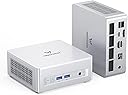
The MINISFORUM UM880 Plus is a compact powerhouse mini PC featuring an AMD Ryzen 7 8845HS processor with 8 cores and 16 threads, boosted up to 5.1GHz. It comes equipped with 32GB DDR5 RAM and a 1TB PCIe 4.0 SSD, delivering ultra-fast performance and ample storage. Triple display outputs (HDMI 2.1, USB4, DisplayPort 1.4) support up to 8K resolution, perfect for multitasking professionals. The unique OCuLink port enables external GPU expansion, while 2.5G LAN and Wi-Fi 6E ensure blazing network speeds. Designed for demanding workflows, light gaming, and creative tasks, this mini PC offers desktop-level power in a sleek, space-saving form factor.


| Asin | B0DYP6Z8RN |
| Aspect Ratio | 16:9 |
| Best Sellers Rank | #1,235 in Computers & Accessories (See Top 100 in Computers & Accessories) #25 in Mini Computers |
| Brand | MINISFORUM |
| Built In Media | 1x HDMI cable, 1x OCuLink Adapter, 1x UM880 Plus Mini PC, 1x US Power Adapter, 1x Wall Mount Bracket |
| Cache Memory Installed Size | 16 MB |
| Color | Silver |
| Connectivity Technology | Wi-Fi |
| Cpu Model Number | Ryzen 7 8845HS |
| Customer Reviews | 4.5 4.5 out of 5 stars (218) 4.5 out of 5 stars |
| Display Resolution Maximum | 3840x2160 |
| Display Type | LED/LCD |
| Graphics Card Interface | Integrated |
| Graphics Card Ram | 2 |
| Graphics Coprocessor | AMD Radeon 780M Graphics |
| Graphics Description | Dedicated |
| Graphics Ram Type | DDR5 SDRAM |
| Hard Disk Description | SSD |
| Hard Disk Interface | PCIE x 4 |
| Hardware Interface | 3.5mm Audio, DisplayPort, Ethernet, HDMI, USB, USB 2.0 Type A, USB 3.0 Type A |
| Human Interface Input | Keyboard, Mouse |
| Item Weight | 1.41 kg |
| Keyboard Description | Not Included |
| Keyboard Layout | QWERTY |
| Manufacturer | Micro Computer (HK) Tech Limited |
| Memory Clock Speed | 4800 MHz |
| Memory Slots Available | 2 |
| Memory Speed | 4800 mt_s |
| Memory Storage Capacity | 1 TB |
| Model Name | DeskMini |
| Model Number | DeskMini |
| Native Resolution | 3840 x 2160 |
| Number Of Component Outputs | 3 |
| Operating System | OS |
| Personal Computer Design Type | Mini PC |
| Processor Brand | AMD |
| Processor Count | 8 |
| Processor Series | AMD Ryzen 7 |
| Processor Socket | FP8 |
| Processor Speed | 5.1 GHz |
| Ram Memory Installed | 32 GB |
| Ram Memory Maximum Size | 96 GB |
| Ram Memory Technology | SO-DIMM |
| Ram Type | DDR5 RAM |
| Resolution | 3840 x 2160 |
| Screen Size | 25 inches |
| Specific Uses For Product | Multimedia, Business Computer, Personal Computer, Office PC, Education, Online Learning, HTPC, Work For Home, Photo Editing, Web browsing, Server |
| Style Name | UM880 Plus 32GB+1TB |
| Total Expansion Slots Quantity | 4 |
| Total Number Of Hdmi Ports | 1 |
| Total Usb Ports | 5 |
| Video Output | HDMI, USB4, DisplayPort |
| Video Output Interface | HDMI, USB4, DisplayPort |
| Wireless Compability | 802.11ax |
| Wireless Technology | Bluetooth, Wi-Fi |
User
Quiet, fast, and beautifully simple — great first Windows 11 experience
This is my first Windows 11 PC after coming from a Surface running Windows 10, and the transition has been excellent.The first thing I noticed is how quiet this unit is. Even under load it stays impressively silent. Performance has been rock solid and very fast for everything I’ve thrown at it so far. It feels responsive and well optimized right out of the box.I really appreciate the design. It’s clean, minimal, and modern with no flashy or embossed branding. It looks great mounted to the side of my desk and doesn’t draw attention to itself—in a good way. The build quality feels solid and premium.I also plan to travel with it occasionally, and while it’s compact enough to do so easily, I haven’t been able to find a good case made specifically for it yet. (Note to Minisforum: a dedicated travel case would be a great accessory.)I had a quick question for support and received a prompt, helpful email response, which was reassuring as a new customer.Overall, this has been a fantastic experience so far—quiet, powerful, well-built, and thoughtfully designed...all at a great price too! I looked at a lot of options before I bought and this was by far the best, and am please with my choice. Very happy with the purchase.
User
A fast, capable mini PC that is also an excellent value
I'm a big fan of MINISFORUM. They make computer products to fit a wide range of needs and budgets, their products have proven reliable over time, and they represent good values. This particular model, the MINISFORUM UM750L, with its AMD Ryzen 5 7545U processor, 16GB memory and 1TB solid state drive, is a very well-rounded mini PC with an attractively low price as of the date on this review. (Memory and storage prices are volatile at this time, so pricing on computers have been a rather wild ride of late.)I'm not going to get into how this mini PC runs specific applications, but I will say that most of my clients are doing pretty typical clerical work: word processing, spreadsheets, accounting (generally QuickBooks), e-mail and web browsing. If that sounds staid and boring, well, it is, but let's face it, that's what most people do with computers. And this mini PC shines when used for such activities. It has more than enough power to handle doing all of those activities at once, even if you're the kind of user who keeps a couple dozen Google Chrome pages open. Most of my clients use this and other mini PCs with just one monitor. Some hook up two. This mini PC claims to support up to three, but I only have one or two clients who have that many monitors attached to a single computer. I can say with certainty that this mini PC works great with two monitors.A quick word about the memory: 16GB of LPDDR5. LPDDR5 is memory that is fast and consumes little power, intended for laptops and other mobile devices. (Mini PCs are very small desktop PCs that are basically made from laptop components.) It's soldered in, not socketed, and therefore not user-replaceable or upgradeable. That means you can't upgrade the memory in this mini PC. So, why did I give this mini PC 5 stars? Because, among other things, I don't see this as a disadvantage for a mini PC. Mini PCs are intended for mainstream use, the kinds of activities that most people do with their computers, and most people never upgrade their computers' memory. I contend that most people who buy a computer with 16GB of memory in 2026 will never feel a need to upgrade the memory. If you're a AAA gamer or someone using applications that call for more memory - and probably a very fast processor and maybe even an advanced video card - then this isn't the computer for you. In the grand scheme of personal computing, this is a budget PC, even if it's on the high end of the budget PC scale.Speaking of gaming, many mini PC sellers claim that their mini PCs are gaming PCs. That's a dubious claim at best. Very few mini PCs qualify as gaming PCs unless your game is Solitaire. The few mini PCs that do qualify as gaming PCs are physically larger than this one, typically connect to a video card externally via an OcuLink port, and have prices over $1000; closer to $2000 by the time you've purchased the NVidia GeForce RTX video card, external power supply and OcuLink dock for it. At that point, why would anyone be looking at a mini PC? If gaming is your thing, wouldn't you rather have a self-contained, traditional desktop PC on your desk rather than a mini PC, power supply, OcuLink dock and the cables criss-crossing your desk to connect them all? I'd think at that point, the traditional desktop PC would be less expensive, not to mention safer. In any case, I'm very pleased to note that MINISFORUM makes no gaming claims for the UM750L.I have a number of clients now using the MINISFORUM UM750L, and so far, they're all very happy with them.
User
So glad I picked up this unit!
Exactly what I needed. Compact. Power, signal and data can all be delivered directly from one single full-featured USB-C cable. Silent and doesn't heat on idle and basic tasks that I tested. Its body looks metal, but feels and sounds like plastic. Maybe it's thin metal - I can't tell, but I don't mind as the lighter it is the more suitable it is for my needs.I needed a compact mini PC for my portable monitor stand, that would serve for both retro gaming and occasional web browsing and remote desktop. But the most important thing was something that could be powered from the 65W power delivery that my portable monitor provides via its USB-C. This unit supports exactly that, and at the same time has enough juice with its AMD processor, 32GB of RAM, 1TB NVMe and a dedicated GPU to run the tasks, programs and games that I want to run on it. It also comes with a Windows 11 Pro licence.I secured it with zip ties to the monitor stand, and gave it a little support from the bottom with a 3d printed part that I sticked to the stand with double-sided tape so it doesn't slide down, run the single USB-C cable through cable management holders and got this neat portable setup to take anywhere I want around the house. Can't be more pleased.The only downside I find is that it doesn't come with a USB-C cable, so you have to bring your own; a shame in my opinion for a system that is advertised as one that can be powered from its USB-C port. It does come with an HDMI cable, though.
User
Great little PC and plays games amazingly.
First off, I did upgrade this thing to the max, 94Gb of DDR5 5600MHz RAM, and dual M.2 NVME drives. You have to go into the BIOS as set a dedicated portion of the RAM for use as video RAM (can be up to 16GB) and since it does not have an hard drive and OS then you will need the driver package from the MinisForum website. The model UM870 slim uses the same drivers as another model (like UM640 or something) but they work fine.This runs games faster and in better quality than my PS5 does. I definitely recommend it. And it was about the same price to buy this bare bones system and then get twice the RAM and hard drive size on my own than even the largest amount offered on a pre-built bundle. Not including an OS, but I already have a Windows 11 Pro key, so I didn't have to include that in the cost of building it on my own.The 4 stars out of 5 is just because of the way the bottom of the system is. First off, it is a bare bones system, meaning you absolutely have to open it to put in RAM and a M.2 drive (or 2) yet in order to open it up you have to pull off the 4 rubber feet that are held on by sticky tape, and it only comes with 2 replacement feet (by the way, you also have to remove the feet if you plan on using the vesa mounting bracket or you need to supply your own longer screws). Then you need to remove 4 screws that use thread locker on them, then you can pop off the bottom cover, and be careful not to pull it off too fast, because the cooling fan is screwed to the bottom, and attached to the motherboard with a 4 pin connector. Also, the cooling fan mount is just a thin sheet of metal and comes with 2 thermal pads on it so it is supposed to act like a heat sync for the 2 NVME drive slots, but does not allow you to put any 3rd party heat sync on the drives because there is no room for the cover to go back on. However I was able to modify the fan mount by basically cutting 90% of it off and moving the fan over so it is only held on by 2 of the 3 tiny screws that hold the fan to the bracket, and only 2 of the 4 screws that normally hold the bracket on, and having to cut a small notch out of the inside of the bottom cover. Basically they could have made it fit, and allowed for better heat syncs on the drives, but decided that one flat piece of steel would be better than aluminum finned heat syncs.Would have been 5 stars if the had just left the feet off and included them as an optional add-on in the box. Had not used that blue thread locker on 4 screws that 100% need to be removed by the customer, and had just moved the bottom cooling fan over far enough to allow for better 3rd party heat sync options to be used (without needing modifications).Also, I don't need the dual Ethernet ports, and would have much rather it had an extra USB-C port. But I just used one of those USB-C hubs to add a bunch of extra ports to it.
User
Incredible deal!
To be clear, this review is for the Minisforum X1 Lite-255 with 64GB of RAM and 1TB SSD. Not sure why Amazon is mislabeling this review under a different product on the same page.I think I am done with full size computers. It's hard to believe just how fast these mini PCs have become and when they are built with quality RAM and storage and have great cooling while costing less than a typical full size computer, I can't find any reason to back. This little guy has 8 cores and 16 threads and nearly hits 5Ghz while remaining nearly silent and having no heat issues even on the most intense tasks. The RAM and SSD are made by Crucial and are not the generic 'cheap stuff' other manufacturers often use to increase their own profit.The case is entirely plastic. This is a good thing because metal cases block WiFi and Bluetooth signals to a point. With plastic, WiFi and Bluetooth range are fantastic on this little guy! I also appreciate that Minisforum sells a version of this exact mini PC without any RAM, SSD or operating system. These days, those components can double the price of a computer. So if you already have your own, its less waste and a big cost savings if you are a DIY type.I love this has USB4 and it has an OcuLink port. By default, with the model I ordered, it has a 1TB NVMe drive that runs at top Gen4 speeds (see photo) with no heat issues. Next to it is an empty M.2 slot for expanding the storage. Alternately, you can use the OcuLink adapter included in the box to install in the empty M.2 slot if you prefer to use it for an eGPU. Your choice and it's not sold separately. It's included at no extra cost and can be removed if you change your mind later and want to use the second M.2 for storage later on. While this mini OC can play plenty of games as-is with it's built-in AMD Radeon 780M graphics, the sky is the limit when gaming with an external GPU using OcuLink.This little guy does my photo editing and my video editing with ease and I can't get over how cool and quiet it stays!The RAM can be upgraded. It is NOT soldered in like other models. Same is true with the WiFi/Bluetooth adapter (a MediaTek) and the aforementioned NVMe SSD.Mine came with Windows 11 Pro 24H2. I updated it to 25H2 and update the AMD Adrenlin and chipset drivers and, again, I find it hard to believe you get so much in every category of computing and pay so little for it! The CPU in here has no NPU (no AI processor) so I also save money there for something I have no use for.I expect Minisforum to be a household name in a few years. They have been around since 2018 and I have been very impressed with their products, prices, warranty and support so much, I have been buying from them ever since with each year bringing new designs and more performance and functionality with each new generation.Minisforum just makes these mini PCs with so much unique ingenuity that many of their models have no equal competitors (yet!)So, for whatever it's worth, until you get one in your own hands and see for yourself, I don't know the words to express my happiness with this purchase!
User
Very capable tiny PC.
I'd rate it a 4.5 stars only because this is a tiny PC that can do most tasks you want and even some light gaming. This is a secondary PC for the main room to play light steam games. NVME is about 5400MB\s and 4000MB\s read write speeds. You can put a Gen4 NVME Predator drive and see full speed of 7500+MB\s and 5000MB\s read write. It does come with an adapter for the second slot for a SATA 3.5" SSD if you wish, but you can't have 2x NVME and SSD. USB3.2 is supported. I have a 512GB thumb drive with 1000MB\s and it's pretty close to that speed. It only has two USB2.0 ports so if you have a wireless keyboard or mouse, you'll be struggling for other devices.It only has one USB-C 4.0, but it is a godsend for being able to use one cable for powering up my monitor and sending data to the monitor's USB 3.0 port. I have it to a hub which lets me have a thumbprint reader for logging in, an SD card reader for my cameras, and a half size gaming keyboard. Before I had to have a separate power cord to the monitor and an HDMI cable. Now I can power it alone by the one USB4 cable and even when turned off, it supplies power to the monitor to let me use my nVidia Shield for TV watching with the HDMI.It will be able to do RAW photo edits in PS, LR, or DxO Photo Lab. There isn't Ai exceleration for DxO or Topaz Sharpening since it's an AMD GPU and nVidia owns that area. I tested out Path of Exile and while it did start on 4K resolution and low frame rate, I dropped it to 1080p@60 with everything turned on and it never dropped below 60fps until I got into a town. The stuttering probably happened with loading on new NPCs and town assets. It also ran Trials of Mana (3D JPRG) with 60fps mostly. I don't have an eGPU yet, but if you want more power, you have that option.The only reason why I didn't give it a full 5-star is because the power brick that comes with it, it shorted out and fried the PC. I had dropped a controller on it and it must have jolted something sent a spike to the PC. The brick stopped working and other bricks I had wouldn't power the PC on. I bought it in June and knew I was outside the window of return. MinisForum doesn't make it easy to contact them, but I had stated my grievance on Reddit and emailed Support. A MinisForum rep messaged me on Reddit within a few hours to talk about getting an RMA and replacement after an evaluation. It did require me to pack everything back up including the RAM and original NVME, cables and such. Luckily, I had kept the box and was able to send it back, which they paid for shipping to them and to me for the replacement. The new PC is up again, but I'd recommend firing it up and updating Win11 before putting in another drive. I kept running into boot errors, but eventually did get it up and running.
User
great hardware, questionable design choices and support
I bought the M1-1390 with the Core i9-13900HX, 32GB RAM, and 1TB SSD. On paper, the hardware and specifications are excellent, and purely based on performance and specs I would give it 5 stars. After working with it, however, there are several design choices and support issues that bring my rating down to 3 stars.For anyone interested in exactly what hardware is included, mine came with ADATA DDR4-3200 SODIMM memory and a Crucial P3 Plus 1TB NVMe SSD.The system also supports a second NVMe drive, as mentioned in the product description, but the implementation is unusual. The mini PC has a PCIe x16 slot with a proprietary style NVMe to PCIe riser installed in it. Unlike typical desktop NVMe to PCIe adapters, the SSD mounts on the opposite side of the riser so that it faces inward inside the case. This makes me wonder how easy it would be to find a replacement if the riser ever failed.There is another important limitation with this riser. NVMe SSDs can have components on only one side of the PCB or on both sides. The clearance on this riser is not really suitable for a double sided NVMe SSD, so I recommend checking the physical design of the SSD before buying one for the second slot.The riser also doesn't use the newer tool free knob or latch for securing the NVMe drive. It requires a traditional screw, but mine did not include the necessary screw. I had to supply my own M2 2.5mm screw.Another design choice I don't particularly like is the memory heatsink. It is held in place by two rubber bands. RAM gets warm during operation, and I don't expect rubber bands exposed to repeated heating and cooling to remain reliable over the long term. Metal retaining clips would have been a much better permanent solution. Rubber bands make sense for temporary assembly, not something intended to hold a heatsink in place for years.The computer is also quite large compared with other mini PCs I've used with similar specifications. I would estimate the enclosure is roughly 2.5 times larger. That isn't necessarily a negative because an i9-13900HX produces considerable heat and the additional internal space can help with ventilation and cooling. However, the enclosure looks metallic in the product photos, which would have been useful for heat dissipation, but it is actually plastic.The front of the computer looks nice and clean, but I would have preferred at least some USB ports on the front. Having to reach around the computer for commonly used USB connections is less convenient.My biggest concern, however, is the technical support experience. I wanted to boot from a USB drive to install a different operating system. Going into the BIOS and changing the boot order works, but I also wanted to use the one time boot menu so I could select the USB drive without permanently changing the boot order.I found documentation indicating that F7 was the boot menu hotkey, but F7 did not work. I contacted support and was told to repeatedly press F7, try another keyboard, make sure I was using a wired keyboard, and reset the BIOS. I knew the keyboard and function keys were working because I could enter the BIOS normally.After investigating further myself, I discovered that F7 simply isn't the correct boot menu key on this machine. A different key brings up the boot menu correctly. I'm mentioning this because it says something about the level of technical knowledge I encountered from support. Instead of identifying the correct hotkey for their own computer, I was given a series of generic troubleshooting steps.Overall, the specifications and core hardware are impressive and would earn 5 stars from me on their own. Unfortunately, the unusual second NVMe implementation, missing NVMe screw, rubber bands holding the memory heatsink, plastic enclosure, port placement, and especially my experience with technical support reduce my overall rating to 3 stars.
User
Powerful Compute in an Efficient Package - Proxmox Cluster Node
I've always been one to buy decommissioned enterprise gear for my homelab but I had a need to add an additional Proxmox cluster node in the house, around people, so I wanted something more human friendly. Looking over all the options, MINISFORUM seemed to offer a wide range of combinations of technology and the most difficult decision was which processor/ram/architecture I wanted. I ended up choosing the NAB9 w/ Core i9-12900HK specifically for the Cores/Threads and clock it ran at with 32gb of RAM. This should be plenty to play host to infrastructure VMs to maintain HA. I am using the 2.5gb LAN ports as one for the VM network and one for the Storage network. With how fast it is, you can't even tell that the VM's disks are in another building on a NAS when it serves a site from the VM on the NAB9. It boots very quickly and is completely silent and it doesn't seem to generate much heat, if any. In my case, I unboxed it, plugged in the KVM and network, connected my Proxmox USB Bootable installer, and went from new to cluster member in under 30 minutes making it very easy to use! I do have to bring up one small issue. A few weeks after I had it up and running it suddenly turned off and wouldn't turn back on. I know this sounds bad but it's actually a testament to how supportive MINISFORUM is. I opened a support ticket and had an email response within hours, not days! We performed the troubleshooting steps and emailed back and forth that next day before I was given the greenlight for a repair. The speed of their service and support was way beyond my expectations! I sent in the NAB9 and counting travel to there, from there, and fixing it, was 5 days. Under 1 week and I had the machine back and up and running! Since the repair I wanted to wait a bit to make certain everything stayed good before I left my review. But now it's time. I've had the NAB9 running 24x7 since I got it back several months ago and it's been amazing. So much so, that I forget I have it running in the house. I haven't had to do any fiddling or anything. It's great and just works. I feel that I can confidently say now that it's high quality and an excellent value for how much compute you get for the price. Thank you MINISFORUM, this device has filled a specific need for me perfectly.
User
Minik Canavar
Ürün çok başarılı. Ev laboratuvarımda Proxmox cluster yapmak için kullandım. Heyecanlanınca biraz fan sesi gelebilir ama sakinleşince duyulmuyor.Ürünlerden bir tanesini tamamen kendi hatam ile bozmama rağmen (yanlış BIOS), Teknobiyotik firması sorunu çözdü. Onlara da Amazon'a da 5 yıldız. Böyle firmaların artması dileğiyle...
User
Great product, unfortunate about the choice of the Mediatek WiFi card
Great product, unfortunate about the choice of the Mediatek WiFi card that's not supported on Linux. I had to get a USB WiFi adaptor to have a functional WiFi
Trustpilot
3 days ago
2 days ago