Buy anything from 5,000+ international stores. One checkout price. No surprise fees. Join 2M+ shoppers on Desertcart.
Desertcart purchases this item on your behalf and handles shipping, customs, and support to Panama.
🖊️ Elevate your digital canvas with precision and speed — never miss a stroke!
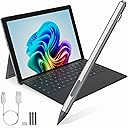
The Microsoft Surface Pro Pen Stylus offers universal compatibility across Surface devices and major laptop brands, featuring 4096 levels of pressure sensitivity and tilt detection for ultra-precise input. Its dual-touch design combines a professional pen tip with a capacitive touch-cap for intuitive navigation. With instant activation, anti-palm rejection, strong magnetic attachment, and USB-C fast charging delivering up to 60 hours of use, this stylus is engineered for seamless productivity and creative flow.


| ASIN | B0DSKCG331 |
| Are Batteries Included | No |
| Are Batteries Required | No |
| Battery Average Life Standby | 60 Hours |
| Best Sellers Rank | #28,278 in Cell Phones & Accessories ( See Top 100 in Cell Phones & Accessories ) #667 in Styluses |
| Brand | Pubiohs |
| Color | Silver with Touch-Cap Top |
| Compatible Devices | ASUS, Acer, DELL, HP, Surface |
| Compatible Tablet Computer Models | HP 7 Plus, HP Pro 8, Microsoft Surface Go, Microsoft Surface Pro 11, Microsoft Surface Pro 3, Microsoft Surface Pro 8, Microsoft Surface Pro 9 |
| Customer Reviews | 4.5 out of 5 stars 21 Reviews |
| Enclosure Material | Aluminum |
| Manufacturer | Pubiohs |
| Material | Aluminum |
| Mfr Part Number | SP02-BK |
| Minimum Required Operating System Version | Windows 10 |
| Model Number | SP03-SR |
| Unit Count | 1.0 Count |
| Warranty Description | 1 year |
F**A
Product
Great product
J**.
Works great with the Surface Pro 4!
This pen worked great with my Surface Pro 4! It was easy to set up and use. No Bluetooth connections needed, so you just power on the pen and it immediately starts drawing. It draws pretty nicely, albeit a tiny bit jagged. Works great for Note taking, and drawing if you don’t make lines too crazy fast. Battery lasts a long time, I’ve only had to charge it once and I’ve had it for like 2 weeks. Pressure sensitivity does work, but you need to make sure that in programs like Krita, you have the touch framework set to the newer Windows Ink standard (as opposed to WinTab, the older one). The eraser button on the side of the pen also worked on the Surface Pro 4, but you need to hold it down while erasing something. I don’t know what the other button is supposed to do, but on my Surface it did nothing. The dust cover that came with the USB-C port fell out pretty quickly after having it attached to my surface in my backpack, which didn’t inspire a whole lot of confidence. All in all, pretty decent value for an aftermarket Surface Pen replacement.
Y**Y
My favorite pen for the Microsoft Surface Studio! Has good feel, function+very little latency
This is now my favorite pen for the Microsoft Surface. It is very easy to connect... it connects out of the box no bluetooth configuration required. To enable the button you need to configure the Bluetooth tho'. Why is the button necessary? When drawing as an artist - the button switches the "eraser" and "ink" making it easy to go back and forth between adding and deleting. The latency in drawing apps is QUITE GOOD compared to other pens I've used. The pressure feels fine. To make it clear, I use this pen as an artist, primarily. The pen is lighter than other pens and the weight ratio is nice so it feels good when drawing in your hand. I use it with Windows 10 on the Surface Studio. For software I used "Clip Studio" which is my "go to" artist application. I strongly recommend this pen due to its feel, function and quick drawing (no latency).
R**O
Works with the Kobo Libra Color
I ordered this to try out on a Kobo Libra Color ebook reader. The pen works great with it and the buttons do function as the erase and highlight functions. It also sticks magnetically to the side of the reader, but the buttons get a bit in the way. Not a detriment in my case since I am using it on a different product than intended. This is an excellent alternative to the Kobo for less than half the price. So unless you want to keep with the originals esthetic, this is a great and functional alternative. It also came with spare tips in case you ever wear out the original.
M**C
Good but Tad Sensitive
The pen switches into “selection” in paint software a lot which is kind of annoying but otherwise works well!
Y**E
Very smooth and responsive, fast recharge
Using this on a hp spectre and it works great. Very smooth and responsive. Size feels nice in your hand and right click and erasure and a great addition and value. Magnet keeps pen on laptop and it has minimal latency if any that i can tell. Has a charging light and recharges fast.
A**R
Compatible With Kobo Libra Colour
This pen is compatible with the Kobo Libra Colour and it works great. The top front button highlights, and the bottom front button erases. It is magnetic and sticks to the case or the front of the device. Allows you to write and annotate books. Nice value for those who don’t want to spend more on the name brand.
T**N
Not bad...
The buttons don't work on my Surface Pro 4. But I can still write with it and use it to navigate. it's not bad but it's not an original either. It charges pretty fast via USB-C. There's definitely room for improvement.
A**.
3 Monate und läuft nicht mehr
Nach 2 x aufladen lässt er sich nicht mehr einschalten noch aufladen. Keine 3 Monate und defekt
Trustpilot
2 weeks ago
4 days ago