Desertcart purchases this item on your behalf and handles shipping, customs, and support to Panama.
⚡ Power up your classic & modern gear with 3x USB magic!
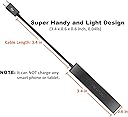
The AuviPal 3-Port Micro USB OTG Hub Adapter expands your device’s connectivity by adding three USB ports with power pass-through, enabling simultaneous use of keyboards, mice, flash drives, and controllers. Designed for compatibility with Fire Stick 4K, PlayStation Classic, Raspberry Pi Zero, and other OTG-supported devices, it delivers fast 480 Mbps data transfer in a compact, plug-and-play black ABS shell. Ideal for professionals and tech enthusiasts who demand versatile, reliable USB expansion on the go.


| ASIN | B083WML1XB |
| Amazon 売れ筋ランキング | 家電&カメラ - 56,808位 ( 家電&カメラの売れ筋ランキングを見る ) 携帯電話用OTGアダプター - 128位 |
| OS1 | Chrome OS, Windows 10, Windows 7 |
| USBポートの総数 | 3 |
| USBポート数 | 3 |
| おすすめ度 | 5つ星のうち4.4 1,888 レビュー |
| カラー | ブラック |
| データ転送速度 | 480 ギガビット毎秒 |
| ハードウェアインターフェイス | USB |
| ブランド | AuviPal |
| ブランド名 | AuviPal |
| ポートの数 | 3 |
| メーカー名 | AuviPal |
| メーカー型番 | 3USB |
| ユニット数 | 1.0 個 |
| 互換デバイス | スマートフォン, タブレット |
| 付属品総数 | 1 |
| 品目寸法(L x W x H) | 8.6長さ x 1.5幅 x 1.5高さ cm |
| 商品の追加説明1 | 電動 |
| 商品外装素材 | アクリロニトリルブタジエンスチレン (ABS) |
| 型番 | 3USB |
| 対応デバイス | スマートフォン, タブレット |
| 必要な最小オペレーティングシステムバージョン | Windows 7 |
| 特徴 | 電動 |
| 色 | ブラック |
ガ**ー
不良品なのか、用途に合っていないか不明
うまく動作しませんでした… 結構高かったのにな
L**Y
tip top
funktioniert tadellos
J**E
Best for use with Fire TV .
Solid product. By far, the best I have used .
F**S
AuviPal 3-Port Micro USB OTG Hub Adapter
Works like a charm! Plugged it into my Fire Stick and now I can use a keyboard and USB drive with ease. A great little device to expand compatibility.
G**.
Funciona muy bien para conectar almacenamiento extra a dispositivos tipo "stick"
Funciona muy bien para conectar almacenamiento a los fire tv stick o a los xiaomi stick. OJO no funcionan los dispositivos USB en los sticks: esto no es problema del producto que estoy reseñando, sino del diseño de los sticks que hay en el mercado. No hay mucho que decir, cumple con su cometido.
D**O
Excellent for backing up digital photos without a laptop
This device is perfect for a traveling photographer. It allows me to make backup copies of my photos (and view the jpg versions on a nicer, larger screen) without having to travel with a laptop. I can use my Android tablet or even my Android phone, instead. This very small and light USB hub plugs into my 2017 Samsung Galaxy Tab S2 Android tablet. I connect a USB flash drive and either a cable to my camera's USB-out connection or a tiny SD card reader with the card from my camera. Then I use a file manager app (the default Samsung Files app works fine, as does the default Android Files app on my phone - which I actually prefer to the Google Files app) to select all the files I want to duplicate and copy them to the flash drive. File transfer is not fast (200 files totaling 2.79 GB took 5 minutes and 50 seconds to copy, or about 8 MB/s [64 Megabits per second]). I think the slowness may be partially the fault of the 512 Gb Sandisk Ultra Flair USB 3.0 flash drive I used, since it slows down drastically on large write operations even when connected to a PC, apparently to prevent overheating. Since it starts fast and then slows down, a larger transfer might produce an even slower average transfer speed. But the bottom line is that for one or two transfers of, say, 2 to 10 Gb per day, even this slow speed is good enough. I can do something else for five, ten, or even twenty minutes while a day's worth of photos copy themselves. In my 2.79 GB test, none of the devices got more than just barely noticeably warm. With a small adapter (micro-USB to USB-C; it MUST be "OTG" [USB "On The Go"] compliant), I can plug this hub into my Pixel 2 phone and transfer files in the same way. So if my tablet dies or I want to travel *really* light, I don't even really need the tablet. Managing files on the small screen of a phone is doable but not as convenient. Note that you CANNOT get a USB-C hub and use an adapter to connect it to a micro-USB tablet or phone, because apparently no one sells a USB-C to micro-USB adapter that is USB "OTG" compliant. So if you want to use a hub with devices that have both types of connectors, you must get a micro-USB hub and an OTG compliant adapter to convert it to USB-C when needed. You apparently can't go the other way. Given this limitation, there are not many competitors to the AuviPal hub reviewed here. You can plug a charger into the hub, as well. I believe that will provide power to the attached USB devices, but not concurrently to the tablet or phone. I have not tried this feature and do not anticipate needing it. Advice: be sure to "eject" or "dismount" the flash drive and camera or SD card before disconnecting. This tells the tablet or phone to finish writing any data or file allocation table entries to the flash drive or SD card. I have already found that just yanking out the flash drive when the file transfer appears to be done can cause it to produce error messages the next time it is plugged into a PC, although interestingly, I did not actually lose any data. The Samsung and Android Files apps make the "eject" or "dismount" command hard to find. On the phone, you can see it by tapping the notification bar on the Android home screen, then the "more" link on the notification for each USB device. I never did find the "eject" function on the Google Files app. Physically, the hub seems reasonably well made, but nothing special. I had been attracted to some USB-C hubs with solid aluminum housings, but as noted above, a micro-USB hub is more flexible. This one is plastic, not premium but probably fine.
Trustpilot
4 days ago
2 months ago