



Enbrighten Z-Wave Plus Fan Control, Works with Alexa, Google Assistant, 3-Way Compatible, ZWave Hub Required, Repeater/Range Extender, Smart Ceiling Fan Control, Smart Switch, White & Almond, 14314
Product ID: 790185231
Details
- Operation modeON-OFF-ON
- Current rating2.5 Amps
- Operating voltage120 Volts
- Contact typeNormally Open
- Connector typeClamp
- BrandENBRIGHTEN
📶150ft signal range extender
🔄3-way compatible for multi-switch setups
⚙️3-speed fan control (high, medium, low)
Details
- Operation modeON-OFF-ON
- Current rating2.5 Amps
- Operating voltage120 Volts
Description
🌬️ Elevate your comfort with smart fan control that’s always a breeze!
- TAILORED AESTHETIC - Includes interchangeable white and light almond paddles to perfectly match your home’s style.
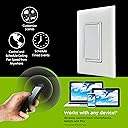
- EXTENDED SMART REACH - Boost your Z-Wave network with a 150ft signal repeater, expanding your home automation coverage effortlessly.
- SEAMLESS FAN MASTERY - Control and schedule up to two fans wirelessly from a single in-wall switch for ultimate convenience.
- VOICE ACTIVATED COMFORT - Works flawlessly with Alexa and Google Assistant for hands-free fan speed adjustments and scheduling.
- UNIVERSAL Z WAVE HARMONY - Compatible with Z-Wave Plus and all previous generations, ensuring smooth integration with your existing smart home setup.
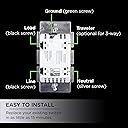
The Enbrighten Z-Wave Plus Fan Control is a smart in-wall switch designed exclusively for ceiling fans, offering wireless control of fan speeds (high, medium, low) and scheduling via compatible Z-Wave hubs. It doubles as a Z-Wave signal repeater extending your network range by up to 150ft, supports 3-way switch configurations, and includes interchangeable paddles in white and light almond. Compatible with Alexa, Google Assistant, and all Z-Wave generations, it seamlessly integrates into your smart home ecosystem for effortless, voice-activated fan management.
Specifications
| Manufacturer | Jasco Products Company, LLC |
| Part number | 14314 |
| Item Weight | 200 g |
| Product Dimensions | 4.57 x 5.59 x 10.54 cm; 200 g |
| Item model number | 14314 |
| Colour | White |
| Style | 500 Series |
| Item Package Quantity | 1 |
| Switch Type | 3-way |
| Included components | 1 Smart Fan Control |
| Batteries Required? | No |
Common Questions
Yes, all products are sourced directly from authorized retailers in the US, UK, UAE and India. We maintain strict quality control processes and verify each product before shipping. All items come with applicable manufacturer warranties and are covered by our standard return policy.
Delivery times vary by destination country, typically ranging from 3-9 business days. Each order is fully trackable through our system. We handle all customs clearance and use reliable courier partners for last-mile delivery. You'll receive regular updates about your order status via email and our app.
Desertcart is an international e-commerce platform operating since 2014. We securely process thousands of orders globally each day. Every product goes through our quality verification process before delivery, and we provide end-to-end order tracking, 24/7 customer support, and a comprehensive returns policy to ensure a safe shopping experience.
Our prices include the product cost, international shipping, import duties, customs clearance, and local delivery charges. We handle all customs and import procedures, ensuring there are no hidden fees upon delivery. PRO members receive additional benefits including free shipping.
Trustpilot
TrustScore 4.5 | 7,300+ reviews
Shop Global, Save with Desertcart
Value for Money
Competitive prices on a vast range of products
Shop Globally
Serving millions of shoppers across more than 100 countries
Enhanced Protection
Trusted payment options loved by worldwide shoppers
Customer Assurance
Trusted payment options loved by worldwide shoppers.
Desertcart App
Shop on the go, anytime, anywhere.