Desertcart purchases this item on your behalf and handles shipping, customs, and support to Panama.
🎮 Elevate your workflow and game with silent precision — don’t get left behind!
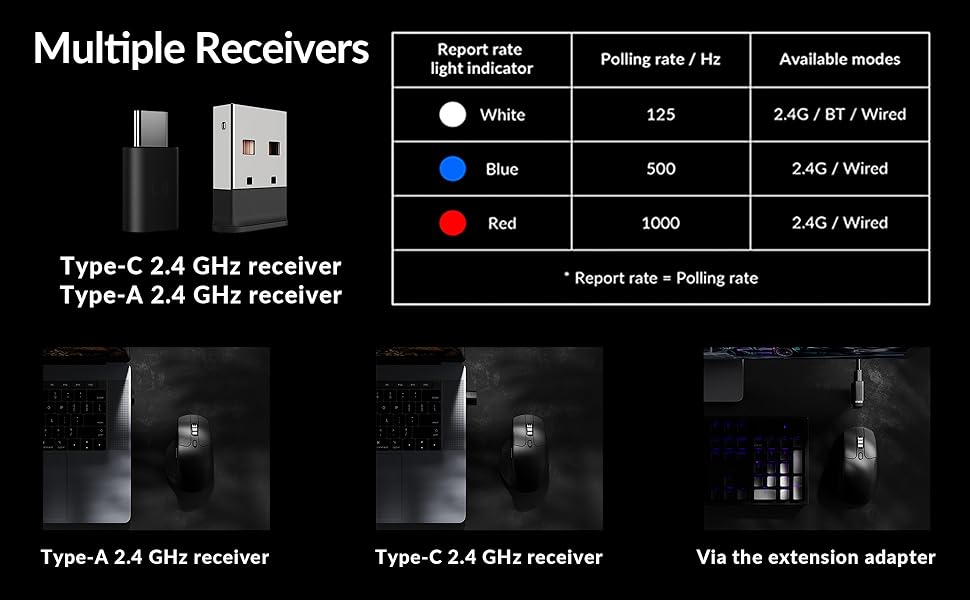
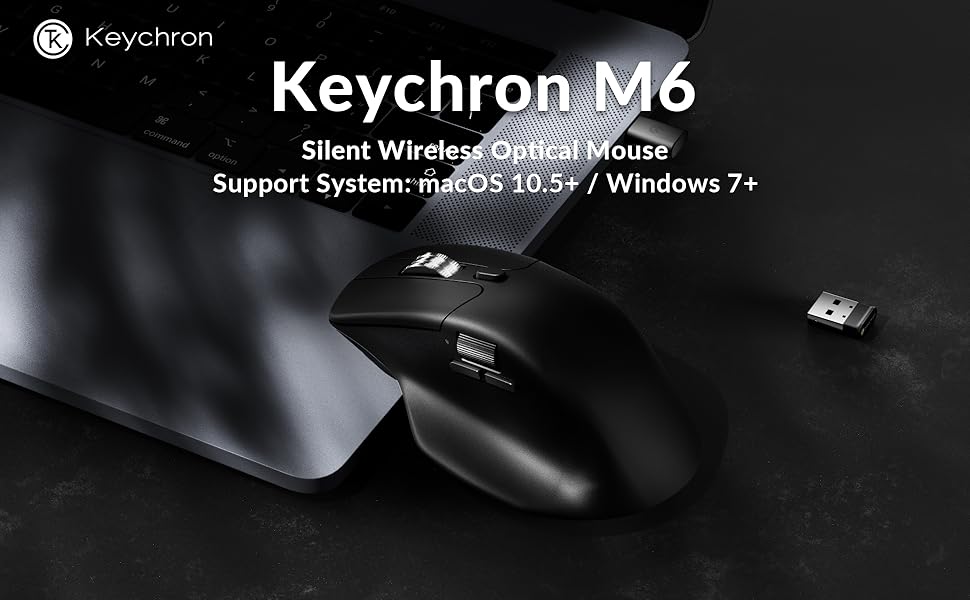
The Keychron M6 Silent Wireless Gaming Mouse combines a featherlight 86g ergonomic design with a whisper-quiet click mechanism, powered by the high-performance PixArt 3395 sensor offering up to 26,000 DPI. Featuring ultra-low latency 1000Hz polling over 2.4GHz wireless, Bluetooth 5.3, and wired connectivity, it supports seamless multi-device switching. Its premium metal infinite scroll wheel and fully programmable buttons with on-board memory make it a versatile tool for professionals and gamers alike, delivering precision, comfort, and productivity in one sleek package.


| Additional Features | Soundless |
| Antenna Location | Gaming, Indoor, Office |
| Asin | B0FP2D8DW6 |
| Best Sellers Rank | #94 in Computer Mice |
| Brand | Keychron |
| Button Quantity | 4 |
| Color | Black |
| Compatible Devices | Personal Computer |
| Connectivity Technology | Bluetooth |
| Customer Reviews | 3.9 3.9 out of 5 stars (155) 3.9 out of 5 stars |
| Enclosure Material | Plastic With Metal Accents |
| Hand Orientation | Right |
| Manufacturer | Keychron |
| Minimum Required Operating System Version | Mac OS 13 Ventura, Ubuntu 22.04 Jammy Jellyfish, Windows 11 |
| Model Number | M6S |
| Mouse Maximum Sensitivity | 26000 dots_per_inch |
| Movement Detection | Optical |
| Number Of Batteries | 1 12V batteries required. (included) |
| Operating System | Linux, Windows, macOS |
| Power Source | Battery Powered, Wired |
| Range | 33 feet |
| Style Name | Modern |
| Unit Count | 1 Count |
| Warranty Description | 1 Year Manufacturer |
User
Keychron PixArt 3395 1K (All Silent) vs MX Master 3S
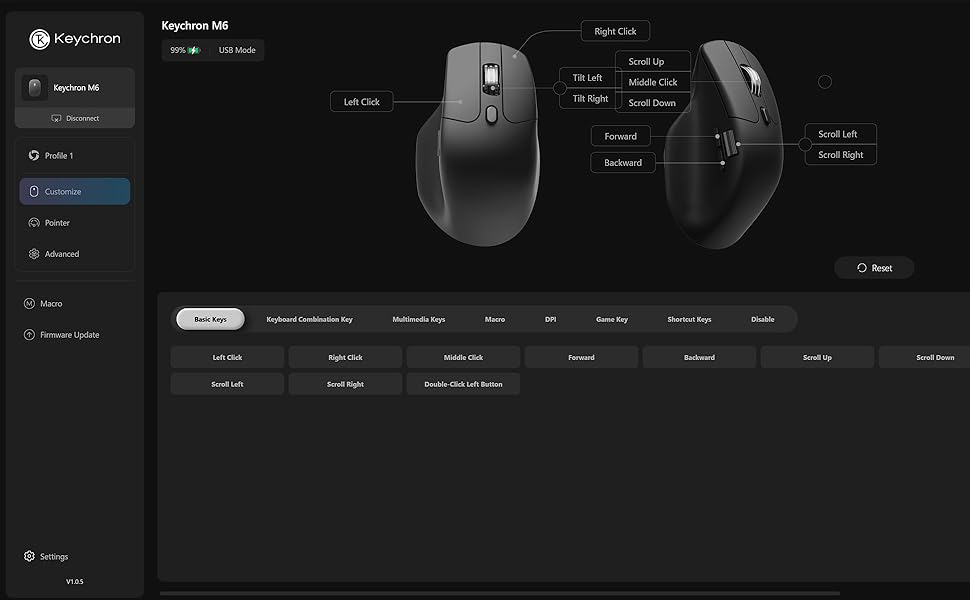
Important note before unboxing-------------------------------------Don’t let the box fool you. Keychron seems to have some printing errors that they really should fix, otherwise they will face many unnecessary returns.In my case, the box says M6 LITE, SKU M6S-A1, and lists the PixArt 3311 sensor, including all specs for that sensor—which is incorrect for my mouse. Because of this, I almost returned it and even opened a support ticket. They suggested I try the mouse first.After testing, I realized the mouse was actually the PixArt 3395 1K version. Here’s how I confirmed it:- In the online Keychron Launcher, I was able to set DPI up to 26,000- The firmware version installed is exclusive to the PixArt 3395 1KSo yes, it was clearly a printing error (come on, Keychron 😅), and I decided to keep it.Why I started looking for an MX Master 3S replacement----------------------------------------------------------------There were two main reasons:Right click issues:1. The right button started to become unreliable. Sometimes it wouldn’t register clicks depending on how the button was pressed.2.Terrible 2.4 GHz connection:The wireless connection on the MX Master 3S is a nightmare unless the dongle is less than 10 inches from the mouse. During work, it would randomly become laggy. Turning it off and on temporarily fixes it—but expect the issue to come back.After discovering that the same 2.4 GHz dongle is used for the MX Master 4, I concluded this is likely a protocol issue. That’s when I decided to try another brand.Why the Keychron PixArt 3395 1K is better than the MX Master 3S (and possibly MX Master 4)-------------------------------------------------------------------------------------------------------------- Much smoother gliding than the MX Master 3S. I use a PU leather desk mat, and the difference is huge—mouse movement feels far more pleasant.- Great materials: The Keychron plastic feels premium and solid. In contrast, the rubberized coating on the MX Master started peeling after about one year.- Left & right click buttons: Very different from standard mice. They have more travel and better tactile feedback, which I personally love.- Middle button: Hard to describe, but noticeably easier to press than on the MX.- Side buttons: Forward and back buttons are much easier to press compared to the hard MX Master 3S buttons.- Weight: It feels significantly lighter—almost weird at first—but I ended up really liking it.- Polling rate: 125 Hz (MX) vs 1000 Hz (Keychron). Pointer feels softer and more responsive- Connectivity:Keychron: 5 devices (3 Bluetooth + 2.4G dongle + wired)MX Master: 3 devices (2 Bluetooth + 2.4G dongle)The Keychron 2.4G connection is stable 60 inches away with no lag.- Software: No more glitchy software. Keychron Launcher is free, web-based, and works flawlessly.Being picky-------------- The metal scroll wheel on the MX Master 3S rolls more smoothly.- The side wheel on the Keychron feels a bit stiff when scrolling.
User
A decent, mid-range mouse with an uncomfortable shape
A decent and functional mid-range wireless mouse with top tier performance.I got this as a temporary replacement for my Logitech G502 hero wired as that mouse finally began double clicking and I had worn holes through the rubber siding. It was time.So far, this mouse has worked as intended. It's not too cheap but also not all that premium. You get premium functionality with a relatively cheap, lightweight build that's an awkward shape.I have small hands, by glove size, with long fingers, and the mouse just doesn't fit in my hand in any comfortable way if I try to palm grip it. The hump sits awkwardly in-between the first and second knuckle of my pointer finger, leaving a gap. If I push my hand forward, it's still super awkward and my thumb ivershoots the side buttons and scroll wheel. The left and right mouse buttons are very short and slender, so your third and pinky finger tend to sit off to the side at an angle. It doesn't hurt my wrist really, but it's not comfortable after a while either. It's just a very crunched mouse shape, I think they should have made it a bit longer/wider. It's really not at all comfortable for me.The matte black material doesn't stay matte for long, either. After a few weeks of light use and regular cleaning, my palm has already managed to wear away spots off the finish to leave shiny marks. Though, I do prefer plastic over rubber as rubber just wears away and gets gross over time. So I don't really care about the body material here. Build quality is solid and nothing creaks or bends.The metal infinite scroll wheel is a huge plus, though the button to release the lock on it has a hard and plasticy press thats not really pleasant. I wish they made the side button metal as well. It's not terrible but, it's not great either. I've used it for excel sheets.Gaming performance is great. I play shooters at low dpi, maybe 8-12,000 max with the 1000hz sensor and so far I haven't noticed any hits to my accuracy despite the wireless connection.Battery life is great as well. I haven't needed to charge it since I've started using it.If you need just a decent mouse that's under a hundred bucks and has the features this mouse has, I recommend it. I'll eventually upgrade to something that fits my hand better. Just know that keychron is a company that's excellent in making good quality, all-rounder products that don't really excel at doing more than one or two things at a time. So, you get what you pay for here.
User
Great value for the features.
This is a great "do everything" mouse. Productivity work is excellent, easily customizable, and you can do it all on a web browser, so no software needed. I mapped the side scroll wheel to the left and right arrow keys for music production and it works insanely well. I love the tactility of the side scroll.I've had it for 2 months and charged it only once last week at around 40% while using it at least 4 hours a day. And up to 6-7 hours on the weekend using the dongle. And you can use it while it's charging (imagine that Apple).The mouse is really light which didn't bother me as much as I thought it would. The clicks are quiet, and feels really comfy in my hand. I used it for gaming in MOBAS and it's great.Biggest downside, is that there's only 1 profile. So if you want to map different buttons for different uses, it doesn't seem like you can. Not even on the software. Kind of a bummer but not a deal breaker for me.Either way. This is a solid mouse for the cost. Yeah you'll get a more premium experience with an MX master, but this is like 85% there at a quarter of the cost.
User
Nice build. Weird Scrolling. Tiny.
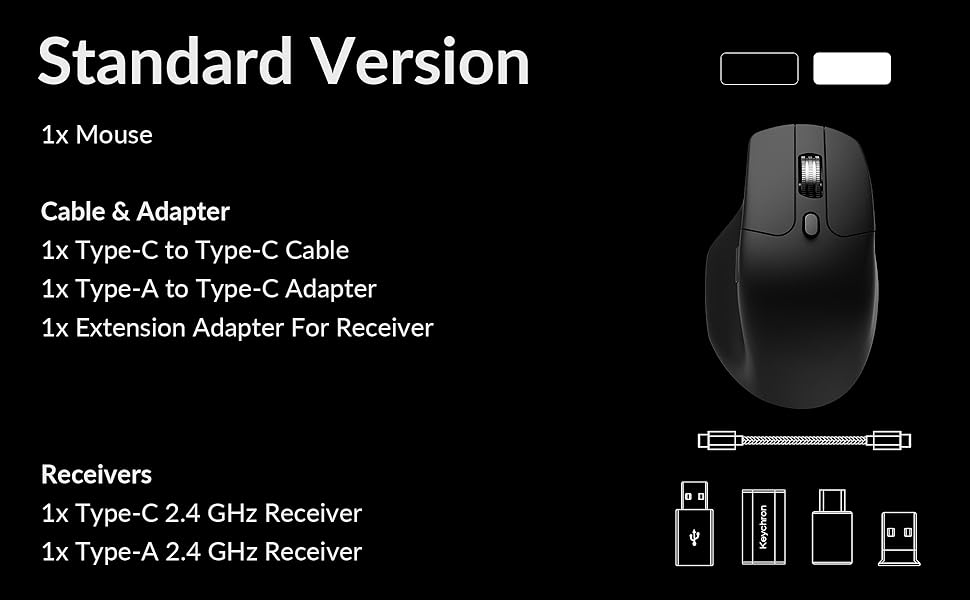
This mouse is tiny. If you have large hands this mouse is not for you and the scrolling is.. weird.I really wanted to like this mouse. The sensor is fantastic, the silent version has satisfying clicks even if the throw is fairly long, the build quality ok, its extremely lightweight, the materials feel good if a bit plastic-y, the scroll wheel is high quality and smooth, the inclusion of both a USB C and USB A wireless receiver is very nice, and macro and button customization through the Keychron Launcher is very powerful. Unfortunately the ergonomics and function of the scroll wheel really put me off of this mouse.Ergonomics:The mouse body is extremely narrow at barely 2" wide not including the thumb rest. For me this caused my ring and pinky fingers to hang completely off the right side where there is no support. Seating the palm curve of the mouse in the center of my hand (the intended position) caused my fingers hang off the front of the mouse and put my thumb too far forward to use the thumb controls. If I positioned my thumb so the thumb controls are in reach then the base of my fingers lay directly on top of the "palm curve". Using the mouse in fingertip-grip was OK but renders the ergonomic design useless.For reference I have fairly large hands: 8” long (wrist to middle finger tip) and 3.5” wide.Scrolling:One click on the main scroll wheel moves a document a very small amount, maybe half a line at a time. Scrolling multiple clicks of the scroll wheel appears engage some kind of scroll wheel acceleration which makes scrolling difficult to control. For browsing long documents this is probably ok but this function makes zooming in CAD software extremely unpredictable. i.e. one click is not enough and multiple zooms waaay in or out.I will admit that this could be an OS issue but I could not find settings for changing the function of the scroll wheel in either the OS settings or the Keychron Launcher. Additionally I have not experienced this scroll wheel behavior from any other mouse on this same machine: MX Ergo S, M720 Triathlon, G502, and a generic Dell USB mouse.
User
For casual use, its great! But drawbacks for everyday use
Quiet operation but is lacking some refining touches. Tilt wheel has such a smooth finish that its hard to get a grip with your thumb to scroll left and right. The toggle to activate infinite scroll was great, until it stopped functioning, now only a month in and the toggle is starting to fail and forever stuck in infinite scroll... Noticed some cutting in/out with the mouse if its 4ft away, seems objects in between the mouse and receiver could be causing interference.
User
Switched to the M6 from MX Master 3S
I am one of many who switched from the Logitech MX Master 3S to the Keychron M6 and I am happy with my decision. While the MX Master 3S felt slightly more premium than the M6 the M6 is still well built and very comfortable to use. The shape is very close to the shape of the MX Master 3S. The middle vertical scroll wheel feels and works nearly the same. The horizontal scroll is a bit stiffer on the M6 but still works well. The button clicks are slightly more audible on the M6, but still very quiet. Finally, I never used any of the Logitech app functions, so I won't miss those or the app being installed. So for less than half the price of the MX Master 3S the M6 is great choice.
User
MX Master 3 replacement
Switched to this after my MX master 3 started rattling and the click button started working intermittently. I’ve used a couple months now and decent alternative. I splurged on the Logitech and always kept it in a case but still broke. This one seems sturdy but is more lightweight. Which is fine, but doesn’t feel as robust, and like a heavier mouse. Connecting was super easy and would recommend. Bert quiet. Only con is the grip. Just feels a bit off somehow. Maybe just my hand or used to the MX master, but been a few months and still feels odd. Definitely useable though, just longer adjustment than I anticipated. Hope it last longer than the Logitech, but for half the price I am ok to purchase another if it breaks.
User
Silent clicks that don't feel cheap, plus a proper sensor
(Disclaimer : I do, love Keychron in general, so big bias here!)The silent switches are the reason to buy this one, and they're done well. The click is a soft muted thunk instead of the loud snap you get on a normal gaming mouse, which matters if you're on calls, sharing a room, or gaming at night. The tradeoff is real though: there's less tactile feedback than a clicky switch, so fast double-clicks feel slightly less definite until you get used to them.The sensor is the good news. The PixArt 3395 is a genuine flagship-tier sensor and it tracks flawlessly, no spin-outs, no jitter, no acceleration weirdness on any surface I tried. Tri-mode connectivity works exactly as it should: 2.4GHz for playing, Bluetooth for a second machine, wired when the battery gets low. Switching between them is quick and it reconnects on its own.Worth being clear about the 1000Hz polling rate. It's completely fine and it's what most people have used for years, but if you're a competitive shooter player who specifically wants 4K or 8K polling, this isn't that mouse. For everything else, including plenty of serious gaming, you will not notice.Shape and build are solid, nothing flashy, no creaks. Software is available if you want to remap or adjust DPI, and it works without drama.Four stars. Excellent sensor, genuinely quiet clicks, good connectivity, and the only thing holding it back is a polling rate that only a small slice of buyers actually care about.
User
Bof
La souris est pas trop mal en soi, mais je trouve les matériaux un peu trop plastiques et la molette assez désagréable pour le niveau de prix.
User
Good Quality
Good Quality
User
サイドスクロールマウスの最高峰
某coolのMXとの比較になりますがやはりKeychronは裏切らないですね。MXはポーリングレートが低かったり、省電力モードで更にポーリングレートが落ちたり、たまにマウスが飛んだりしていたのですがM6は優秀です。電池持ちのために1000hzで使っていますが最大8000hzまでポーリングレートを上げられるのでサイドスクロール付きのマウスの最高峰では無いでしょうか。4ヶ月使用していますが問題は全くありません。
User
Ottimo successore del mio G502 Hero
Ho comprato diverse tastiere di Keychron ed ero indeciso tra l'MX master e questo M65, conoscendo entrambi i brand ho deciso di fidarmi di questo nuovo e piu` economico brand, mai scelta poteva essere migliore.
User
Buon mouse, ma si può fare di meglio, per Mac è un po’ tosto da settare
Allora, sono un grande fan keychron possiedo (k8 pro, lemokey p1 he, e q1) e questo è il mio primo mouse Keychron, premetto che lo utilizzo sul Mac, sto veramente cercando in tutti i modi di apprezzare il mouse, prima di tutto il punto forte è la leggerezza del mouse, per me è fondamentale siccome è per il mio setup da lavoro (sono un designer) e mi sposto spesso, il sensore è ottimo (lo uso senza tappetino e va benissimo) anche l’ergonomia non è male di certo si poteva fare di meglio ma i competitor attualmente non sono meglio e con questo prezzo, sicuramente il punto dolente è la rotella, con tutto che è la versione metallica nulla, è leggerissima e non si riesce a controllare, i dentini non fanno bene scalo fra una riga e l’altra e si deve essere molto precisi (essendo un problema di build non ci si può fare niente…), mentre per il problema dello scroll su mac, consiglio a tutti l’installazione di Linear Mouse (open source su mac), fixa completamente il problema della rotella, che ha anche il tanto osannato MX 3/4 (controllate su reddit, tutti installano Mos), invece qui vi consiglio Linear Mouse, per il design tutto settato è perfetto, anche la rotellina laterale è ottima, ci vuole un po’ per settarlo, ma dopo è super utilizzabile, ripeto peccato per la rotellina principale se avesse un po’ più di resistenza per tacca, sarebbe secondo me il mouse definitivo e aggiungo una texture un po’ più ruvida su tutto il mouse aiuterebbe il grip (io ho risolto con delle skin grip di un deathadder che uso per gaming) sono davvero fiducioso che questo mouse potrebbe diventare a tutti gli effetti un ottimo mouse per mac, ma ci vuole ancora un po’!
Trustpilot
1 month ago
1 month ago