Buy anything from 5,000+ international stores. One checkout price. No surprise fees. Join 2M+ shoppers on Desertcart.
Desertcart purchases this item on your behalf and handles shipping, customs, and support to Panama.
🚀 Upgrade your iMac, upgrade your workflow—speed and space that keep you ahead.
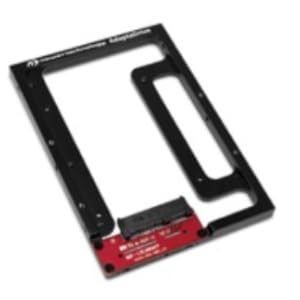
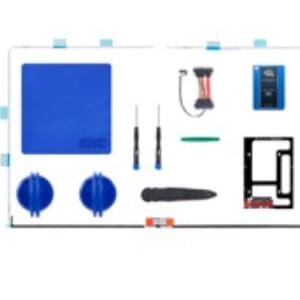
The OWC SSD Upgrade Bundle offers a 1TB 6G SATA SSD with up to 532MB/s read and 467MB/s write speeds, designed specifically for 2012-2015 27" iMacs. This comprehensive DIY kit includes all necessary hardware and tools, plus expert support and a 3-year warranty, enabling a seamless, high-performance storage upgrade without software hacks.


| ASIN | B0026SB27Y |
| Additional Features | Portable |
| Best Sellers Rank | #343 in Computer Memory |
| Brand | OWC |
| Cache Memory Installed Size | 1 |
| Color | Noir, Or, Vert |
| Compatible Devices | Desktop |
| Connectivity Technology | SATA |
| Customer Reviews | 4.4 4.4 out of 5 stars (231) |
| Data Transfer Rate | 540 Megabytes Per Second |
| Digital Storage Capacity | 1000 GB |
| EU Spare Part Availability Duration | 5 Years |
| Enclosure Material | Nand Flash |
| Form Factor | 2.5-inch |
| Global Trade Identification Number | 00812437025651 |
| Hard Disk Description | Solid State Drive |
| Hard Disk Form Factor | 2.5 Inches |
| Hard Disk Interface | Serial ATA |
| Hard-Drive Size | 1000 GB |
| Hardware Connectivity | Solid State Drive |
| Installation Type | Internal Hard Drive |
| Manufacturer | OWC |
| Media Speed | 467 megabits_per_second |
| Mfr Part Number | K27IM12HE1TB |
| Model Name | OWC2700DDRS512A |
| Model Number | OWCK27IM12HE1TB |
| Number of Items | 1 |
| Read Speed | 540 Megabytes Per Second |
| Specific Uses For Product | Personal, Gaming |
| UPC | 812437025651 |
A**N
Brilliant Upgrade Kit that makes installing a stimulating challenge.
I have to admit from the outset that I am a technical fool. This is fully proved by me purchasing the OWC SSD Upgrade Bundle in the first instance! I own a 27” iMac late 2013 and noticed how the impressive speeds have slowed down over the years. I am seriously waiting for Apple to bring out a new larger screened all in one iMac. However, not knowing when and even if this will happen I thought I would attempt to upgrade the iMac both as a project but more so as a challenge to occupy me. I watched endless videos on various sites but especially on OWC’s own site. These were wonderfully informative and gave me the confidence to do the upgrade. Having purchased this via the US Amazon site, as it wasn’t available in the UK, the kit arrived in no time at all, which impressed me no end. What deterred me from attempting to do this immediately was that the description of the install process being described as ‘Difficult’. I opened the box and immediately got cold feet. I doubted myself and so returned to watching the install videos. The more I watched the more confident I felt that I should send the kit back!! But having come this far I knew there was no going back. So a week after the kit arrived. I did the first brave thing and inserted the adhesive cutter wheel into the computer. Again, in my mind, I replayed the videos. Breaking the seal was easier than I imagined and the screen separated from the main body of the iMac with considerable ease. I disconnected the 2 cables and stood and marvelled at the sheer beauty of the internal workings of the iMac. Before doing anything else I cleaned the inside of the iMac and all of the old residue adhesive. Before removing the hard drive I ensured the hard drive contents were transferred fully to the new SSD. This took about 5 hours using a reputable Carbon Copy Cloner site. I then set about removing the hard drive. Having every tool I needed to hand thanks to the kit was a huge help and increased my sense of confidence. The drive was easily removed and the I assembled the SSD into the new adaptor bracket and replaced the nodules/screws from the hard drive surround to the new adaptor frame. Inserted this into place connected it applying the heat sensor and reconnected the screen leads and tested it by powering it up. It was a magical moment when everything worked. I immediately noticed the speed improvements. I now set about adding the adhesive strips. These are straightforward to apply and again there are videos which cover these. I carefully followed the advice OWC give and left the Mac to bond. After 8 hours I reconnected the iMac and it was perfect. A job brilliantly done even if I say so myself. After a few hours of using the iMac I noticed the upper part of the screen had separated from the main body. Even though I purchased this kit from Amazon US, I notified OWC Customer Support of this issue and their response was first rate. They immediately dispatched replacement adhesive strips, which arrived two weeks later and again after thoroughly removing the residue of the old adhesive I then reapplied the strips. Some two weeks later everything continues to be impressively brilliant. The responsive and the Read/Write speeds are staggering. I suspect that I have given my iMac a new lease of life for a fraction of the cost than if I were to have had this SSD professionally installed. Even if I say it myself, I deserve a pat on the back for challenging my lack of technical know how and increasing my skills set whilst achieving an end result that I am truly proud of. I cannot recommend more highly the OWC SSD Upgrade Bundle. It comes with everything you need and the support both online from the install videos and when I needed human support was outstanding. Despite the adhesion issue, I am giving this 5 stars, as despite the sealant failing the first time, the support response was so brilliant that I feel OWC went above and beyond to ensure I was one very happy International customer. Indeed it’s a pity that OWC hasn’t a UK presence. I have shared my experiences with friends and have highly recommended OWC products as the ones to rely on. Thank you OWC.
D**A
Almost everything you need...
You'll need to buy an adapter to plug the new drive into a USB slot on the back of iMac so you can clone the drive. I recommend watching several videos on how to upgrade it before ordering. The kit has quality contents. I had some difficulty in two areas, not the fault of this kit. When I cut the seal on the screen, it fell away so easily, it yanked a ribbon cable from the logic board, damaging the cable end. Fortunately, replacements are under $20 on Amazon. Use extra care and you'll be fine. Another issue was cloning the disk. It migrated all my data but not the OS. I had used CC Cloner software for this, perhaps if I had used the Mac utility, it would have been completed on the first try. My solution was to do an OS download/install right over the data. It took a couple of hours but everything works great now. Being a late 2015 iMac and now a legacy model, this was a relatively inexpensive upgrade for boot speed and operating speed. It boots fully in under 30 seconds vs 90 seconds. I also upgraded my RAM to 32GB. Simple and inexpensive.
J**H
New life to a 2013 iMac
Our 2013 iMac has been working fine but knowing all hard drives fail, I decided to change it out on my schedule. The kit arrived 2 days early and, with the installation video running, I proceeded slowly and carefully. Since it is my wife's Mac and she keeps the business books on it, she was a bit nervous. I actually had three backups! Installing the SSD was the easiest part of the process. Having all the needed tools supplied by OWC helped immensely. Positioning the tapes required steadier hands than mine so my wife successfully did the honors. We hooked everything up with the system open, formatted the drive for APFS and connected to the internet. Check the owcdigital link for formatting options. CMD-Option-R at startup got me to the proper menu. The latest Mojave downloaded and installed without issue. I had made a SuperDuper copy of the original HDD and used the migration assistant to migrate from that to the SSD. Once I saw everything was migrated, it was time to close it up. After taking off the tape covers, did one last check and found the (really tiny) LCD connector was not properly seated. It was hard for these 75 y-o eyes to see this so my wife was again pressed into duty. Everything now worked, we closed it up and everything works. As others have reported, the SSD makes boot and app loading much faster. This was probably the most intense and satisfying computer upgrade I ever did. Great sense of accomplishment and success in no small matter due to the great kit and instructions from OWC. The only thing I would have liked was a second set of tape. I put some down incorrectly. it seems fine but the perfectionist in me would have redone it if I had a couple of extra pieces. I am sure OWC would have provided them but I wanted to get it done. Perfectionist and impatient don't go together well :)
A**R
Incredibly easy
I was very apprehensive about this purchase. The reviews I read talked about the difficulty but my experience was completely different. Watch the video, read the instructions and TAKE YOUR TIME and it works like magic. The hard drive on my 2014 IMAC 27' died. Dead as a door nail!! I did not think it was repairable for an affordable price so I purchased a new 2022 IMAC 24". Don't get me wrong, but SIZE DOES MATTER. The 24' is very nice but the 27" is just beautiful and the perfect size, especially for an old man. So I decided to try and put a new hard drive in the old fella. It literally took me under an hour and would of been less if I hadn't kept referring to the video for support. I plugged all the cables in and then set the screen on the base to see if it would power on and sure enough did. I then used Apples internet recovery and let the IMAC update. I then shut it down and cleaned the inside and cleaned the edges where the old adhesive was. I used 2 paper clips to align the new adhesive strips and carefully placed them. I then was able to replace the screen and set it face down to set up over night per the instructions. THIS IS IMPERATVIE for success. The next morning I carefully set the IMAC upright and checked the screen and it looked like the day I unboxed it. If I could give this product 10 stars for quality, performance and support, I would. Oh, by the way, I took the 24" IMAC back for a full refund. Instead of $1500 for a new IMAC, I spent $139.75 with free Prime shipping. I LOVE THIS PRODUCT!!!!
J**L
Good Initial Experience, Followed by FAIL
Initially I have been happy with this upgrade kit. I'm technical by nature and have built dozens of computers over the years. The video instructions offered on the OWC site were easy to follow and everything went well. New drive performed well and all seemed rosy. Fast forward to a few weeks later. The screen on my 27" iMac fell off! The adhesive strips in this kit just gave out. Fortunately my daughter was using the computer and was able to catch it. The pins to the monitor cable were bent, but I was able to get it back together and thankfully nothing was permanently broken. While apart I noticed the thermal sensor adhesive had also given out so it was no longer attached to the SSD inside. My guess is this kit sat on a shelf for too long and all the adhesive in it was just too old. Not sure what to do at this point to insure it doesn't come off again.
T**R
This is a fun project for a secondary computer
5 stars with a caveat: only because I had a hard time locating the manufacturer’s instructional videos that I know existed. If you are planning to complete this upgrade be sure to have a helper around to assist you with re-attaching your iMac screen; I was unable to complete it 100% correctly with the new adhesive due to doing this on my own, one side is liable to fail overtime due to still having some of the blue tape on, it began curing very quickly. Now that the Mac is back together, though, this has made my computer very snappy and is much better than the factory HDD. I even was able to patch to the latest OS and have found everything working nicely. Be sure to allow plenty of time for your adhesive to cure with the Mac screen down on a soft surface to avoid issues. The included drive is excellent and I had exactly the right tools needed to complete the install.
X**E
SSD Kit Replacement for Fusion Drive
This came all the equipment needed to repair my failing/failed fusion drive in my 2017 27" iMac. Still need tools to complete the replacement. It wasn't too hard as long as you take your time to ensure nothing gets damaged. Had to look up some instructions to install macOS but everything worked out. The new SSD is much faster than the fusion drive but the capacity is a lot smaller.
A**I
It's like a new iMac again
One of the best investments I made. I just didn't like the new 24" iMacs because I got used to the 27" 5K screen. The kit arrived on time from Amazon US store to Bahrain which is a good thing. I have no problem dismantling gadgets and putting them back together due to my experience in the field so I can't say it is gonna be easy for everyone but it's relatively easy for anyone used to working with his/her hands. After removing the screen it's easy to replace the hard drive with the provided SSD. nothing special. While there it's good to remove the fan assembly to clean it thoroughly. I removed the fan blades and spayed them with Glass cleaner to get rid of accumulated dust. It looked more like dry mud because of humidity. Also make sure to remove all old adhesive completely before applying the new one and you should not have any problem with adhesion. I then reinstalled Mac OS online using Disk utilities (Restart while Holding CMD+OPTION+R) and then restored files from Time Machine backup. Now my iMac starts up in no time and Apps launch much faster. I'm waiting for the new 27" iMac if any.
C**Y
Excellent kit.
Kit came with everything needed. Best upgrade done by far. Like a new machine. Definitely do the extra step of cleaning the old surfaces on both side with a cloth and rubbing alcohol. We put the adhesive strips on the comp frame and used the plastic tool to make sure they had good contact and left them sit for 30min before installing the monitor. And also after the monitor was in used masking tape to hold it in place for a couple days so it’s good and set. No issues so far.
ع**ه
رائع
رائع
P**M
Great product OWC
Worked like a charm and great online instructions that make things clear and easy to Suction tool a bit loose at times.
L**C
Excellent produit!
Le kit est complet avec tous les outils requis. Excellent rapport qualité prix.
A**C
Fast as heck!!
So I did a thing!! My Imac was on the verge of dying due to a failing hard drive and came across OWC for their SSD conversion. So many Imac users do this sort of DIY for their computing needs so I jumped the fence and bought their kit. Shipping was quick (thanks amazon) and I got it for a steal (179 CAD). Installation was pretty straight forward. Just follow their videos on youtube and next thing you know my Imac is as good as new (faster too!) No more lags and slow processing. If you are looking to convert yours to an SSD, this is the kit you need. (Check model compatibility) 🙂🙂🙂 Also add some RAM while you're at it. It makes a whole lot of difference in speed, and post processing photos. The adhesive is great to be honest but make sure that you clean the glass side for adhesion or it will not stick.
Trustpilot
2 days ago
1 month ago