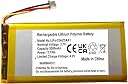
Desertcart purchases this item on your behalf and handles shipping, customs, and support to Panama.
🔋 Power up your play, never miss a beat!
The AOLIKES 3.7V 3000mAh rechargeable lithium polymer battery is a premium replacement designed specifically for Logitech wireless gaming keyboards including G915, G913, G715, and MX Mini models. Featuring built-in safety protections against overcharging, overheating, and short circuits, this lightweight 39-gram battery ensures reliable, long-lasting performance to keep your keyboard energized and ready for intense gaming or professional use.
| Antenna Location | Replacement battery for Logitech wireless keyboard. |
| Asin | B0CSC47FPC |
| Battery Capacity | 3000 Milliamp Hours |
| Battery Cell Type | Lithium Polymer |
| Battery Weight | 39 Grams |
| Best Sellers Rank | 62,148 in Computers & Accessories (See Top 100 in Computers & Accessories) 958 in Keyboards (Computers & Accessories) |
| Brand Name | AOLIKES |
| Compatible Phone Models | Logitech Gaming Keyboard G915, G913, G715 Battery Replacement, |
| Customer Reviews | 3.1 3.1 out of 5 stars (16) 3.1 out of 5 stars |
| Manufacturer | AOLIKES |
| Model Name | Ahb355085pct battery replacement upgrade. |
| Model Number | BAT37V3K |
| Number Of Batteries | 1 Lithium Polymer batteries required. (included) |
| Reusability | 3000mAh 3.7V Li-ion rechargeable battery. |
| Unit Count | 1.0 count |
| Voltage | 3.7 Volts |
User
Amazing battery, best investment I've made for my keyboard.
Amazing battery: the battery that comes from the factory in your keyboard is only half of the capacity of these. I use my keyboard wirelessly for at least 14 hours a day, and after installing this batter,y my keyboard now only needs to be recharged once a week. If you use it less and turn off the RGB you could probably get 2-3 weeks of use out of this battery.Installing is also very simple. Here are the instructions:1. On the back where the sticker is (S/N and all that), peel back the lower half of the sticker.2. You can use a heat gun to make it peel back easier if you don't want to ruin the sticker.3. Underneath the sticker you'll find 2 screws, simply remove those and the plastic piece slides out.4. Uninstall the old battery and plug in the new one; make sure the connector has a snug fit.5. Put everything back, then turn off the keyboard (with the switch) and turn it back on.That's it!
User
普通に使える
初回充電で82%までしか充電されず、あーハズレかなと思っていたがキーボードのスイッチOFFって放置してたら100%まで充電された。それ以後は普通に使えてる。正確には計測してないけど普通に1週間以上は持つ感じ。
User
品質が終わっている
満充電44%、1日使ったらもう充電されなくなってしまいました。これを返品したあとまた誰かのもとに行くのではないかと邪推。ジャンクボックスから当たりを引きたい方におすすめ
User
poor quality
crappy battery, started out good then 3 months later, completely useless and will not take a charge or hold it.
User
ハズレ商品?
購入して一か月も経たずに、充電できなくなりました。購入時点から、電池もMAXにならず。
Trustpilot
2 weeks ago
1 week ago