
DOWNLOAD THE APP


Customer Services
Copyright © 2025 Desertcart Holdings Limited
DOWNLOAD THE APP
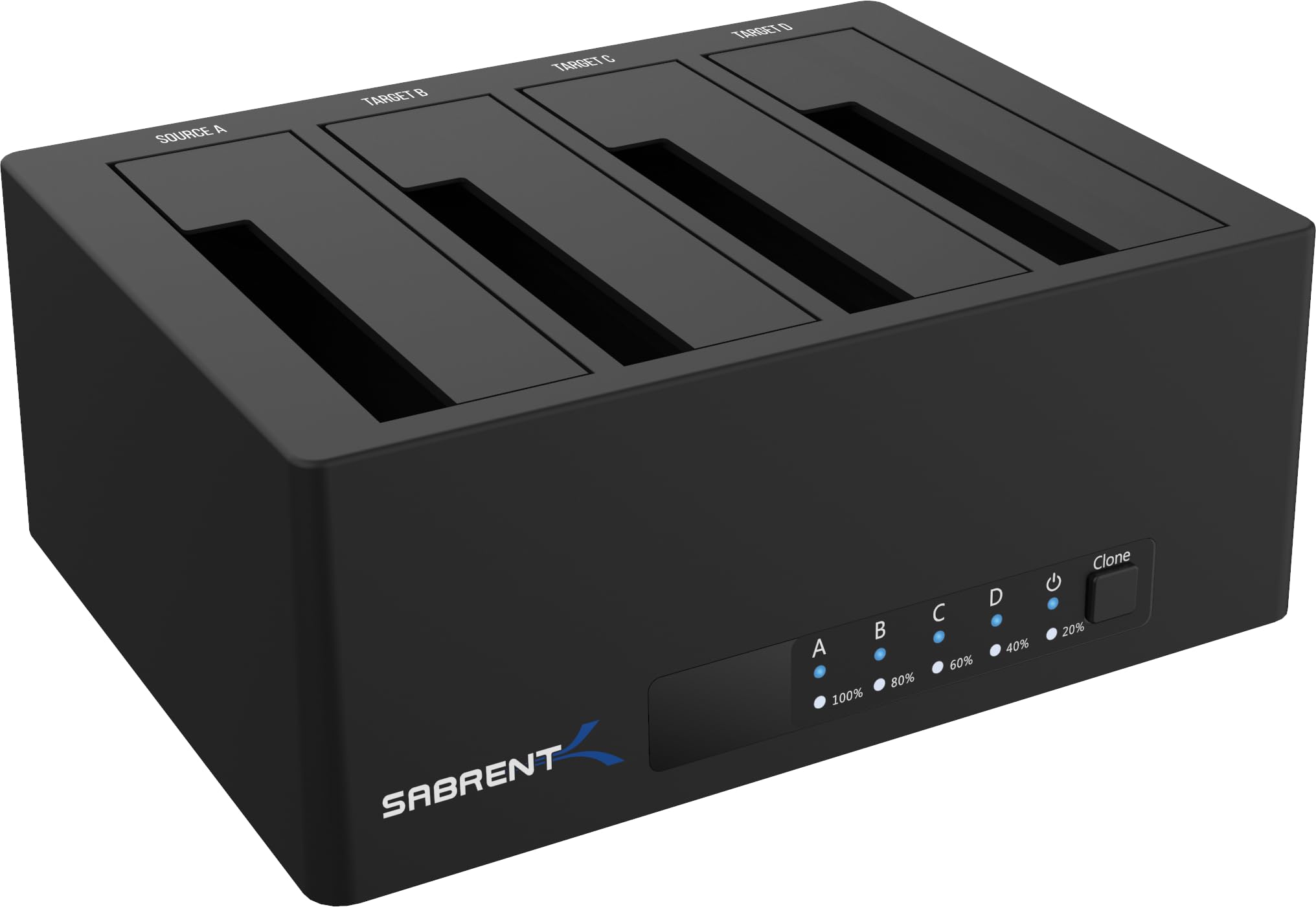
🚀 Elevate your storage game with instant multi-drive access and pro-level cloning!
The SABRENT 4-Bay USB 3.0 Docking Station (DS-U3B4) supports up to four 2.5” or 3.5” SATA HDDs/SSDs with trayless, tool-free insertion. It delivers fast USB 3.0 data transfers up to 5Gbps and features an offline clone function for direct drive-to-drive copying without a PC. Plug-and-play with no drivers needed, it’s perfect for professionals seeking flexible, high-capacity storage management and quick backups.


| ASIN | B07H11KXCL |
| Best Sellers Rank | #2 in Hard Drive Docking Stations |
| Compatible Devices | Desktops, Laptops |
| Connectivity Technology | usb |
| Customer Reviews | 4.0 4.0 out of 5 stars (1,367) |
| Data Transfer Rate | 5000 Megabytes Per Second |
| Date First Available | August 31, 2018 |
| Department | Adults |
| Global Trade Identification Number | 00819921016225 |
| Hard Disk Form Factor | 3.5 Inches |
| Is Discontinued By Manufacturer | No |
| Item Weight | 1 pounds |
| Item model number | DS-U3B4 |
| Manufacturer | SABRENT |
| Material | Plastic |
| Max Number of Supported Devices | 4 |
| Memory Storage Capacity | 88 TB |
| Product Dimensions | 6.3 x 4.72 x 2.76 inches |
| UPC | 819921016225 |
D**N
Works well, with one minor reservation.
This item was delivered on time and was not packaged in an Amazon box, which was surprising. Nonetheless, the Sabrent package is as sturdy and professional as I have come to expect from the brand. Short version: This docking station worked just as I expected. The 4 HDDs I inserted into it were recognized immediately by the OS (Windows 11 Home) exactly as they were when they were installed in the PC the docking station is now connected to. My only complaint is that the slots that the drives sit in are not suited for slim profile drives. I had to insert a small piece of cardboard into the slot along with the one slim profile HDD (first drive on the right in the photo) to help it stay upright. Other than that, I am satisfied and will continue to use Sabrent equipment for my PC and network needs. Long version: I have been building my own PCs for years with great success. The current iteration uses a Gigabyte motherboard mounted in an Antec gaming tower enclosure with three SATA drives installed in addition to two M.2 drives, one of which hosts the OS. When I decided that I needed more drive space and there were not enough power plugs on the existing power supply to accommodate an additional HDD, I decided that a docking station was the way to go. Since I have been using Sabrent networking accessories for years, it was the logical choice. I currently use a Sabrent USB hub attached to my TP-Link router to share 4 "My Passport" drives on my home network and it works well. When this docking station arrived, I removed the 3 HDDs from the PC, mounted them in the dock along with the fourth drive, and powered the system back up. The drives were recognized in the same configuration as they were when mounted in the PC. I did make sure the drives were mounted in the dock's slots (A, B, C, and D) in the same order as they were connected to the PC's SATA slots (0, 1, 2, and 3). I'm not sure that was necessary, but it seemed reasonable to me. Subsequently, the drive shares show up on the other PCs on the home network just as they were before the installation of the dock. That is exactly what I was expecting. As a bonus, my PC now seems to run cooler without having to contend with powering the HDDs and dealing with the heat they generate, which is now dissipated into the air. Highly recommended.
K**Y
Extremely useful and fast
If you want to have the flexibility to add up to 4 drives to your computer without the hassle of opening up your computer and dealing with wiring it up, this is your baby. The beauty of this docking station is that you can physically insert and remove 3.5" drives and 2.5" SSD with ease. This lets you keep a stack of hard drives in your storage library at a much more cheaper cost by eliminating having to buy the enclosure for every storage unit. Just label them and organize to a file type (images, audio, documents, etc.) and keep a master list. When it comes time to getting them online, just remove drives you don't need access to and insert new one's into the docking station. This is JBOD but with transfer done over a USB 3.0 port. Its not enclosed which is great because you can hot swap with ease. Installation is fast. Just plug into a USB 3.0 port on your computer and the USB B into the Sabrent. Then, attach the power supply. Less than 5 minutes and it just works with no special drivers. You can use this as a mobile storage device to attach to a fixed computer or mobile laptop. Unfortunately, it is not a USB 3.1 Gen 2 connection. I really wish Sabrent would have created one because this would allow even faster data transfer. Still, this is USB 3.0 fast at up to 5Gbps. I like this solution over NAS storage as it requires very little setup and administration. The best $80 I've spent.
P**O
Use at your own risk
It works well except for some it is not really universal some of the drives you have to hold up with tape and between the crevice so that way it can read it. I try to give it another chance and it actually didn't clone my disc it made one of them corrupted where it will not come over anymore and now I have to use a day to recovery program to do it so spending my money on this compared to just doing it the easier way which is the longer way cost me more money
P**T
Good Value For The Money Fan, Clone & 2 Types of Drives
Update: 10-25-2023 I formatted my one of the drives in my new Sabrent Docking system and the speed more than doubled with the exact same file I used yesterday. Yesterday I was getting max 50MB/s on a 1.6TB File Today I am getting 164MB/s on the same 1.6TB File Transfer both NTSF. So, great improvement. Excellent Indeed. 10-24-2023 I got this because I have 4 OLD HDD's THAT I still want to use to back things up to. The reasons I picked this were 1. Low Cost 2. Has a Fan so no overheating, 3. Can fit both HDD 3.5 Inch and SDD 2.5 inch Hard Drives 4. It also has a cloning option built in. It was very simple to install. Literally just plug and play. My New PC recognized the Drives Straight Away. They simply act as a large volume flash drive for those wondering. I have a 2 TB, 8 TB, 4 TB and 6 TB My New computer uses the latest technology and was rather spendy so I didn't want to purchase any more hard drives just to fit inside the computer. So, for $88 plus tax it was a good deal. I am copying all of my documents, photos and personal videos about 1.6TB over from one of the HDD to another HDD in the Sabrent Dock and I am getting about 50 MB/s. Rather slow but I didn't format the old drive prior to the copy and I regret that now. I think I would have gotten better speeds had I reformatted prior to the copy. Overall I am very pleased with the Dock and Highly recommend it for anyone so long and you don't have a dog or say children that may accidentally knock it over. The drives themselves won't take much of a jostle but the dock although plastic works very well and as intended. CHEERS!
V**E
Doet wat het moet doen mooi
D**D
Product descriptions was acurate...!! Awesome
K**D
One of the cheapest 4 bay docking station. Seems to be solidly built and is working perfectly.
M**O
PRO: - di facile installazione, con cavi usb e dell'alimentazione piuttosto lunghi - pulsante on/off presente - usb 3.0 presente - versatile, possibilità di collegare 4 hard disk da 2,5 o 3,5 in diverse combinazioni tra loro - possibilità di collegare e scollegare a caldo gli hard disk senza spegnere l'hub - nessun driver specifico richiesto per la configurazione - presenza di un tasto 'copia' che permette la clonazione tra hard disk - ottimo rapporto qualità prezzo considerati 4 bay disponibili CONTRO: - la clonazione tra hard disk non è configurabile da pc - non è presente alcun software specifico da installare su pc CONCLUSIONI: Da acquistare se si desidera una soluzione per l'installazione on the fly degli hard disk, considerata la buona qualità rispetto ad un prezzo sotto i 100€. Se si sta cercando qualcosa di più elaborato con un software specifico è necessario passare ad una soluzione tipo NAS
K**N
Great product works great. Packaging could have been Better no Amazon box just raw product box.
Trustpilot
2 weeks ago
1 day ago