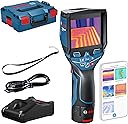
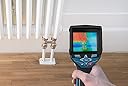
🌟 Capture the unseen, command the job with Bosch precision!
The Bosch Professional 12V System Thermal Camera GTC 400 C combines a wide temperature range (-10°C to 400°C) with high-resolution 160x120 thermal imaging, enhanced by built-in Wi-Fi for seamless data transfer via app or PC. Lightweight and portable at 540g, it comes complete with a 12V battery, charger, and durable L-Boxx, making it the essential tool for professionals demanding fast, accurate thermal diagnostics on the go.


| ASIN | B079K11257 |
| Best Sellers Rank | 266,858 in DIY & Tools ( See Top 100 in DIY & Tools ) 124 in Lab Digital Thermometers 3,112 in Scanners & Testers |
| Brand | Bosch Professional |
| Colour | Blue |
| Connectivity Technology | Wi Fi |
| Country Of Origin | Malaysia |
| Customer Reviews | 3.7 out of 5 stars 174 Reviews |
| Display Type | LCD |
| Display type | LCD |
| Global Trade Identification Number | 03165140920162 |
| Included Components | GTC400C; Hand Strap; Micro USB Cable; EPP Inlay Device; L-BOXX; 12 V Battery Pack; GAL 1230 CV Charger; Operating Manual |
| Included components | GTC400C; Hand Strap; Micro USB Cable; EPP Inlay Device; L-BOXX; 12 V Battery Pack; GAL 1230 CV Charger; Operating Manual Included components GTC400C; Hand Strap; Micro USB Cable; EPP Inlay Device; L-BOXX; 12 V Battery Pack; GAL 1230 CV Charger; Operating Manual See more |
| Indoor Outdoor Usage | Outdoor |
| Item Type Name | Professional Thermal Imaging Camera GTC 400 C (1x 1.5Ah Battery, Fast Charger and Micro USB Cable In Box, 12 Volt, Built-In WiFi Hotspot, Measuring Range: -10 C to + 400 C, 160 x 120 Resol)" |
| Item Weight | 0.54 Kilograms |
| Item height | 15.5 centimetres |
| Manufacturer | Bosch Professional |
| Model Name | GTC 400 C |
| Model Number | 0601083171 |
| Number of Batteries | 1 Lithium Ion batteries required. (included) |
| Outer Material | Plastic |
| Outer material | Plastic |
| Power Source | Battery Powered |
| Product Warranty | 3 years. |
| Reusability | Rechargeable |
| Special Features | Built-in Wi-Fi connectivity |
| Style Name | GTC 400 C |
| Unit Count | 1.0 Count |
| Upper Temperature Rating | 400 Degrees Celsius |
M**S
A fantastic thermal imaging camera. For the money and features, it can't be beaten.
So, this is the Bosch GTC 400 C thermal imaging camera. A thermal imaging camera produces a picture purely from the heat emissivity of an object. It then displays this heat temperature as a colour (colours are dependant on which scale you choose to use) This camera has a thermal image sensor of 160 x 120. This means that the display array has 19,200 pixels. The camera constantly measures the temperature of every single one of those pixels separately and then displays that pixel as a colour depending on its temperature. As you can see in Photo 3 (which is an Echo Dot on the wall) the Dot is warmer than the rest of the surroundings, this consequently is displayed in red hot colours with the rest of the photo cooling to blue colours, depending on its temperature. You can see 3 targets on the picture. The centre one doesn't move and will always display the temperature of the centre pixel. The red target will move to the hottest pixel in the picture and will display that temperature. The blue target will move to the coolest pixel in the picture and will display its temperature. In Automatic mode there are 4 separate spectrums to choose from. A standard rainbow spectrum, 2 other colour spectrums and a grey scale, where cold is black and hot is white (Photo 2-3). There are 4 ways of viewing the Image. 1) A combination of ordinary digital picture and thermal Image. 2) Thermal Image only. 3) Thermal image in the centre of the screen, with the digital image as the border. 4) As 3, but the thermal image is smaller. There is a manual mode, in which you can change the hot and cold limits, to determine what will show up thermally. Where the Bosch really stands out is with its Hot mode and Cold mode. In Hot mode, you can change the temperature so that only objects above a certain temperature appear thermally (Photo 4). This is incredibly useful for identifying things such as electrical faults or hot water pipes. The Cold mode works the same, only you set the cold temperature. As you can see in Photo 1, there is a leak around the seal of my front door. There is a trigger on the front of the camera which you press to freeze the image. You can then record this as a photo, or another squeeze will release the image. Photos are taken by pressing a dedicated button on the back of the camera. The camera has its own built in WiFi hot-spot, so once you have downloaded the Bosch Master Measuring app to your phone, you can port them across seamlessly. You can also download to your PC via the supplied USB cable. The software is great, with many options to alter the images. I suggest you look on the Bosch website for full details. The camera itself is very well made. The main body being covered in a rubberized shell, protecting it to IP53 standard. It has a built in lens cover on the front. When you compare this camera to the Flir and Fluke offerings that are even close to this price, there is really no contest. The sensor size and the different modes on the Bosch have it winning in every department. If you think a thermal camera may be useful to you, I can thoroughly recommend the Bosch HTC 400 C. I hope you found this review helpful.
W**N
Quality and convenience
I am a DIY enthusiast and bought a 1930s house which we are slowly doing up while living in it. I needed to know where the central heating pipework is located and also find and resolve thermal inefficiencies in the house. Having looked at many other products and reviews, this one stood out for a number of reasons. 1) Out of all the professional ranges of thermal imaging products available for under a grand, this Bosch GTC 400 seems to be the only one that is able to consistently see under carpets. The configurations allow you to tune colour sensitivity and this allows you to pick up the pips under the carpets with ease. Some of the standout pros are: 2) The ability to overlay camera imaging with the thermal to show more detail in the thermal picture is a very nice feature and one that professionals would require. 3) The battery life is great. I was using this for a few hours and very little drawdown 4) the navigation functions are easy to use Some things I found with the GTC 400 are: - I found several areas in my ceiling where there were clear insulation issues. - I found one of my exterior walls seems to have no insulation as I can see the outlines of the bricks in the walls as cold lines. - i found one of my floating floors had no insulation - i found my front door was full of leaks overall it is an expensive gadget to have but one that will make any homeowner better informed for DIY decisions and also to troubleshoot problems where thermal imagine can highlight problem areas.
M**C
Thermal imaging camera
Product seems very good, just need to learn how to use it properly, so far it has shown me places that need insulating. Time will tell, but am happy so far
S**N
Excellent tool.
A calibrated, precise, specialist tool with a great many varied applications, vastly more once you own and use the unit than I previously imagined. I had a great deal of pleasure surveying both the exterior and interior of my house. I was very pleased to see that there was no evident of heat loss from the walls or roof and minimal waste from windows even though the outside temp was -3°c. I toured the inside of the house searching for cold spots and draughs, which have since been rectified. Then moved on to examine the surfaces and doors on our ovens while operating which were very well insulated. The detail and variety of viewing modes makes this thermal camera suited to a very wide range of applications, such as heating/cooling and electrical systems defect detection or verification even spotting wildlife in pitch darkness!. The accompanying software package is available to download from the support website, although it has limited appeal to me, it is offers a great way to structure a professional looking package for clients if that is your intended use for the camera. I like this camera and would recommend it it anybody thinking of which one to opt for.
A**S
Will not download photos from camera to the app
I spent £100s extra to have the app functionality. The transfer of photos from the works on an old iPhone 8 that I resorted to try to test it wasn’t user error. But it still won’t work with my iPhone 13 Pro. I’ve been in touch with Bosch Thermal app support for months and the new app update issued today (that I was told to wait for) still hasn’t resolved this issue. I’m now out of my refund window with an item that’s not fit for purpose.
U**K
Very easy to use, good performance
The thermal camera is really easy to use, the interface is intuitive. So far it has done what I expect it to do, the thermal image is relatively high quality and tells me what I needed to know. Images can be transferred through an app, and it includes a non-thermal image in the storage by default which is helpful.
T**Y
Bit of a Love / Hate experience.
The bosch thermal camera itself I loved to use, it works quickly and took some great pictures however the software I hated, it lets it down for myself in two ways. The Bosch Thermal app kept producing an error when trying to view and edit several photos, this prevented me from creating reports on my phone. The app software did back the photos up to the photo reel but I need the app for quick reports. I use an iPhone XR which should be compatible. I then tested the desktop software as a back up option. The desktop software did let me download from the camera but only 5 photos at a time which is such a low limit when you can easily take 40 photos plus. It’s quite messy when they are uploaded, under various file tabs so if you can bear the upload limit then make sure to do them in order and keep a mental tab of where you are. Overall there is a way to work with the software which is slow but for the price I’d want the convenience of a working app. The customer service team gave me the standard factory reset advice (the option doesn’t exist in the menu or instructions) The Bosch app software team were also nice and have been in touch and taken a report of the issue however I have chosen to return it as I do not want a product without fully functional accompanying software. I may buy it again if it stays the similar price and the software issue is fixed because it was itself a really good camera. I have not tested the app on android so it may work fine there.
D**A
Not convinced for the price
Product came in unopened box however the metal clasp used to attach the lens cover came off after a couple of uses. Not what you would expect for the money. I found the unit had varying results on the same material. I used it to see the layout of underfloor heating cables. Using the exact same parameters the unit would produce a good visual which showed exact location of cables with good quality images but when restarting the unit the same cables became very fuzzy and very low definition, so much so that the cables just blurred into each other. I may have had a faulty unit but not prepared to take the risk of repair in case it went beyond the returns deadline. Sent back for a refund. All my tools are Bosch (and I have a lot!) but this one is not up to my expectations. Sorry Bosch, I wanted to love you but you left me disappointed.
Trustpilot
1 month ago
5 days ago