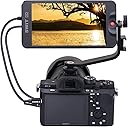



SWIT CM-55C 5.5 inch Full HD 4K-HDMI LCD Monitor
Product ID: 94977652
📺5.5-inch IPS LCD Full HD
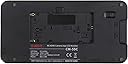
🔋Dual battery slot NP-F & LP-E6
🔗4K HDMI 1.4 input (4K30p)
🎥 Elevate your shoot with pro-grade clarity and power on the move!
The SWIT CM-55C is a compact 5.5-inch Full HD IPS LCD monitor designed for professional DSLR and mirrorless camera users. Featuring 1920×1080 resolution, 4K HDMI 1.4 input at 30fps, dual battery compatibility (NP-F & LP-E6), quick zoom and pan controls, and built-in HDMI audio meters, it delivers reliable, vibrant monitoring ideal for demanding fieldwork and creative projects.
| ASIN | B07L8N53YM |
| Additional Features | Flicker-Free |
| Aspect Ratio | 16:9 |
| Brand | SWIT |
| Color | Black |
| Compatible Devices | モニター |
| Connectivity Technology | HDMI |
| Customer Reviews | 4.2 out of 5 stars 10 Reviews |
| Display Resolution Maximum | 1920 x 1080 pixels |
| Display Technology | LCD |
| Display Type | LCD |
| Hardware Connectivity | 3.5mm Audio, HDMI, USB |
| Item Weight | 0.16 kg |
| Manufacturer | SWIT |
| Model Number | CM-55C |
| Mounting Type | Wall Mount |
| Native Resolution | 1920x1080 |
| Resolution | FHD 1080p |
| Response Time | 2 milliseconds |
| Screen Finish | Glossy |
| Screen Size | 5.5 inches |
| Screen Surface Description | Glossy |
| Total Number of HDMI Ports | 2 |
| Viewing Angle | 178 degrees |
Trustpilot
3 weeks ago
3 days ago