Buy anything from 5,000+ international stores. One checkout price. No surprise fees. Join 2M+ shoppers on Desertcart.
Desertcart purchases this item on your behalf and handles shipping, customs, and support to Panama.
🚀 Unlock pro-level storage power with QNAP TR-004 — your data’s new best friend!
The QNAP TR-004 is a 4-bay diskless direct-attached storage (DAS) enclosure featuring USB Type-C connectivity at 6Gbps, hardware RAID support (RAID 0, 1, 5, JBOD), and lockable metal drive bays. Compatible with Windows, macOS, and Linux, it expands NAS capacity or serves as a standalone external storage solution with versatile RAID configurations and a compact, durable design.


| ASIN | B07K4RC7X9 |
| Additional Features | Compact, fast speed |
| Best Sellers Rank | #8 in Network Attached Storage (NAS) Enclosures |
| Brand | QNAP |
| Built-In Media | AC power adapter x 1, Drive tray keys x 2, Power Cord x 1, Quick Installation Guide (QIG), Screws for 2. |
| Cache Memory Installed Size | 1 |
| Color | Diskless |
| Compatible Devices | Computers |
| Connectivity Technology | USB |
| Customer Package Type | Standard Packaging |
| Customer Reviews | 4.2 out of 5 stars 634 Reviews |
| Data Transfer Rate | 6 Gigabits Per Second |
| Enclosure Material | Metal |
| Form Factor | Mini-ITX |
| Global Trade Identification Number | 00885022016358 |
| Hard Disk Description | DAS (comes unpopulated) |
| Hard Disk Form Factor | 3.5 Inches |
| Hard Disk Interface | Serial ATA |
| Hardware Connectivity | USB 3.0 |
| Hardware Platform | Mac |
| Installation Type | Not Specified |
| Item Type Name | QNAP TR-004 4-Bay USB Type-C Hardware RAID Enclosure/ DAS |
| Item Weight | 4.08 Pounds |
| Manufacturer | QNAP |
| Media Speed | 375 MB/s |
| Mfr Part Number | TR-004 |
| Model Name | TR-004 |
| Model Number | TR-004-US |
| Number of Items | 1 |
| Read Speed | 6 Gigabytes Per Second |
| Special Feature | Compact, fast speed |
| Specific Uses For Product | business, personal |
| UPC | 885022016358 |
| Unit Count | 1.0 Count |
| Warranty Description | 2 year warranty |
R**I
I had a lot of criteria, and this fit the bill. So far so good.
I spent an embarrassingly huge amount of time researching options for my needs. I know reading this you could probably name 2 or 3 other options that would easily fit my criteria, but I'll explain why I chose this one. To start, I use a Mac Mini as a home network server. I run Home Assistant and Jellyfin, primarily, for now. I wanted a DAS that had a physical on and off switch. This one has that; in case of a power failure (it should be connected to a battery backup UPS anyway), it will power back on when power restores. Although I don't store Home Assistant data on this enclosure, I do store Jellyfin media, and I didn't want my family to have to go reset this device in case of a power interruption. I did not want an internal power supply. Some people prefer that, but I figured there's more heat and internal components to fail with an internal power supply. Plus, an internal power supply of a DAS is likely proprietary and not easily replaced like a desktop computer's power supply. This has an in-line power brick, meaning it goes from the DAS to a brick, then uses a traditional C13 (I think, I actually can't remember if it's grounded or not) cord to the wall. I wanted the enclosure to accept 2.5" and 3.5" drives, and both HDD and SSD. This one does. It was not clear in the product description for me if it accepted 2.5 SSDs, but the manual confirmed it, and I am successfully running a combination of HDD and SSD. Though I am not using the hardware or software raid, I wanted the option for that. Right now I have it configured to be individual drives. I cannot attest to the software, but the hardware raid is working for me with the setting I have (configured via switches on the back side of the unit). I also wanted either thunderbolt or USB C, which this has the latter. I wanted to use the Thunderbolt port on my Mac Mini because there are only two USB that I wanted to leave open. I realized I am not getting Thunderbolt speeds, but using spinning hard drives, my bottleneck was those anyway. It is quiet! The hard drives spinning is louder than the fan on the unit. No complaints there. I have the four drive option, and it is about a hard drive wider and taller in dimensions. It's a good size, and isn't too obnoxious sitting in my office. The lights aren't bright, and they could easily be covered with a piece of electrical tape if they are bothersome. As I mentioned, I am using it with a Mac, so it is compatible with that OS. It does also work with Windows. Set up was really easy. I slide out the cages, and if you're using HDDs, there are no tools required. If you want to mount a SSD, you do need to use screws and you will also need to remove one of the side clips that hold in a traditional HDD (you'll see what I mean if you do it). Slide the trays back in, lock if you'd like with the included key, and boot it up! My mac instantly recognized all the drives as external volumes, and they automatically mount any time I need to restart the system. I have transferred many, many TBs so far, and all have been hash verified to be copied perfectly, with no interruptions or disconnects. 10/10 would recommend, at least so far. Again, I cannot speak for the RAID aspect of this, so you're on your own there. Will report back if there are any issues. I guess it would be nice if the enclosure was a nice aluminum, but I think the fan does a good job of drawing out heat from the unit. I don't plan on moving this thing around at all, so once it's set up and just sitting there, the durability aspect is fine. Oh, and it was also packed very well. It arrives in a box much bigger than the unit itself, and the DAS is surrounded by plenty of foam.
S**N
Great affordable RAID enclosure!
Bottom line: I recommend the TR-004 with drives I mention below (or others on its list of supported drives) in one of the 3 modes: Individual, RAID 1/0, or RAID 5. Please keep in mind that RAID is not a substitute for a good backup. You should always keep a backup copy of anything important on a separate device! If you want to know more details, read on. As an IT professional, I appreciate the benefits of using RAID. It provides faster performance than any one of the drives in the array. How much so depends on the type of array you configure. Configured properly (more on that later*), it provides safety against data loss when a drive fails, and that's always a matter of when, not if. My only complaint with the TR-004 is that the trays that the drives go in are a little flimsy. The down side of RAID is often cost - it's not terribly cheap. Building a home network storage server using it can be expensive because motherboards that support it cost more that those that don't. Using a dedicated controller card is often even more so. I could never convince my better half to let me build a file server with enough storage to meet our needs using RAID because of this - until I found the QNAP TR-004. The TR-004 is a great price when you consider that it has the RAID controller built in. It's an even better value because it supports many of the various popular levels of RAID (more on that later*). Add the fact that you don't have to fill every drive slot to use it, and it's a high value for the money. I put it on a tiny PC also available here on Amazon.com for under $200, and **boom** - instant dedicated file server for home! You need to populate the TR-004 with drives, it comes without any. Get good NAS or other server grade drives. I recommend WD RED, WD PURPLE, or WD GOLD from Western Digital, or Seagate's IronWolf or SkyHawk lines. These drives are specifically designed for use in RAID arrays for Network-Attached Storage, also called NAS (WD RED & IronWolf), security camera systems (WD PURPLE & SkyHawk) or other servers (WD GOLD & IronWolf). They are made for very high reliability. At the very least, use either the Western Digital WD BLACK or high-end Seagate Barracuda drives. Anything cheaper, and you'll end up having problems with your RAID array loosing sync. "What's that mean?" you ask? In simple terms, all the drives in a RAID array look, to the computer, like a single giant drive. Data gets spread across the drives in chunks. This is how you get the speed performance increase from RAID. While one drive is busy handling one thing, others are frequently able to handle other things. It's also how you get protection against data loss if a drive fails, when you are using a level of RAID that provides this. * Here's the "more on that later" I promised above. RAID comes in different "levels", referred to as RAID x, where x is a number. All RAID arrays are made up of multiple drives. The TR-004 supports 6 different modes, though I only recommend 4 of them. These modes are: Individual - Every drive in the TR-004 is visible to the computer as a separate drive letter (ie: e:, f:, etc). The drives can all be different models, brands, and sizes. I can recommend this mode, but know that data on each drive will be lost if that drive fails and the data on it isn't backed up elsewhere. If you are going to use this mode, you can use any drive the TR-004 will support, not just the ones I mentioned above. JOBD - This stands for Just One Big Drive. All the space of all the drives is available to the computer as one giant drive. It requires at least 2 drives, but supports as many as the controller can handle, 4 in the case of this enclosure. This mode allows the use of different, models, brands, and even sizes of drives. It works by spreading the data within files across all the drives in the array (as do all the RAID levels in one way or another). DANGER: If any drive fails, all data on all drives in this mode is lost, unless it's backed up elsewhere. I do not recommend this mode. RAID 0 - This is technically the first RAID mode. It's the same as JOBD, with the notable exception that all the drives in the array should be identical, the same exact model number, the same brand, the same size. The only difference their should be is the drives' serial numbers. This requirement is continued to all the rest of the RAID levels. RAID 0 is fast, however it has the same danger as JOBD, so I do not recommend this mode, either. RAID 1/0 - This mode is also know as RAID 10. It requires an even number of identical drives, and a minimum of 4 (all bays filled in the TR-004). It copies 2 RAID 0 arrays between each other. In larger arrays, an even number of identical drives is required for RAID 1/0. This is the fastest of the RAID levels, but it has the drawback of only making half the total space of all the drives combined to the computer (ie: 4 drives of 3 TB each would look like 6 TB to the computer [4 drives * 3 TB = 12 TB, 12 TB / 2 = 6 TB]). Although I do not recommend RAID 0, the fact that there are 2 identical copies of a RAID 0 array, any single drive can fail without loosing data. Therefore, I do recommend RAID 1/0 for speed and data redundancy. RAID 5 - This mode is a good compromise between between the speed of RAID 1/0 and the desire to get more storage space from the drives in the array. RAID 5 also requires at identical drives. It needs a minimum of 3, but can go up from there to however many drives the controller can support, in single drive increments. It achieves redundancy, by spreading data across "stripes" that are duplicated on the multiple drives. At it's absolute simplest, it places 2 copies of each stripe in the array. For example, lets say there are 3 stripes stored in a 3-drive array. We'll call the stripes A, B, & C. We'll call the drives 1, 2, & 3. RAID 5 stores a copy of A on 1 & 2, a copy of B on 2 & 3, and a copy of C on 3 & 1. By doing this, any 1 drive can fail but there is still at least 1 usable copy of all stripes in the array. Replace the failed drive, and the controller will copy the necessary stripes to the new drive. The amount of storage available to the computer is the combined total of the storage on all but one of drives in the array (ie 4 drives of 3 TB each would look like 9 TB to the computer [4 drives -1 = 3 drives, 3 drives * 3 TB = 9 TB]). RAID 5 is not as fast as RAID1/0, but it gives more storage from the same drives, so I do recommend it in particular for home servers, where cost is a bigger consideration that many businesses. SFOTWARE CONTROL: When the TR-004 is in this mode, special software must be downloaded and installed on the computer it is attached to. The mode it will run in will then be controlled by the user from within this software. I do not recommend this mode because if you are going to move the TR-004 from one computer to another, you may accidentally loose everything stored on it. You never know when you may have to move it to another computer - say if the one it's on dies?
C**6
Loud enclosure, flaky drive error reporting
You get what you pay for with this unit. It functions and performs fine, no problems there. But there is no dampening at all in this enclosure. In fact, the drives I had in my PC before, now are louder when in this enclosure. It sounds like someone is drumming on the desk when it is doing it's thing. A little bit of dampening material where the drives mount would have helped this. Also, it randomly reports a failed drive on any of the 4 drives for no apparent reason. The S.M.A.R.T. function reports no errors ever, but the DAS does sometimes. Shutting down the PC and DAS and powering it back up again fixes it for several months. Other than these minor issues, it works great!
S**N
Consistent, reliable and easy to use once set up.
Been using this for the past 2 years for RAID for a plex server, among other things. At first I thought it was just going to be junk as compared with some other devices it was pretty cheap. But I'm pleased to say this has been a workhorse and stable. I've got mine connected to a Mac Mini that I use for home networking stuff and I've had no issues at all. Just bought a second one for individual backup drives. Great value for the money.
P**N
Poor performance as a DAS and is very cheaply made
I installed 3 SSDs into the QNAP TR-004 enclosure and connected it to my M4 Pro Mac Mini. I am not using hardware RAID, just the "individual disks" mode where each drive mounts individually, so this should basically have been a simple USB / SATA enclosure at the end of the day. The performance of this device is beyond terrible. I found that my Mac Mini was constantly beach-balling when trying to access data on these drives. Further, it seems that it would put the drives to sleep (not sure if this was commanded by the enclosure's firmware or by the Mac's OS), but it would take ages to wake them up again. SSDs obviously don't need to spin-up, but it would take 30+ seconds (often a minute or so) before data was available. I would expect that a sleeping SSD should wake up in around a second or two (or less!). Out of the box, I was really disappointed by the cheap plastic used for the enclosure as a whole, and especially the drive trays. Releasing the latch and pulling out the tray just feels awful and like it's going to break easily (and with time, this may be an issue if the plastics become brittle). 3.5" drives mount with a tool-less system, but the 'rails' that hold it in also feel really low quality. 2.5" drives need screws to hold them in. That's fine, but the problem is that the 'rail' that would be used to retain a 3.5" needs to be removed because it mechanically interferes with the 2.5" drive. So now, where to put that rail so that it could be used in the future?? There's no place to store it, so you'd need to be careful not to misplace it. Fast forward and I picked up a 5-bay Sabrent enclosure at the same price point. The Sabrent unit has two downsides: it only supports 3.5" drives directly (an adapter fixes that issue) and the fan is noisier. But, the Sabrent is mechanically very well built and more importantly performs really well -- no more beach balls, super fast and reliable data transfers, fast wake-up, and it's even significantly faster to mount the drives in the OS. I did not perform quantitative performance tests, but it's clear that the QNAP is not fit for purpose. I also did not test the hardware raid capabilities (hopefully it is better, but I'd doubt it). I'd recommend avoiding the QNAP TR-004 as it is really a poor product with extremely poor DAS performance. The possible exception for this would be if you need to extend a QNAP NAS device, but I would still expect poor performance so you may be better buying an entirely new NAS system.
D**R
Fabulous technology
This array has many great features. It can be used as a network drive OR can be directly connected to your computer. The drives in it can be configured to operate independently or used in a RAID array. The RAID levels include 0,1,2,5, an 10. It has worked flawlessly for me and was reasonably easy to set up. The RAID levels can be controlled either by software (easily downloaded) or by switches on the back of the unit. My only complaint is the online user manual. If you are not technically inclined, it can be a bit of a challenge to set this up, especially if you plan to use it as a network drive. ALL of the information is available online but if you do not know the technical terminology, it can be a little difficult to follow. Other than the manual issue, the equipment is wonderful and the fan noise is almost nonexistent.
R**.
QNAP is the BEST DAS I have found. So simple and easy to set up. Large capacity potential.
I did some extensive research on finding the perfect DAS. The noise level is minimal (depending on where you are writing data to and on which drives). The connectivity led me to have to buy a PCIe card to add 4 USB-A ports to my computer. The storage capacity easily held my four 12 TB drives. But the coolest thing about this QNAP has to be the installation and setup. I'm really tech savvy, and I was surprised at just how easy it was. I cannot wait to upload my YouTube review. The speed is fast...especially since I loaded four 7200 rpm drives. The setup, once again, is so easy that all you have to do is load the drives, plug the QNAP DAS into your machine, and turn it on. Make sure you download the latest QNAP external RAID Manager software. Depending on whether you want to set up a RAID or just use all four separate drives, the software walks you right through the process. It is also so easy to navigate. The only drawback is that if you want to increase the overall size of your DAS by purchasing four high-capacity drives, you'll have to start over (15-24 hours to sync everything). That is the only thing that confused me.
N**N
Works well for my needs
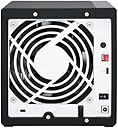
This is a rather simple 4-bay disk enclosure. QNAP has been around a long time, so it's not a fly-by-night Chinese brand or even an unproven newcomer in the field like Ugreen. Downside of that is that it kind of feels like a legacy product. RAID is set up via the three switches in the back. Once you got your drives up and running, don't change the switch toggles; you might just be erasing your drives while the enclosure is trying to reconfigure your drives to a different RAID setup. I've bought this more than a year ago. It was very much a set-it-and-forget-it affair, especially now. Last firmware update was two years ago, and that was probably to fix the drive failed state issue that one of the storage enthusiast website came across. You'll also want to install the external RAID manager from the QNAP site, which honestly doesn't update often, which could be a good thing or bad thing, depending on your point of view. I'm running my setup in RAID 10 with 4 10TB drives that I got for cheap before the world came crashing down. It's been working flawlessly. I hope it continues to do so... especially since I can probably not afford to replace the drives if it doesn't at this time.
K**X
Easy To Set Up, Works Great
Very easy to install hard drives, simple to set up as a RAID 5 storage on a Lenovo ThinkStation (Windows 11) with four WD Red Pro 18TB HDDs. USB interface.
F**O
Recomendable
Funciona perfectamente, plug & play. Muy recomendable para ampliar almacenamiento.
S**P
Easy to setup and quiet running
Setting up is a breeze, using the clips to secure the hard disks to the trays. The fan is also quiet while doing its job. A small detail I appreciate is the inclusion of a cable clip for the USB wire to avoid pulling out of cable by accident or unnecessary stress on the port due to cable weight. The LEDs are also dimmed, but bright enough to see. Does not annoy people like other brands of enclosure that uses super bright LEDs. I join the long list of other users wishing for a way to disable the startup diagnostic beeps. This is perhaps the only ‘on the fence’ point I can think of. Other than that. It works well and looks nice.
V**O
OTTIMO
Ottimo extender per HHD e SSD...unico collegamento usb per la gestione fino a 4 dischi...io mi trovo benissimo. Al posto di dover gestire singoli HDD ognuno con i proprio cavi, utilizzo un unico cavo usb e un solo cavo per corrente. La gestione è abbastanza pratica con il software. OTTIMO!
D**N
Easy setup and does the job!
Easy to setup. Speed is like a normal hard drive and I have it connected via usbc to my Mac Mini 4 as a shared drive on a 2.5Gbit lan. Not that noisy. I like that fact it is a standalone RAID 5 not dependant on the host machine. For editing I copy the files from the archive first to an SSD or across the network to my laptop. 1GB video takes about 8 seconds to copy across.
Trustpilot
4 days ago
2 weeks ago