Buy anything from 5,000+ international stores. One checkout price. No surprise fees. Join 2M+ shoppers on Desertcart.
Desertcart purchases this item on your behalf and handles shipping, customs, and support to Panama.
🎮 Level up your Switch with Skull & Co’s ultimate D-Pad upgrade—game smarter, not harder!
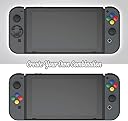
The Skull & Co. D-Pad Button Cap Set transforms your Nintendo Switch Joy-Con with precision-engineered, warranty-safe D-Pad options and vibrant Super Famicom-inspired button caps. Designed for easy installation without voiding warranty, it offers pro-grade responsiveness and stylish customization, making it the top choice for serious gamers seeking enhanced control and aesthetic flair.
| ASIN | B07LGF9WWY |
| Best Sellers Rank | #9,159 in Video Games ( See Top 100 in Video Games ) #1,167 in Nintendo Switch Accessories |
| Brand | Skull & Co. |
| Color | SFC |
| Compatible Devices | Nintendo Switch |
| Customer Reviews | 4.3 4.3 out of 5 stars (878) |
| Enclosure Material | Plastic |
| Global Trade Identification Number | 08011727334332 |
| Manufacturer | Skull & Co. |
C**U
Skull & Co. Uses Their Brains! Great Innovative Products!
Skull & Co. is a a great team of progressive thinkers in the gaming industry! They have the BEST Grip Case for the Nintendo Switch as well as the best solution for adding a d-pad to the left Joy-Con, not to mention the simplest and the cheapest solution! Another added bonus is you get to keep your warranty in tact just in case you need to send it to Nintendo for some kind of repair, unlike d-pad shell replacements. Skull & Co’s d-pad add on is also much more responsive and accurate than the Hori D-pad Joy-Con, which can’t be used wirelessly, doesn’t have rumble, and doesn’t fit properly in any cases on top of all that. Save yourself the time and the money and get the BEST for the CHEAPEST! This is it! This d-pad feels amazing. Just follow the directions and don’t forget to apply the pivot in the center. I also added the Super Famicom button color layout to the right Joy-Con, and now the buttons feel so much better. The d-pad even feels better than the one on my Nintendo Pro Controller! You seriously can’t go wrong with Skull & Co. products. Elegant and functional. Thank you guys!
A**C
Nice alternative for dpad 👍🏼
I needed a dpad for my regular Switch for certain games. I could easily break open my joycons and do a shell swap... thing is I don’t have the luxury to buy and replace my joycons if I muck it up nor risk voiding my warranty. I also don’t trust myself enough to do it tbh. I’m happy that Skull & Co offers these dpad alternatives and installation was very simple. I watched a YouTube installation guide just in case. You do have to press the adhesives firmly all around the corners before peeling off the backing sheet. I also love the added colorful buttons, gave mine the super famicom look. I used the cross dpad as I had no need to use the circular one which I feel is best for fighter type games. The pivot was more than enough for how much pressure I put on the dpad and got responsive clicks. I have small fingers and can see someone accidentally pressing the middle of the dpad which can cause wrong button presses. Overall for me this dpad set is working out great and I’ve purchased another set for my other Switch. I wish you get to pick the dpad style which could of saved me money if I got both cross pads in one set instead.
M**Y
A steal for the price, great for fighting games, just follow the instructions.
Just received the items, I bought only for the D Pads. The adhesive was simple enough to line up and put on the top and bottom D Pad on the left Joycon, once on where you want it just peel off the top. Each D pad has a black circle piece that has to be popped out and placed on the bottom middle. Then make sure the arrow on the bottom of the Dpad is pointing up. Line up the top cover of the Dpad with the top button and it should fall in place. Using each Dpad is distinct and comfortable. I tested a number of fighting games, SF 30 collection, Power Rangers, Mk11, King of Fighters series, all input was accurate and pretty seamless and it didn't matter which Dpad I used. Also used on Sonic Mania, Snipperclips (used sideways) and you can still feel each independent button click, Super Mario Bros 3 (sideways) and everything was just fine. The Dpads work well in fighters where you may slide your finger to do a fireball, or a iceball with Sub Zero. They also allow you to feel each independent button press as the original Switch Dpad has. I didn't use the colored buttons just for the fact they don't have any A, B, Y, X on them. I like anyone who uses my console to know what button is where. A slight disappointment but oh well, maybe they will start to add letters, maybe not. Overall the Dpads are great and feel solid and smooth. I am very happy with them.
L**N
Excellent value and performance, especially for the price. A bit frustrating to install.
These things are amazing. I wasn't expecting much, especially for the price, but while the initial installation was a bit frustrating and finnicky, I've been very happy with the final result. I had just bought my Switch when I ordered these. Their implementation of the d-pad as four separate buttons felt awful and borderline unplayable to me, so the fact that these work so well is awesome. The d-pad is the star of the show here. I went with the cross configuration and saved the circular one to use as a backup or give to a friend. Once it's on, it feels solid and natural. It feels solid and clicky, which I like. Some have mentioned that they prefer a more "mushy" feeling d-pad and if you're one of them, this might not do it for you, but if you're like me and prefer something with some click to it, you'll be very happy. The face button caps get an honorable mention as well. I expected them to be little more than cosmetic, but they actually make the buttons feel more substantial and satisfying to press. As mentioned, the only drawback is the installation. The included stickers are extremely difficult to peel properly from their backing. You're supposed to remove them from the backing, then stick them to the button faces and then lift the piece concealing the glue off. Sticking them to the buttons is easy enough, but lifting the rest of the paper off so that the little glue circle stays on the button and doesn't bunch up or slide off is extremely difficult. I had to use two pairs of tweezers to accomplish it, one to pick at the edge of the glue to make sure it came off the backing, and another to actually lift the backing off while carefully holding the glue circle down. It was a bit nerve-wracking and a wasted a few stickers in failed attempts but thankfully, they give you a pretty generous number and after I got the hang of it, I got it to work, though it was impossible to keep the glue circles from bunching up a bit on the buttons. This doesn't seemed to have stopped the caps from sticking properly though, and everything has worked well since. Another review mentioned that if you can't get the little stickers to work well, using removable wall mounting putty like you can find at OfficeMax or Staples is a great substitute, and if the initially applied stickers ever fail, I may turn to that. So far, though, this has been a fantastic purchase, and aside from the slight initial difficulty of the installation, I have nothing but good things to say. This has caused the JoyCons to go from uncomfortable to nearly ideal in handheld, especially for retro games, and I don't feel the need to run out and spend more money on a pro controller quite as urgently as I did at first.
P**N
Werkt prima
A**S
Nintendo switch dpad sorununu ortadan kaldırıyor. Hızlır kargo için teşekkürler.
J**T
If you want to customize your Switch or just identity, you will never go wrong with this add on. No need to open your console, just stick it and the visual of your Switch body will never be the same again.
J**4
It does not fit on switch 2 joy cons the tape doesn't hold correctly I've forced it with super glue because I like to feel of the buttons and the d-pad I can finally play Street fighter in handheld mode
B**E
This product definitely exceeded my expectations. I didn’t think such a simple and low cost solution would be effective but the d-pad works great...much better than the stock 4 button setup and even better than the pro controller d-pad as well. It’s responsive, accurate, and makes it much easier to pull of complex moves in fighting, etc games. It looks like a normal part of the controller and is a good size...slightly bigger than a Xbox one d-pad. The button caps work great as well. They install easily and don’t affect button performance at all. They look good, add a bit of size to the buttons which I prefer and they have a smoother texture. Personally I arranged them so that the colours match the Xbox colours (A = green, B = red, etc) since I play on both systems and it makes it easier when I go between the 2. That being said it would be nice if at least one of the 2 included button sets had the letter labels on them instead of just being solid colours. One thing worth pointing out that I have noticed is that several of the reviews and YouTube videos for this product are not installing it correctly. Make sure to follow the included instructions and the 3 key points.: 1) Install the rubber pivot on the dpad underside. Many of the videos I have seen are not doing this. There is a small rubber pad that comes in the package and it has 6 small removable discs on it (they are hard to see). You must stick one of these on the bottom of the d-pad in the middle to act as a pivot point. 2) Only use 2 adhesive stickers to attach the d-pad. I’ve seen videos using them on all 4 buttons but you just want them on the top and bottom buttons. 3) Make sure the d-pad is positioned the right way up. It may look symmetrical but it’s not....there is an up arrow on the backside of the dpad and you want to make sure this is over the top button when you install it. The kit is an excellent value...it’s a simple solution and you get enough to do 4 joycons (2 dpads and 2 sets of button covers) . It is much cheaper than the other options out there so I would definitely recommend giving it a try if you’ve been missing having a proper dpad.
Trustpilot
2 weeks ago
1 month ago