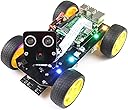
🤖 Drive the future: Build, code, and control your own smart 4WD robot car!
The Freenove 4WD Smart Car Kit is a comprehensive robotics project designed for Raspberry Pi enthusiasts and learners. Featuring a 4-wheel drive chassis, rotatable camera with face tracking, and ultrasonic sensors for obstacle avoidance, it offers multi-platform wireless control via smartphone or computer. With detailed Python tutorials and broad Raspberry Pi compatibility, this kit delivers an immersive hands-on experience in programming, robotics, and hardware integration (Raspberry Pi and battery not included).


| ASIN | B07YD2LT9D |
| Best Sellers Rank | #66,587 in Industrial & Scientific ( See Top 100 in Industrial & Scientific ) #18 in Robot Parts |
| Brand | FREENOVE |
| Color | Ordinary Wheels |
| Computer Memory Type | DDR DRAM |
| Customer Reviews | 4.3 4.3 out of 5 stars (689) |
| Date First Available | September 26, 2019 |
| Is Discontinued By Manufacturer | No |
| Item Dimensions LxWxH | 8.27 x 5.91 x 4.92 inches |
| Item Weight | 1.36 pounds |
| Item model number | FNK0043 |
| Manufacturer | Freenove |
| Number of Processors | 1 |
| Operating System | Raspberry Pi OS |
| Processor | none |
| Processor Brand | Broadcom |
| Product Dimensions | 8.27 x 5.91 x 4.92 inches |
| RAM | 2 KB LPDDR4 |
| Series | Freenove 4WD Smart Car Kit for Raspberry Pi |
| Wireless Type | Radio Frequency |
K**F
This little car has a lot going for it but mine had a couple of problems
The well designed parts and 128 page instruction manual including the computer code make this car easy to assemble and operate. The ability to handle the testing of each module on a PC via RealVNC facilitates testing, and the phone app provides steering and speed control as well as control of the LED lights, camera and switching to other modes of operation. Tech support provides 24 hour responses via email and was very helpful for straightforward problems. All in all this kit offers a lot for the money and earns a five star rating. However, I encountered a couple problems that should have been handled better and distracted from my overall enjoyment of the project. Next to control from a phone the most useful function is the obstacle avoidance using the ultrasonic sensor for control. The ultrasonic sensor that came with the car kit was defective and was replaced after three weeks for overseas shipping. However, the replacement sensor was also defective, and in spite of my detailed documentation of the problem Freenove refused to replace it. I had an ultrasonic sensor from another project which I was able to use but it had intermittent errors that severely compromised this important function. The other problem was less serious but annoying and time consuming. The code downloaded to control the car had an error which applied less than a third the required power to the wheels for forward motion. Therefore, the car refused to move resulting in several days of emails blaming the problem on the batteries before I finally traced it to the code error. It has been three weeks since this problem was reported to Freenove and a download of the code today showed the error had not been corrected.
C**.
Computer Engineer - Incredible Project
I'm a professional computer engineer with 30+ yrs experience who designs high end electronics, circuit boards and writes embedded software. I also help as a mentor on my daughters robotics team. It's no secret that I am a huge fan of the Raspberry Pi. For some time I've been looking for a kit that teaches how to integrate the Rpi and robotic hardware. This kit does all that and more. First a heads up - this is an engineering learning kit. It teaches the builder how to assemble a robot from lots of pieces, how to connect wiring between the Rpi and robot, how to write software for the Rpi that explains how to control things like the camera, ultrasonic sensor, drive motors and more. It also explains how to bring up a Rpi and how to log in remotely from a PC. Simply put, this kit is amazing. I also want to put in a plug for one of the most helpful books for learning about the Rpi and Linux - it is 'Exploring Raspberry Pi" by Derek Malloy https://read.amazon.com/kp/embed?asin=B01H2KNGX8&preview=newtab&linkCode=kpe&ref_=cm_sw_r_kb_dp_V5obGb6X7CV0Q Here is an overview of what this kit has to offer: 1. You build a fully functioning 4wd car from the pieces supplied in the kit. The instruction manual is well written and explains 90% of what you need to know. If you don't have any experience building things, then I suggest getting help. 2. You learn how to test each function of the robot one at a time - this is really helpful because you learn what each sensor does and the software used on the Rpi to talk to it. This is really great because the python code for each sensor is explained so that you can modify it to learn more about how the software and sensors work. All software is provided and simply works. Impressive 3. You learn about the Rpi and how to log in remotely - this is a key aspect of running this little computer and it helps you understand just how amazing the Rpi really is. 4. The final part of the project is to fire up an app that gives you control over the robot and lets you drive it around, stream video, change the LED's and more. The app is either an iPhone or android app that you can download from the app stores or you can also run a Windows or Mac app. CONCLUSION: Simply put, this is a really great project. It is not a toy, but a intermediate robotics kit designed to introduce you to the world of robotics, computers and the Rpi. As someone who designs electronics for a living, this is one of the best kits I have seen. Highly recommended.
D**D
Works well for someone wanting to get into robotics cheaply.
Pros: - Car works mostly as advertised - Fairly feature packed (motors, servos, camera, sensors, leds, line tracking, ultrasonic sensor, buzzer, etc..) - Instructions are fairly detailed with only a few weak points. - Software mostly works out of the box. - The server for connecting via an android app over wifi works, though the frame rate is slow and it is hard to control the car over it effectively. Cons: - This is very sensitive to the batteries you use. If your batteries cannot provide full voltage you may have trouble with the pi losing power at full throttle on the motors. - The camera and ultrasonic 'head' mount are connected via a separate piece that uses servos to allow it to move around. This is nice when the device is still, but leads to extremely unstable video when the car is moving because the mount is so weak. - Raspberry pi wifi out of the box drops a lot on battery. Turning off power managment for wifi helped immensely - Had to play with the motors to get them connected up in software correctly (doesn't match up with which ones are connected where). Overall this is a good base for a Raspberry Pi robot for those just getting started who knows there way around python and linux already. Some suggestions if you order this: * Read the supplied battery instructions in the freenove github website BEFORE ordering * Buy/Borrow a separate USB/USBc power supply for your Raspberry pi to use while setting up and testing. * Get a raspberry pi 4 vs an older model to get faster video
L**G
First, the product works if you assemble it correctly (see my video). My kid and I really enjoyed the features such as auto-driving, obstacle avoidance and etc. The kit really deserves five-star for its functionalities. However, there are a few issues. One issue is that the car kit doesn't come with rechargeable 18650 batteries. I ended up spending some time on Amazon doing research and buying a bundle of these expensive batteries and charger. I wish the car kit can include batteries and charge a little extra. My second major issue is that the manual is poorly written. There are duplicated sections all over and it can confuse people. Most importantly, some key installation steps should be emphasized. For example, my kid was stuck between Step 9-11 on Page 51 (duplicated on Page 72) when attaching camera module to servo package. After quite a while of watching the video of assembled car like a detective to gather clues, I realized that one needed to attach a white rocker arm on Step 9. Then Page 73 says there are two ways to fix the servo 0. I don't think the second way works. Another example is when wiring the ribbon for camera (Page 54). A kid would simply insert a ribbon into the slot. Step 1 on Page 54 should emphasize that one needs to pull the lever out first, insert the ribbon and then push the lever in. In retrospect, the car worked great. I am surprised that the installation of software is very smooth. The assembling process was frustrating sometimes and there is a lot of room for improvement and simplification.
M**U
マニュアル(PDF)や組み立て動画があるので、初心者でも簡単に作れると思います。 組み立てた後、動作せず、私の手順が違うのかとサポートの方とメールでやり取りしました。 まず驚いたのが、1日以内で返信をくれるという返信の速さ。 メールの内容も丁寧で分かりやすかったです。 何度かやり取りした結果、新しい基盤を送ってくださり、無事に動くようになりました。 トラブルが起きたとしてもメーカーのサポートが充実しているので、安心して購入できる品だと思います!
A**E
It says so in the description, but do note, you need a Raspberry Pi (I used a Pi 3) and two 18650 batteries, which are not included. I was very keen to build this and try it out, so I downloaded the code and set up my Raspberry Pi, shortly after placing my order. Fortunately, I already had a couple of 18650 batteries. So, when the kit arrived the next day, I was good to go. Assembly took about 2 hours. First point to note is that I have big fingers and some of the screws are really tiny – I needed fine tweezers for these. Second point, when assembling the pan and tilt ‘head’, the instructions tell you to plug in the servos and run servo.py to put them in the correct position before assembly. I would recommend carrying out steps 1 to 9 of the 11 illustrated steps (page 51 at time of writing) before connecting the servos. I would also suggest connecting the cables to the camera and ultrasonic units before connecting the ‘face’ to the ‘neck’ as they are lot more accessible at this point. Excepting a couple of fiddly bits, the kit was straight forward to assemble, I ran all the test modules and everything worked first time, except it went backwards instead of forwards – but the instructions covered correcting this. It does everything shown in the Freenove video and can also be controlled directly by a phone app (android in my case). I was impressed by the quality of the build and also that all the code is open source. At the price, having a kit you can control from your phone, pretty much out of the box, is already good value, but the potential for writing your own code is even more appealing and I would imagine would be a great incentive for novice coders. I hope a community will develop where people can share their code and ideas. I also think the kit is ideal for further development – a robot arm would be a cool addition, perhaps Freenove may develop expansion kits in the future. In summary, a great kit, a great learning tool and best of all – open source!
S**N
Liked the kit, but the instructions has some holes and the mobile apps required to control the model leavs a bit to wish for. But over all it has potential and I will most definitely have fun with this one. All the parts are there, well packed and easy to follow instructions, but a bit un clear at some parts. Will get more kits. And I'm planning to upgrade this one.
N**Y
Rien à dire, juste incroyable Le montage, super simple Le paramétrage pour le raspberry (obligatoire) un peu moins simple mais en suivant les différents tuto, c'est relativement facile à comprendre enfin jusqu'à maintenant
Trustpilot
1 month ago
2 weeks ago