We remain fully operational. Our teams are working around the clock to ensure your deliveries continue safely.

DOWNLOAD THE APP


Customer Services
Copyright © 2025 Desertcart Holdings Limited
DOWNLOAD THE APP

⏳ Plug in, program, and power up your smart lifestyle!
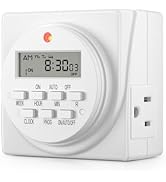
The BN-LINK Indoor Digital Timer Outlet features dual 15A grounded outlets with 8 programmable on/off settings, a backup battery to retain schedules during outages, and a convenient Daylight Savings mode. ETL listed for safety, it offers energy-saving automation and a vacation mode that randomizes lighting to enhance home security. Compact and easy to program, it’s the perfect upgrade from analog timers for modern, efficient living.







| ASIN | B00MVF16JG |
| Best Sellers Rank | #445 in Tools & Home Improvement ( See Top 100 in Tools & Home Improvement ) #1 in Wall Timer Switches |
| Brand | BN-LINK |
| Color | White |
| Date First Available | August 20, 2014 |
| Is Discontinued By Manufacturer | No |
| Item Weight | 8 ounces |
| Item model number | FD-60/U6 |
| Manufacturer | BN-LINK |
| Material | Plastic |
| Number of settings | 8 |
| Product Dimensions | 2.7"D x 3.5"W x 3"H |
| UPC | 746264393471 680474115587 |
M**K
Works right out of the box
Our old pull-the-pins manual lamp timer finally bit the dust and I decided to go digital this time. After reading the review, I settled on giving this a try. It's brand new to us so I can't talk about longevity, but my initial impression is, it's perfect. Because of the internal battery, you can program it while sitting at your desk before bending down to maneuver behind whatever piece of furniture is blocking the outlet. For those who have read the negative reviews about difficulty in programing. I have some experience with digital timers and no two of them program the same way. I found this one easier than most. All I did was follow the step-by-step instructions in the manual. Unboxing to plug-in took about 7 minutes. The size is ideal. The low profile means that you can plug it into a standard 2-plug outlet and still use the other one. Very pleased with our purchase and value for the money.
E**E
I still love it after two years. It's well designed and relatively easy to set up
Two Year Update: After a little over two years, I still love this timer. It's worked flawlessly and has been a night-and-day improvement over the analog timers I used to use. I use it for setting a radiator-style space heater to run in the evening and early morning. Unlike the analog timers I formerly used, I never have to correct the time and I never have to worry about bumping it and changing the programming inadvertently. The main potential problem is that how to program it is not obvious. I keep the original instructions handy for when I want to change the schedule. It's not a big problem. After you've learned to program it initially, changing the programming is pretty easy, but it helps to have the instructions as a reminder. Overall this is a great timer that I recommend highly. Original Review From Two Years Ago: I’ve only had the timer for a day, so I can’t attest to its reliability yet, but I am impressed with how much of an improvement it is over the mechanical timers I’ve used for years. Set up is fairly easy, however many people may be confused by the setup and programming instructions, so here is how I did it. Setup ===== Follow the instructions to initially set the day and time. Be sure to set it to standard time even if you’re currently on daylight savings time. If you’re currently on daylight savings time, then after you set the time, press the HOUR and MIN buttons simultaneously. The time will automatically advance an hour for daylight savings time. In the fall, to return to standard time, press HOUR and MIN again to set the timer to standard time. Programming ========== This is the part that will confuse a lot of people. Here’s how I did it. There are 8 program settings, each of them with a separate ON-OFF setting. Each time you press the PROG button, it will advance. The first time you press PROG, it displays 1ON (1 + ON in smaller, raised letters). The second time you press PROG, it displays 1OFF, the third time it displays 2ON, the fourth time 2OFF, etc. The programming steps are: 1. If 1ON isn’t displaying, press PROG until you get to 1ON. (1 + ON in smaller, raised letters) 2. Press WEEK. You’ll see all seven days display. If you want the timer to turn on all seven days, then just go to step #3, otherwise press WEEK again until the days you want are displayed. 3. Press HOUR until the hour you want the timer to turn on is displayed 4. Press MIN until the minute you want the timer to turn on is displayed 5. Press PROG once. It will now advance to 1OFF. 6. Repeat steps 2 - 4 for the day, hour, and minute you want the timer to turn off. 7. If you want to set another day and time for the timer to turn on and off, press PROG once and then repeat steps 2-6. Continue this process until you’ve set up to eight day-time combinations for the timer to turn on and off. 8. To activate the programs you’ve just set, press ON/AUTO/OFF twice. It should now display AUTO. In the future, if you want to override the programming and force the timer to be either on or off all the time, press the ON/AUTO/OFF button until either ON or OFF displays. A red light on the timer will turn on whenever the timer is on. The light goes off when the timer turns off automatically or when you turn it off manually by pressing ON/AUTO/OFF. CAUTION about using this with a space heater ==================================== I’ve used 1500 watt space heaters on timers for decades, but YOU HAVE TO BE CAREFUL! Make sure the timer is rated for more than the wattage of the heater. This timer is rated for more than 1500 watts, so theoretically it is safe, but it nonetheless can still start a fire if you don’t take precautions (and even if you do take precautions). 1. Never plug the timer into an extension strip or surge protector if you’re using for a heater. 2. Never plug the timer into an extension cord that isn’t rated at least for the heater. 3. Try to avoid running the heater at full 1500 watts. It’s easier for me to follow this rule because I don’t experience extreme cold weather where I live. On the rare occasions when I do run the heater a the full 1500 watts, I don’t leave it unattended. 4. Periodically unplug the heater and examine the plug. Over time, the heater’s plug may deteriorate. I’ve thrown out several heaters when they’ve reached this point. Last week I threw out both my 30 year old oil-filled radiator heater and my last timer because the heater’s plug showed signs of deterioration and had visibly damaged the socket in the the timer. The timer still worked, but would have been unsafe to use. I’ve seen two forms of plug deterioration: the plug’s smooth plastic surface becoming rough around the metal prongs, and the metal prongs themselves showing signs of beginning to disintegrate. So far I'm really impressed with this timer. If something happens to lower my star rating, I'll update this review.
J**.
Quite, directions okay
I'm very pleased with the BN-LINK 7-Day Digital Programmable Timer. As someone who appreciates a quiet home environment, I love that this timer operates silently. Unlike some mechanical timers that can have an annoying buzz or tick, this one is completely discreet. While the initial setup took a little bit of figuring out, it wasn't overly complicated. The instructions were helpful, and once I had the basics down, programming the timer was straightforward. The dual outlets are a fantastic feature, allowing me to control two devices at once. I've found it incredibly easy to use on a day-to-day basis, and it has worked perfectly for scheduling my lights. Overall, I highly recommend this timer. It's a reliable, quiet, and very effective tool for automating your home.
H**V
Electric programabletimers
I bought these timers to run the drip irrigation on my grow table I use to grow tomato plants and pepper plants from seed. The timers work very well. The 2 pack are a value for the money, easy to program, an internal battery that holds the programming, allows for 1-8 programs per day, and has 2 times outlet's. Great product.
B**E
Easy to use timer
I used this timer for the lights on my Christmas tree and it worked very well. It’s easy to program the time schedule and the lights always turned on and off as scheduled. The timer does have a built in battery which allowed me to program it before I plugged it.
P**Y
It’s a good timer and not bad to setup
I got this to turn on /off a grow lights for my greenhouse that I did a dyi project. It works great so I don’t have to worry about making sure the lights get turned on or off when I need them on/off and with my work schedule it works great.
S**H
Couldn't plug anything into it
I ended up returning these timers. One worked fine, but the other one was unusable. The holes for the plugs were too small for the prongs of what you want to plug in. I tried the timer on a few different appliances; some fit after you forced it in, and some wouldn't fit at all. Also know that the timer is designed to take up a lot of space below the outlet. If you need to use the timer on the topmost outlet, nothing can plug in underneath it.
G**J
Setup a little confusing
As others have noted, the setup is somewhat confusing. The instructions could be better. But it didn't take too long to set the time and put in two on/off intervals. The fit in some sockets is a bit loose. I squeezed the plug blades together a little to get a tighter fit to keep the device solidly in the socket. Working OK. Too soon to assess durability.
A**R
Funciona bien, compré uno de los de antes en Home Depot y no funcionó, este funciona bien y sin problema, el único detalle es la configuración que es un poco complicada porque el instructivo no está bien hecho, fuera de eso todo perfecto y sin problemas prende y se apaga a la hora y además tiene pila interna de unos minutos por si se va la energía eléctrica mantiene la hora y la hora de encendido y apagado. Si lo recomiendo
P**H
muy buen equipo, se ve bien y funciona sin problemas.
R**R
It works great and is simple to program, but since it’s an electronic device, I’m not sure how long it will hold up
J**L
This unit performs exactly as advertised. While it has a tremendous amount of flexibility, getting it up and running is quite onerous, time-consuming and somewhat intimidating – that is, until you get the hang of it. The online video, which can be found in the Amazon product page, at the company's website or on Youtube, is somewhat of a help to get you started providing you're prepared to hit pause after each step. But even the video got confusing mid-way through, as the narrator speaks quickly and an important step wasn't clearly articulated. That's when I returned to the printed instructions and, voila, my confusion was alleviated. We'll be utilizing it for operating Christmas lights in our front window, which sits behind a couch. Unfortunately the lights have no switch and must be plugged/unplugged, and needless to say, pulling out the couch twice a day is somewhat annoying. While this unit is probably overkill for that task, we'll also be able to utilize it when we're away and we want the home to have a lived-in look. It appears to be well made and well designed and it's great that it has two three-pronged inputs on its base rather than at its sides; and each input can be independently programmed for precise on/off settings for any day or days of the week. Plus, eight different program digital on/off options can be entered. There's also a daylight savings time mode and a random mode. All this for a very reasonable price. Just be patient and prepare to spend about an hour to get it up and running when you first use it.
A**O
Muy bien. Los he utilizado y me han gustado. Prácticos, cumplen con la función.
Trustpilot
1 week ago
1 day ago