Desert Online General Trading LLC
Dubai, United Arab Emirates
Desert Online General Trading LLC
Dubai, United Arab Emirates


🖥️ Compact power, silent style — your desk’s new best friend.
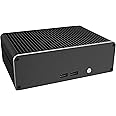
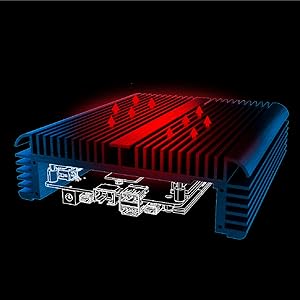
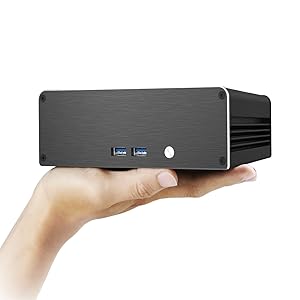
The Akasa Newton CTN is a fanless, ultra-compact aluminum case engineered for Intel’s 11th Gen NUC Core i3 (Tiger Canyon). It supports high-resolution multi-display setups, offers silent operation through passive cooling, and features VESA mounting plus space for an M.2 SSD, making it a perfect fit for professionals seeking powerful, quiet, and stylish computing in minimal space.



| Number of USB 2.0 Ports | 2 |
| Number of USB 3.0 Ports | 2 |
| Brand | Akasa |
| Series | Newton CTN |
| Item model number | A-NUC75-M1B |
| Item Weight | 3.3 pounds |
| Product Dimensions | 2.19 x 6.64 x 2.19 inches |
| Item Dimensions LxWxH | 2.19 x 6.64 x 2.19 inches |
| Color | Newton CTN |
| Manufacturer | Akasa |
| ASIN | B09NBDL3XX |
| Date First Available | November 25, 2022 |
M**R
The new case is significantly larger, but the fan noise is gone forever!
I have the NUC85iBEH model. It has been a faithful performer, but it could heat a small house under heavy load, and the fan noise was starting to bother me. The design of the NUC made it impossible to get to the fan without removing the entire motherboard, so I saw the Akasa Plato X8 as an opportunity to permenantly resolve my heat and fan issues by eliminating the fan altogether. You remove the motherboard from the original case, and place it in the Plato X8.First of all, the pictures of the Akasa should tell you that your resulting case is going to take up significantly more space in your rack or cabinet. You are replacing the small NUC case with a hunk of aluminum that is a giant heat sink which will absorb and spread the heat from your CPU to obviate the need for a fan and the noise that comes with it.In my eyes, this hefty aluminum hunk of heat sink is beautiful, and it abolutely works. All of the front and rear jacks on your original NUC case are duplicated. In fact, the rear panel has two extra openings for Wifi antennas, which are not included with the case. And the wifi antennas which would work with this case are the kind that use two of the vertical black sticks which have wires that plug into the Wifi card on your computer. The original NUC case uses wires that run along the inside of the box. That arrangement does not work with the replacement solid aluminium Plato X8. The aluminum case would block the wifi signal from a wire antenna inside the enclosure. The antenna kits are readily available on Amazon. For my NUC85iBEH, the wifi card required an antenna array with MHF4 connections. Connecting and disconnecting the tiny antenna leads was the most challenging part of the assembly.For all the rest of the connections, the Plato X8 kit supplied the cables to connect to the motherboard. The instructions are not verbose and use diagrams to describe the various parts and how to install them. When you get the motherboard out of the original case, You have to remove the thermal compound underneath the CPU and wipe the exposed area with alcohol gently to fully clean it. You use the supplied thermal compound to fully coat the bottom of the CPU which touches an aluminum block underneath it in the new case. Once you have screwed the motherboard down, connect the cables, and you are ready to power up. I was slow and cautious, and it took me about an hour to remove the motherboard from the original case, clean the CPU contact points, screw the motherboard down, and connect all the cables.With my NUC85iBEH, I lost none of the controls or connections on the front and back panels of the original case. My original case did have a micro SD card slot on the side of the case, so that is lost with the new case, but it is the only feature lost for me. That did not bother me, as I had never used it.When I pressed the front button to boot up, the comptuter booted up in total silence. There is no fan noise, ever. I have had the computer on for two solid days, and the top of the alumimum case is a little warm - nothing more. Using the CAM software to monitor CPU temperature after running for two days, I show a temperature of 37 degrees Celcius. Of course, this computer is used as an HTPC to listen to music and watch videos, so it is really never fully taxed in my usage. Nonethess, the fan used to come on all the time, and was distracting in a small room. And if I ever waited too long to clean the fan, the computer could get hot enough to occasionally have a thermal shutdown. Now there is no more fan to clean, and the motherboard assembly is in a fully enclosed case which should make it invulnerable to dust.I have attached a picture of the finished case in operation as well as my old NUC case and fan in its disassembled state. I did not take a picture of the motherboard installed in either case, but now that the project is finished, I did not want to open the new case back up.The Akasa Plato X8 is beautiful and practical, and I love it.
B**S
Cool case
I bought the original Intel NUC8i7BEH because it has a powerful CPU in a small package. The GPU of the i7 8559U is Iris Pro 655, which is also currently the most powerful Intel GPU. It's an ideal computer for playing UHD bluray discs using PowerDVD. It's also equipped with a Thunderbolt 3 port for external GPU expansion. I was able to develop VR programs and play VR games using the NUC plus an nVidia external GPU. However, the fan sound has been clicking from the purchase. More recently, after an extended period of VR programs, the fan started to make more violent noises. I was initially thinking of having Intel fix the issue until I found the Akasa Turing case. In fact, another importance use of the NUC for me is for music. I connect it to a Sony TA-ZH1ES headphone amplifier for SACD playback or a Sony MDR-HW700DS for multichannel music. When I use the analog amplifier, I also use a pair of Audeze LCD-MX4s. The fact that these are open headphones make the computer fan noise very obvious. Therefore, I decided to go fanless by purchasing the Turing case.The installation was relatively trouble free. I hope Akasa could have included instructions on how to take the NUC motherboard out. To figure it out myself, I found that it's important to remove those static foams first, which were tape-glued to the inside walls of the NUC case. Then, take only those two black screws, turn over the NUC, and pull the motherboard out. Also notice that, you need to keep the microphone array assembly. This is illustrated on the instructions. After taking the NUC apart, I found the original heatsink and fans were too tiny to be thermal effective, even smaller than a typical laptop heatsink and fan. No wonder that the NUC often reached 100C not even underload. Additionally, the original NUC case had a thick thermal pad for the M.2 SSD module while the Turing case just leaves the SSD breathing on its own. I purchased an M.2 heatsink to be installed on the SSD.If you want to keep Wifi and Bluetooth, separate antennas need to be purchased. Be very careful about the antenna connector size. The Intel Nuc uses Intel 9560 wireless card. Antennas need to be made to support this model. I found the most common antennas on Amazon usually have a larger and incompatible connector size. Additionally, in order to get reliable Wifi and Bluetooth signal within room range, a pair of decent antennas are needed. I actually bought two pairs, one of rod-like shape, and another flat. I found the rod-shaped antennas had much better range. This is especially true for the Bluetooth signals.The finished build is 3-4 times the size of the original NUC case. The Turing case can stand upright. Therefore the occupied area on a desk is actually smaller. The reduction on CPU temperature and fan noise is incredible. So far, it normally runs at about 40C when all cores are at 4.5GHz. Under the heaviest load I could give, it never goes over 80C. Of course there in no fan sound at all. But I start hearing coil whine from the NUC board. Well, that probably means quiet for a computer.The case has many sharp edges and corners. And it's heavy. Considering its benefits, the design drawbacks are negligible. I think Intel indeed cut corners on its NUC in order to deliver a tiny package. To get the full potential of the i7 8559U, the Akasa Turing is a well-balanced choice.
J**Y
Very nice case to silence NUC. Requires some altaration.
My year old NUC was overheating and making agonal fan noises. I opened it up (thanks ifixit) and cleaned the mat of dust off the heat exchanger but it was still making horrible noises. Rather than replace the fan (which might have a life expectancy of a year), I figured I'd try one of these cases.The Turing is essentially a big aluminum heat sink. There are some holes tapped for standoffs. You take the motherboard out of the NUC, clean the CPU and adjacent surfaces with toilet paper and alcohol, apply thermal paste and screw the motherboard onto the chassis heat sink.I encountered two problems:1. Since the standoffs were tapped into soft aluminum, I did not want to bear down on the for screws too hard. After reassembly, the NUC went into overheating shut down. I opened it up and goosed down the screws a bit harder. This took care of the problem.2. There was no video output from either the USB-C or the HDMI socket. When I took the back plate off (easy to do), the HDMI socket worked fine. USB-C still dead. It turned out that the back plate was too thick for the HDMI plug to make connection with its socket. The USB-C hole was slightly misaligned as well. I filed the HDMI hole larger and it worked fine. Suspect that either the USB-C plug or socket was damaged by trying to force it into a misaligned too-small hole. It is good that the manufacturer uses heavy grade aluminum, but larger HDMI and USB-C holes would have been helpful.It is now sitting on my desk and working fine. Completely silent and not even warm to the touch. Pretty handsome too - if you are fond of heat sinks with fins :-)
Trustpilot
3 weeks ago
1 month ago