Some deliveries may take a little longer than usual due to regional shipping conditions.

DOWNLOAD THE APP


Customer Services
Copyright © 2025 Desertcart Holdings Limited
DOWNLOAD THE APP

🌍 Stay connected, stay secure—your pocket-sized digital fortress!
The GL.iNet GL-AR300M16-Ext is a compact, ultra-lightweight travel router featuring dual-band WiFi, dual Ethernet ports, and USB 2.0 connectivity. Pre-installed with OpenWrt and equipped with OpenVPN and Wireguard VPN clients and servers, it ensures secure internet access on public or hotel networks. Powered via USB and boasting 128MB RAM with 16MB flash memory, this router offers extensive customization and portability for professionals who demand secure, flexible connectivity anywhere.


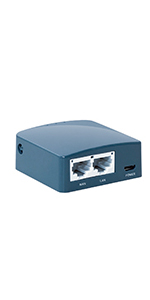


| ASIN | B07794JRC5 |
| Best Sellers Rank | #10,182 in Electronics ( See Top 100 in Electronics ) #72 in Computer Routers |
| Customer Reviews | 4.3 4.3 out of 5 stars (2,046) |
| Date First Available | November 8, 2017 |
| Is Discontinued By Manufacturer | No |
| Item Weight | 0.704 ounces |
| Item model number | GL-AR300M16-Ext |
| Manufacturer | GL Technologies |
| Product Dimensions | 2.28 x 2.28 x 0.98 inches |
D**1
Great value & quality+ it's tiny!
Impressively tiny & lightweight (approx the size of a Samsung Flip cell p but less than 1/2 the weight! 3 in 1 eouter. Acts as a cabled WAN/LAN Router/Repeater & Wi-Fi router/extender + 2.4/5ghz capable & has16MB built-in RAM & it's infinitely re-flashable & imitates whatever name brand router you need it to (as long as you have the software). NOT your typical "Made in China cheap POJ" no name router! Was definitely impressed that it even came with a 3ft flat CAT6 cable in the package for setup or cables use. Simple basic setup & dashboard + does both 2.4/5ghz bands (you may need a 5ghz capable antenna if you don't have 1. I got an extra under$10 extended range 1). Stock, it still has impressive range. Entire package is far under 1/2 a #! Saves me from carrying an extra heavy router in my car. It's absolutely portable & powers off any PBank even for range testing. Definitely buy it again.
V**W
Very capable device, and great value
> GL.iNet GL-AR300M16-Ext Portable Mini Travel Wireless Pocket Router (~$30 on sale) The Good: + Fully configurable. Runs OpenWRT and speed and reliability. + Comes with reasonable defaults. Allows bridge mode and can use wifi as the WAN uplink. + Built well. + Really good value. The Bad: - Wifi RF power isn't terribly powerful. The bang:buck on this is jaw-dropping. I think most GL.iNet stuff has a great value, but this palm-sized router packs a punch for dealing with small, mobile networks on the fly. Edit: This might reset existing upload state if the power drops. My wifi wan uplink keeps dropping. Still doing some tests, but I keep losing connections from a remote site. Doesn't change my rating as my use case is somewhat rare, and it might be my own error.
M**N
DIY fix for a failed SmartTV WiFi module
Although it took a little while to configure, this was a great solution to resolve a failed WiFi module in a 2013 Samsung SmartTV. Plugs into the Ethernet port and serves as a bridge to your home WiFi router.
H**Z
Compact design for easy travel
First item had a stripped antenna. Second took a week to get but arrived perfect. It is up and running as expected. I assume just luck of the draw i had a bad antenna. Packaged nice, and a great small form factor.
V**V
I really really like this product!
It’s an amazing, inexpensive little router, extremely versatile, with great software options and even better company/community support. It’s not anywhere near top of the line, in fact, basically everything about it could be upgraded or improved. However, for the price and flexibility, it’s hard to beat. It’s a great item for travel, learning, or tinkering, but it does lack some newer features like 5G WiFi (although this can be added with a USB dongle) or Gigabit Ethernet. PS: I wasn’t able to find this information online, so if anyone’s wondering, I was able to get about 150 m max range with line of sight to my phone.
N**R
Did not do what the manufacturer claimed, is now a brick
I was in the market for a device to act as a wifi bridge between an adhoc wifi device and my Win10 laptop. This device had the potential to fulfill that need and prior to purchase, I asked if this was capable. There were three answers to my question, two of them clearly not understanding the question (always fun on the publicly-accessible internet!), but the manufacturer also responded, in the positive. So I made the purchase. I could not get the device to join an adhoc network, no matter what I did. I emailed customer support and received the answer I needed to install a plug-in. I was unable to locate an appropriate plug-in and told this to Support. After a few days, they replied back they made a mistake and there is no plug-in. End of communication. I did my own research and deduced I would have more access to the hardware functionality if I upgraded the firmware to a newer (compatible) version of OpenWrt. I downloaded it and started flashing. After approximately 45 minutes there was no visible progress so I killed the web page and restarted the router. I never came fully back up (e.g. no login, wifi SSID not visible). I did the 10-second reset. No difference. I left it unpowered overnight and then did the 10-second reset. No difference. I left it unpowered over another night. Still not functional. It is now a brick and as I no longer have the original packaging, it will shortly join a pile of electronics destined for recycling. Do not buy if you want to do anything more than basic routing, despite the manufacturer's claims.
R**W
Drops the speed by 10x, but easy to setup
My Internet connection has 250Mbps down / 35 up, but this GL-iNET-AR300M-f60-NOR drops it to about 20-25 Mbps up & down. Ping round-trip time to google.com increased as well: direct: rtt min/avg/max/mdev = 3.444/11.866/114.648/21.852 ms GL-iNet: rtt min/avg/max/mdev = 5.138/45.334/218.366/52.692 ms It only support 2.4GHz, but it's very small. Bigger models support 5GHz. It was very easy to set up in Wi-Fi repeater mode. Online upgrade worked flawlessly.
G**E
Perfect for my needs I work in a camp setting and it works perfectly
M**N
Works like a charm, even with the hotel splash pages. get the firmware update going and watch for open ports and attack surfaces. I used cable on the outside and WLAN on the inside. Work like a charm. Maybe a weekly reset is needed, but hey, it packs a punch, fast, easy, runs.
R**.
Its really small. Easy to use. The range is great as well. We have a 90 foot garden and signal went to the bottom of the garden and still got 20 meg speed. normally I get nothing. Crazy. The UI is great and it updated to the latest firmware and restarted fine, and thats without having to download the firmware and stick it on a USB drive. If I had paid double for this I would till very be happy with it. It also acts as a repeater as well. proper amazing for £30. and it runs from a micro usb cable. Got it powered from an always on USB port on a gaming rig then through powerlines to the router at the other side of the house.
W**U
Very interesting abilities in configuring it. Fast delivery. Is quite powerful. Just be aware. It is 2.4Ghz only.
P**K
świetny mały router, polecam!
Trustpilot
1 month ago
5 days ago