Some deliveries may take a little longer than usual due to regional shipping conditions.

DOWNLOAD THE APP


Customer Services
Copyright © 2025 Desertcart Holdings Limited
DOWNLOAD THE APP
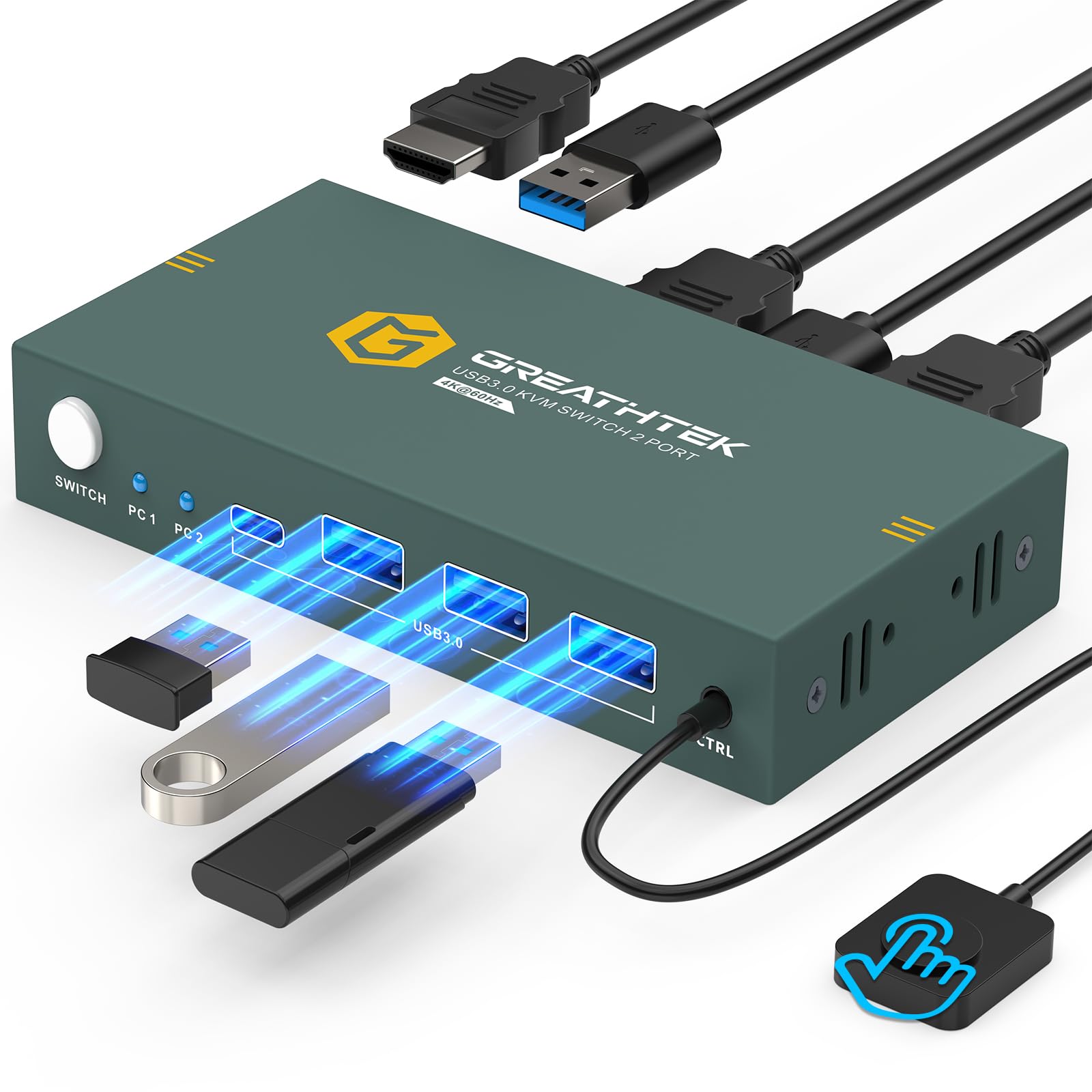
🎯 Master your multi-device setup with flawless 4K switching!
The GREATHTEK USB3.0 KVM Switch 2 Port HDMI empowers professionals to seamlessly control two computers using a single 4K@60Hz monitor and shared USB 3.0 peripherals. Featuring three ultra-fast USB 3.0 ports, dual switching methods including a wired remote, and adaptive EDID for stable, plug-and-play operation, this compact metal-encased switch delivers reliable, flicker-free visuals and smooth peripheral sharing across Windows, Mac, Linux, and more. Ideal for multitasking managers craving efficiency and a clutter-free workspace.


| ASIN | B0CFVBK4XQ |
| Actuator Type | Push Button |
| Best Sellers Rank | #12 in KVM Switches |
| Brand | GREATHTEK |
| Circuit Type | 2-way |
| Color | Black |
| Compatible Devices | PC, Laptop, PS4, Windows 7/8/10/Vista/xp, Linux, Mac |
| Connectivity Protocol | Usb |
| Connector Type | Usb 3.0, Hdmi |
| Contact Material | Copper |
| Contact Type | Normally Open |
| Control Method | Remote |
| Control Type | source selection, peripheral sharing |
| Controller Type | Push Button |
| Current Rating | 1 Amps |
| Customer Reviews | 4.4 4.4 out of 5 stars (1,190) |
| Date First Available | August 16, 2023 |
| International Protection Rating | IP00 |
| Item Dimensions LxWxH | 5 x 1 x 2 inches |
| Item Weight | 9.1 ounces |
| Item dimensions L x W x H | 5 x 1 x 2 inches |
| Manufacturer | GREATHTEK |
| Number of Items | 1 |
| Operating Voltage | 5 Volts |
| Operation Mode | ON-OFF-ON |
| Product Dimensions | 5 x 1 x 2 inches |
| Terminal | Through Hole |
| Unit Count | 1.0 Count |
| Upper Temperature Rating | 70 Degrees Celsius |
S**.
Easy setup, smooth switching and solid build
Setup was really easy, no drivers needed and it worked right away with Windows 10 and Windows 11. Switching between the 2 computers is fast and smooth. Video stays stable at 4K with no flicker or resolution issues. Mouse and keyboard response is solid, even using a wireless mouse. The metal build feels sturdy and good quality. The included cables work fine, though they are a bit short for some setups.
V**K
A
Great product out of the box, and it continues to impress! I've been waiting a bit to write this review in order to give the product a thorough workout. I can now confidently say that this is the best KVM switch I've tried so far and is definitely a keeper. I've tried a few others, but the main issues I experienced with those were that they inconsistently seemed to stop working, or perhaps more accurately, stopped recognizing the "active" system, requiring me to execute a "switch" to the 2nd computer, even if that system was not currently powered on, and then a switch back to get the keyboard to be recognized by the active system once again. In other words, at random moments, I'd suddenly find that the keyboard stopped working. Switching away from, then back to the active system fixed the problem each time, but it was definitely an annoyance at best, and depending on what was going on / what I was doing at the time, a major hassle. I have NOT experienced that problem with this switch in several months of use ... not once, not ever. A related, though less frequent problem with some of the other KVMs ... on boot up, the monitor would not be recognized. It would feel like the computer was booting up, but the monitor would just sit there blank, the power light pulsing as it does when it's "asleep" and there is no input. Once again, cycling the "switch" would fix the problem, but I shouldn't have to do that! And once again, THIS KVM switch has not misbehaved in this fashion. In contract to those "others" ... this KVM switch includes a remote button which is a SUPER nice feature and allows me to stash the box out of sight and off my desktop. A small, unobtrusive button is all that needs to be visible and easily accessible. This is a big plus towards much neater cable management. Additionally, the "shared" USB ports have proven to be surprisingly useful. At first, I didn't expect these to come into play very much since both systems are on the local network and it's not a big deal to transfer files, etc. between them. I didn't think I'd be using the USB ports very much. But once I got this KVM, I discovered that the ports have actually been quite useful. There are times when I'm working on something that I would like to use on my other 'puter, but if it isn't booted up at the moment, I'd have to either start it up, or make a mental note to complete the transfer at a later time. No longer. Just save to a plugged in removable drive / USB stick, and access it on the other system whenever it's convenient. I've also been using this feature a lot to access media files, or portable programs that I don't necessarily want or need to have installed on both systems. The shared USB ports are fast and reliable. All in all, I've been very happy with my purchase and have recommended it to others who are in similar -- i.e., multi-computer setup -- situations. I'm delighted to have found a product that "Just Works" as it is supposed to, without minor, but annoying hiccups. And I've found that having the ability to share USB resources is actually a lot more useful than I thought it would be. Build quality is very good, and I do like the size, the metal case instead of plastic, and the clearness of indicator lights and controls. Again, a great product and one I'm happy to recommend wholeheartedly.
J**N
Excellent KVM switch, very practical to use a single monitor and keyboard with two computers
The image is clear in 4K and switching between computers is quick and easy with the button. USB ports work well for mouse, keyboard and memory. Very good quality for the price.
P**L
Works exactly like it should
I’ve been using this KVM switch to drive my 2 laptops to share my two external screens and it’s been rock solid so far. Setup was simple — honestly, I barely needed the instructions, but they were clear enough if you did want to check them. I have an external HDD connected too. It switches smoothly between two computers and keeps both monitors running just as expected. Performance has been great — no lag, no signal drops, and no issues with throughput. It just works like it’s supposed to, which is exactly what you want from a device like this. Feels well-built too, not flimsy like some of the cheaper ones. Overall, a solid piece of gear that does the job right. It has a very small footprint too so it doesn’t take much space in the desktop- even smaller than it appears in the product images. Great price and a solid performer -I’m glad I have it.
I**D
KVM Switch Review
Setup: Literally a breeze. Plug everything in and it just works. No drivers or anything. Worked for me on Windows 10, 11 and several flavors of Linux servers. Performance: The switch handles video in an expedient manner. Meaning the switching between machines is almost instantaneous. I had no rendering issues such as screen resolution changes or color funkiness. There is no distortion when inseting this KVM into the chain. I have had other KVM’s where the mouse would lag a bit. That is not the case here. In fact, I was using a wireless mouse and had no lag. To switch machines it is a simple press of a button. Switching is quick and simple. Build: The KVM is made of metal! Nice as compared to a plastic alternative. Cables: The cables that come with the unit are functional, but you may find them a tad short for some applications. Fortunately 6 foot USB and HDMI cables are not expensive. However, in terms of quality the cables are good and present no issues. Conclusion: If you regularly juggle two or more computers at one desk, or have multiple servers in a closet this is the ticket to cleaning it up. Sharing a monitor between 4 systems is a worthy benefit. This unit is priced well and I feel it is a good value in terms of performance.
B**A
good device. thanks
C**G
I have 4 devices on this (one laptop, 3 PCs), three of which are 4K & 60fps, all plugged into a Samsung 32" 4K monitor (LU32J590UQUXEN if you're bothered). All devices have HDMI audio pass-thru which is running into the KVM over HDMI and back out of it to the monitor, then out of that via phono to a set of speakers. It all works well. This little switch (which incidentally is surprisingly heavy) handles it all. I think some of the people who complain about the switching delay are actually seeing their monitor reconnect, so it may not in fact be the KVM causing the delay at all, it may be the monitor. I had some oddness with the KVM until I plugged it into a 2A charger rather than trying to power it off the hosts. It will actually appear on, and will "work" off the PC USB power, but for it to be reliable it needs its own power source (not supplied with the unit). I used a phone charger. The LEDs showing which lines are connected (and that the unit has power) are too bright, I've taped over mine with insulation tape to dull it. I found one PC that didn't like the fact that my keyboard has a USB hub in it, which caused an issue as the KVM is *also* a USB hub. Unplugging the second cable from my keyboard (thus removing its hub) fixed this issue. I found the supplied HDMI and USB cables to be too short, so I used other ones I had laying around. The supplied HDMI are just regular ones, around 1m long. I replaced all 5 (4 to hosts, 1 to screen) with 2m HDMI cables I had. The supplied USB KVM to host cables are USB-A at one end (the switch end) and USB-B at the other (male at both ends), again only around 1m. I mention this because in 2021, USB-A is prehistoric; if you want a cable longer than 1m you'll likely need to buy it separately. I was lucky to have a load of old ones. Surprisingly good little device for the money. I paid £70.
D**E
I tried and send back a few HDMI KVM switchs claiming to support 4K but unable to handle 1920x1200 resolution (16/10 format so appreciated for photo editing). This KVM does it very well. Then, the only missing feature is the remote control meaning the box is to be located on the desk to be accessible. Apart from this, this is a nice device.
S**Y
En comparación con un viejo KVM VGA(RGB analógico) al que sustituye, las mejoras saltan a la vista. Una mayor capacidad de resolución para soportar el cambio de monitores al que está destinado , (aunque los conectores son HDMI 1.4 soporta la transmisión HDMI 2.0 de alta resolución). Los diodos led excelentes y muy bien posicionados estéticamente. El Hub para 4 dispositivos USB tiene un pequeño inconveniente como que debería tener 2 entradas B de conexión en la parte frontal para compartir dispositivos Usb, (como pendrives etc.), y las otros dos para el teclado y el ratón detrás, formando parte del cortejo de conexión REAR de los conectores A y HDMI. Los cables suministrados no tienen una longitud excesiva pero son de calidad. No haría falta alimentarlo a 5v. pero yo utilizo el cable de alimentación suministrado para introducirlo en una ranura usb y así alimentarlo desde el PC ya que no trae fuente de alimentación. Por lo demás muy bien. Excelente relación calidad precio, Lo recomiendo para utilizar cuatro ordenadores a la vez con un único teclado y ratón y añadir la posibilidad de extender tus escritorios o pantallas para los 4.
D**L
KVM viene del inglés Keyboard/Video/Mouse. Es decir, teclado, video y ratón. Y es que con este tipo de dispositivos podemos controlar 2 ordenadores distintos con un solo teclado, ratón y monitor. Evidentemente no podemos controlar ambos PCs a la vez, sino que debemos elegir uno u otro, pero hace que el cambio de uno a otro sea cuestión de 1 segundo y no requiera des/conectar ningún cable ni receptor USB. Dispone de 4 puertos USB, lo que significa que podemos tener un máximo de 4 dispositivos conectados a cualquiera de los 2 equipos en cualquier momento. Por otro lado, tiene 3 puertos HDMI, 2 de entrada (uno de cada equipo) y uno de salida hacia el monitor donde veremos la imagen de uno u otro ordenador. Hay que tener cuidado si conectamos algún dispositivo de almacenamiento, como un pendrive o disco duro externo, pues si estamos transfiriendo datos al disco y presionamos el botón para cambiar de equipo, se cortará la transferencia de datos y es posible que terminemos con archivos dañados. En cuanto a la construcción del dispositivo, no es muy grande y es totalmente metálico. Incluye 4 tacos de goma que podemos colocar en la parte inferior si así lo deseamos para que no raye la superficie de la mesa y no se deslice. También vienen 2 cables USB a USB-B (como el de las impresoras USB) y un cable HDMI. En general, un dispositivo sencillo y que cumple muy bien su función, no hace la vida más práctica. Eso sí, a estas alturas es muy habitual tener 2 pantallas, y con este dispositivo solo podremos conectar una de ellas. Hay modelos que permiten 2 monitores aunque son bastante más caros.
Trustpilot
3 weeks ago
2 days ago