

Desert Online General Trading LLC
Dubai, United Arab Emirates
Desert Online General Trading LLC
Dubai, United Arab Emirates


🔧 Build Your Dream Setup with Style!
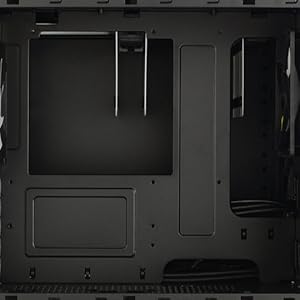
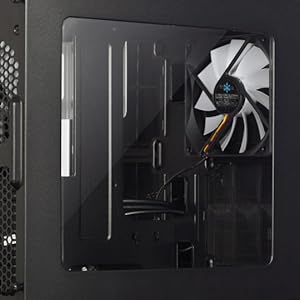
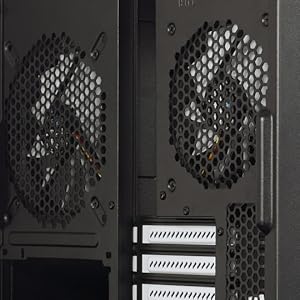
The Fractal Design Node 804 is a stylish MicroATX cube case that combines functionality with a compact design. It features a robust aluminum and steel construction, offering versatile storage options with up to 10 HDD/SSD bays and efficient cooling solutions. With dual USB 3.0 ports and a user-friendly layout, this case is perfect for tech enthusiasts looking to create a powerful yet space-saving setup.


| Standing screen display size | 240 Millimeters |
| Number of USB 3.0 Ports | 2 |
| Brand | Fractal Design |
| Series | Node 804 |
| Item model number | FD-CA-NODE-804-BL |
| Item Weight | 13.2 pounds |
| Product Dimensions | 13.5 x 12.1 x 15.3 inches |
| Item Dimensions LxWxH | 13.5 x 12.1 x 15.3 inches |
| Color | Black |
| Number of Processors | 1 |
| Computer Memory Type | Unknown |
| Audio-out Ports (#) | 1 |
| Manufacturer | Fractal Design |
| ASIN | B00K6OVG0I |
| Is Discontinued By Manufacturer | No |
| Date First Available | September 27, 2017 |
C**E
Fantasitc
This is an awesome case. I have a plex media server which has 8 HDDs in it so I have had a difficult time finding a nice case to put it in. Recently upgraded some of the components and ended up with an MATX board. I was going to get a new case to go with it and had resigned myself to getting some tall monstrosity to hold it all it. Then I ran across this case. Awesome! It fits perfectly on my shelf in my media room and holds way more then it looks like it should be able to. Fits an oversize PSU (which I need for my build) and everything else I needed it to. My one and only gripe... I could not find a way to mount my 140mm AIO in it. Either the screw holes are not there or any place I put it would require moving something else... Like the motherboard... which cannot move. Technically if I had been willing to drill holes in my brand new case I could have mounted it on the back side. But then I would have had to remove 4 HDD's. Not cool. Aside from that I am very pleased. No other case quite like it on the market and even recommended it to a business I used to work for who builds custom NVR's that frequently need 60+ TB of storage and a lot of cooling to fit on a rack in a small space. It is just well designed and unique for what it does. Good buy.P.S. not sure why there is a review metric for tech support (I left it blank). If you need tech support to help you with an empty computer case then you probably shouldn't be buying an empty computer case...
G**G
Amazing case for the money
Sitting on my desk is a very expensive tempered glass Phantek case, but I keep staring at this little cube in awe, and almost in regret for not having bought it sooner.It isn't the cheapest cube case, but it is one of the highest quality ones I've seen. I purchased this to setup as a small media/NAS server and It has exceeded my expectations. I was afraid it would be too big, but it is very manageable and fits a lot of harddrives.The finish is also surprisingly good, and is a product that (imo) made Fractal known for good quality.There is ample cooling and three fans are included. It is also fairly quiet (although I keep it on the floor under my desk so I wouldn't notice the noise if the fans were making any. The dust filters do their job well. I originally bought this to put it in a closet or tucked away under the desk, but now I am considering putting it on display next to my TV. No bright lights and simple black finish means it's not an eye sore as some other cube cases.The only thing that turned me off initially was the price, but honestly it is well worth it. This is a well built case.
T**T
Quirky, but Still Very Good
The bottom line: I can't say enough about this case. I bought it for an HTPC I had because the slim case it was in was downright noisy, as was its tiny power supply. With a quieter 550W PSU upgrade, the Fractal Design Node 804 was the perfect excuse for me to start loading some drives into my HTPC and set up full HD streaming. A couple of weird things that are easily fixable (or avoidable, if you choose) would make this a truly outstanding case.The full review:The easiest way to explain this case is, imagine if you took a standard tower case, cut it in two, and stuck the top half next to the bottom half: it's about half as high and twice as wide. What's interesting about this case is the number of ways you can configure it - the sky really is the limit. I saw one review do dual full-size radiators and SLI. For me, the Node 804 is the McDLT of computer cases: keeps the hot stuff away from the cool stuff. In the left half of the case goes the motherboard, a PCI-Express RAID card, and my OS drive is bolted into the floor. The motherboard hangs on the inner wall just like a traditional case. In the right side of the case hangs an array of 4 hard drives, with the power supply on the floor. I could have chosen to let the PSU's fan vent upwards and flow to the back panel fan, but this case is going to have some ground clearance where I put it, so I decided to vent it through the dust screen on the floor--we'll see how that does over time. Cables are fed through various holes in the motherboard plate, and then the front panel is where the DVD-ROM drive is fed.This is the really "quirky" part that you need to know about ahead of time. It looks really cool that the ROM drive is a vertical slot along the right side of the front of the unit, but it's weird. You need to use a laptop "slim", slot-loading drive (and no physical eject button). If the slim drive has a faceplate, it has to come off. You'll need a cable that will connect the small SATA connectors of the laptop drive to the standard SATA of your motherboard (not included). You'll need some slack or an extension to one or both of these cables because they thread in from the opposite side of the faceplate, meaning they have to take a trip from the power supply, to the far end, through the faceplate, and back again. It's a weird omission that there isn't a cable for you because you'll need a long one. The drive mounts in a very specific way, with an adapter plate to hold it steady. The reality of my case didn't match the diagram in the user manual, which is probably the only time I can fault what is otherwise an amazingly detailed manual. You have to screw the drive onto the faceplate of the machine, and to do that you'll probably need to disconnect the front panel wires: they lack about an inch or two from being long enough to let you just turn things around and sit the front panel on top while you work.The other odd part is, while it's really nice that all the system fans can be junctioned through a three-way set of three-pin connectors, this set of connectors is glued to the back wall right over the motherboard fan. It's in the way, and you're going to need to try to scoot these short things over, plug in the three-pin bridge/"Y" cables you need (also not included), and thread them somewhere they're not in the dead center of things doing a high-wire act over your CPU fan. The place they're glued in is on the back wall, and it's because the LO/HI fan switch sticks out in the back. If you're the Dremel-ing sort, you might pry it loose, cut a hole somewhere else, and glue it there.So back to the pros: the entire top, bottom, front and back of the Node 804 are covered in plenty of holes for ventilation. There are many slide-out dust-screens that you can pull from the outside, blow clean, and put back (though some are harder to get to than others). You can hook up fans just about anywhere you can think of, and it's friendly with 120mm and 140mm fans for quieter airflow. I just use the fans that were included and that's fine for my AMD Phenom II X4 with its stock cooler. The case is like Legos: you can strip pieces out down to "bare metal" and switch things up as desired. There are two hard drive cages, and each hangs from the right-hand ceiling and can easily be slid out and replaced with something else. I'm only using one of mine. There are Velcro strips on the floor on the right hand side; these can be used to hold cabling or can be removed and another hard drive or fan mounted on the floor. But that might be overkill--the left-hand side has two spots on the floor that you can stick hard drives to, either 2.5" or 3.5", or more fans (at which point you might want to just stick a rubber skirt on the bottom and call it a hovercraft :P).Overall, I really love this case. Working with it was like playing with a puzzle: rotate it one way, do some stuff, then rotate it another, do some more stuff, then rotate it again to work with the wiring in between. It's a shame the ROM drive ended up so weird, but most people probably won't even bother having one. It would have been nice to have the correct cable for a slim slot-loading drive. And I'd rather we have that fan switch moved somewhere not over the CPU. Just the same, this case was a joy to work with, and sits, quiet and elegant, running my HTPC very nicely.
Trustpilot
1 month ago
3 weeks ago