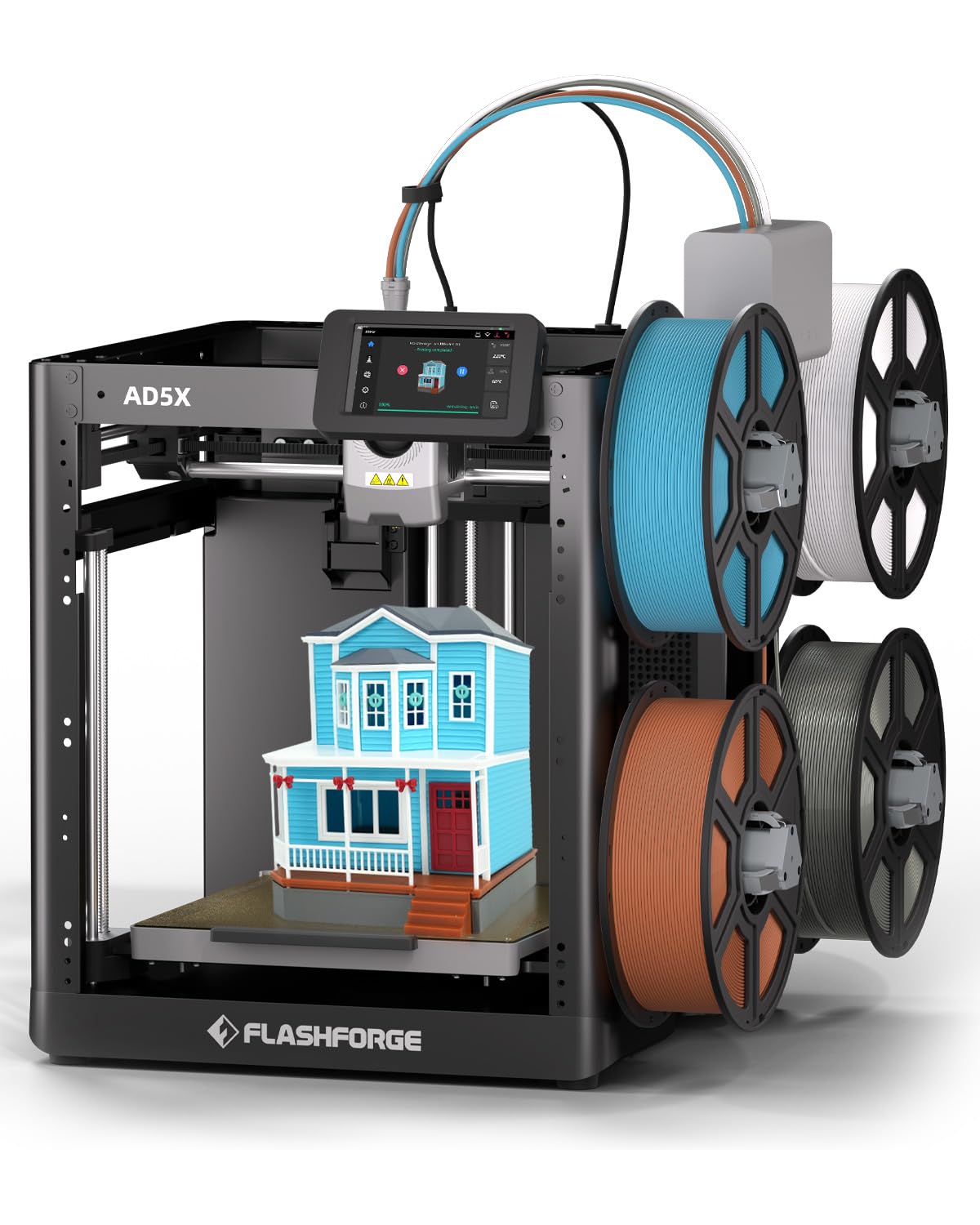
🚀 Print in Color, Print in Speed, Print Like a Pro!
The FLASHFORGE AD5X is a cutting-edge multi-color FDM 3D printer featuring a 4-color simultaneous printing system, a high-speed 600mm/s max print rate, and an Intelligent Filament System for uninterrupted workflow. Its robust all-metal Core XY structure ensures precision and stability, while a generous 220x220x220mm build volume supports versatile projects. Ideal for professionals and enthusiasts seeking vibrant, fast, and reliable 3D printing with advanced material compatibility.


| ASIN | B0F8PZ1WCT |
| Best Sellers Rank | #7,502 in Industrial & Scientific ( See Top 100 in Industrial & Scientific ) #16 in 3D Printers |
| Brand | FLASHFORGE |
| Built-In Media | AD5X 3D Printer*1,Filament 10g*4,Power Cord*1, lFS Connection Cable*1, 4-Color Module (lFS)*1, After-sales Service Card*1,Quick Start Guide*1,Display Screen*1,Grease*1, Cable Clip*1,Glue*1, Allen Wrench*3,Diagonal Pliers*1,Unclogging Pin Tool*1,Phillips Screwdriver*1, Spool Holder*4,4-in-1 Guide Tube*1,Mounting Plate*1,Screw M3x6 *4 |
| Color | black |
| Compatible Devices | Win XP/Vista/7/8/10,Mac OS,Linux |
| Compatible Material | Acrylonitrile Butadiene Styrene, Polyethylene Terephthalate Glycol, Polylactic Acid, Thermoplastic Polyurethane |
| Connectivity Technology | Wi-Fi |
| Customer Reviews | 4.1 out of 5 stars 473 Reviews |
| Enclosure Material | All Metal |
| File Format | STL,OBJ,GCODE |
| Item Dimensions D x W x H | 14.3"D x 16.3"W x 14.8"H |
| Item Height | 14.8 inches |
| Item Weight | 24.3 Pounds |
| Manufacturer | Zhejiang Flashforge 3D Technology Co., Ltd. |
| Nozzle Primary Material | Metal |
| Nozzle Temperature Maximum | 300 Degrees Celsius |
| Nozzle Tip Material | Metal |
| Operating System | Orca-Flashforge/Orca |
| Warranty Description | 12 months |
S**E
Great machine at a great price
Bought an AD5X a couple of weeks ago to replace an aging bedslinger, to use for model railroading. So impressed with it that I bought a 2nd one last week to add to our collection. The 4 color printing is nice but the killer use for me is the automatic spool switching when using the same color filament. As of this review, we have about 12kg of filament run through both machines and not having to worry about running out of filament mid print is a game changer. Set up was simple and right out of the box it's producing quality prints. Adding the app to a phone allows both printers to show in the Flashforge slicer and also allows monitoring of printing progress. You can set it up to alert you when prints are completed. WiFi has been solid on both machines and again set up was straight forward and easy to do. PLA and Silk PLA have both run beautifully and covers 90% of the filaments we use. The machine itself will run more filaments and I have no doubts it will run those just as well as PLA. Bed adhesion has been very good except for very thin prints where the supplied glue has been used and works great. Tools supplied in the box were minimal but enough to get going, it would have been nice to include a plastic bed scraper but that is all that is really missing. The fork of Orca slicer that Flashforge supplies works well and if you're not into tweaking and playing with settings works right out of the box. Packaging was high quality and protected the machines during delivery. All in a great machine for the price ($359 when purchased) and as our older bed slingers die I'll be adding another couple of these to our printer collection. There is an enclosure kit available that comes with all of the acrylic and hardware where you print the supports yourself. At some point we will add at least one enclosure for printing some of the harder filaments. A camera is also available if you wish to monitor prints live.
J**R
Best Budget / Enthusiast 4 Color Printer
Out of the box the printer is likely the fastest setup anyone can ever expect. You can be printing in about an hour or less. The interface is decent, the implementation is excellent. No exotic multicolor system is required and you can just connect 4 spools directly to the printer itself. It can be fully enclosed to print more exotic materials. You print most of the walls and you buy the doors and "glass" areas from them with tools and screws. About 50 bucks for a fully enclosed kit that will do all your exotics. I have seen people print Wood and Iron on this thing with ease. The color switching is intuitive and simple. Colors on the printer must match the Slicer, but other than that pretty straight forward. Advanced users that know what they are doing can unlock ervything to their hearts content including nearly eliminating filament poop in prints (among dozens of other features). Once you have it dialed in, it's better than the Bambu Labs A1 and the Anycubic Kobra 3. A little less polished on the communication than teh Anycubic Kobra 3 and a lot less polished than the Bambu A1, however, you're getting a 4 color system that can print more exotics than the Bambu Labs P1S and all of it is yours for around 339 bucks. I am very impressed with the speed and quality of the printer. I printed off a minature that I forgot to enable supports for and it printed the Driud and his complex staff flawlessly. Then I printed a multi color door sign for my bathroom and it came out flawlessly and smooth. I highly recommend this printer to begineers and enthusiasts alike. Each of those camps of people will find value in this device. The mini below was printed with zero supports. Punched it out in about 30min on quality The sign took about 4 hours and filled almost the entire bed. My only gripe is the bed is 220x220x220mm. If they made another printer like this one with a 300mm bed, iyt would be a day one purchase with the features of this printer.
K**R
very frustrating
This was my first 3d printer, when I got it everything seemed to work perfectly. Easy to use, great prints made about a two dozen successful prints. Then it started intermittently skipping layers in two subsequent prints, after doing a nozzle check and trying a third time the extruder simply failed to heat up at all. It actually stopped reading any temperature. Luckily t was within the return period so I sent it back and thinking it was just luck of the draw (got a bad one) and I ordered another. This one also worked great for the first dozen or so prints, then it started making a grinding noise that seemed to be coming from the extruder. The grinding noise was just at the beginning for 20 seconds then it would stop and the print would proceed as normal. Did another nozzle check and once again that seemed fine. I was not 100% sure what this grinding was from so I printed a couple more items. The first one came out fine, but on the second attempt it missed a bunch of lines about halfway through the print and ended up just making a ball of plastic string on the print bed. A third and subsequent attempt and it again seemed to be going ok at first, but then it missed on parts of the print and after letting it go for a few more minutes it eventually pulled the entire print off the build plate somehow (when I wasn't watching). Also the grinding noise lasted longer on the last attempt, for a two or three minutes not just within the first twenty seconds or so at the beginning. Looking at youtube videos I saw someone fix the "grinding" noise by taking apart the extruder and removing bits of plastic (or some kind of foreign debris) from the gears. He concluded the pieces of foreign debris was from the manufacturing process. Since I don't want to do that only find out it's possibly some other issue and this second one is also within the Amazon return period, I'm returning it as well and will be trying a different brand.
J**S
This is a great printer and no it is not just for beginners
This is an interesting printer. I purchased it because I wanted to print abrasives and I wanted a quick change hot end that is not available on my other 3d printer, a Qidi X-Plus-3. First things first, the setup was not great. The printer has long lags between actions and did not always complete them w/o my having to press the screen. This was very odd-the behavior was that it would complete bed leveling, input shaping and preheating, would show complete but not progress to the next step in the initial setup. And when I tried to have the machine perform the calibration test print it never did. I tried four times and eventually gave up. No idea why it refused to complete the test print. I did just skip it and printed the pointer as a calibration test. And this is where things improved. It was perfect! I printed the PLA object with no bed adhesive and it came out flawlessly!. Not only that I noticed that the presets in the FlashPrint5 software were different for temperature than that what the FlashForge PLA recommended. The presets are 225C for the extruder and 50C for the bed. If you look at the FF PLA it is 220C extruder and 60C bed. This was quite interesting but it worked perfectly. I then printed the PLA with the enclosure completely closed-a seeming no no for PLA. But guess what, another excellent print-not perfect but very close. So close I would be fine with it. But then I moved on to ABS-GF. Not only that but from another brand (Qidi). The defaults were for FF ABS (250C extruder, 105C bed). This required loading the ABS-GF (easy-peasy) and changing the hotend (less that 15 seconds not including getting the .6 nozzle out of the foil bag), doing a purge (the .6mm nozzle was tested with PLA-hmmmm....) and then slice and print. Perfect print with no adhesive used and an unheated enclosure/chamber in my cool basement. Wow! The FP5 slicer is appears to be a Prusa fork and it works well and has some cool features like being able to save project by default as .stl and not 3mf (the Qidi default) and as .fpp . Very useful. Additionally, the printer is light in weight, I was able to take it to the basement and lift it onto the worktable by myself easily. It was easy to get the packing material out (I've seen YouTube'ers struggle with this, no idea why) and the toolkit includes a set of snips for things like supports or opening foil bags. Very helpful. Also interesting the FP5 slicer printed files that my Qidi slicer requires supports for w/o supports and the prints were, as stated perfect! That is very interesting and cool!. And now onto the second reason I bought this-the hepa/activated carbon filter system. I will be printing abrasives and print in my house, not the garage. I needed to be able to ensure that I can limit the VOC's released. I have a box filter and wanted more protection. This printer has it. There are two filters. And the ability to control them (auto-selecting, based on the type of filament, from w/in FP5) and it worked great! So what are some cons-small print bed, strange behaving setup, not filament dry box included. I won't mention lack of heated chamber because it did not make a difference-there was zero curling or warping on the ABS part-none! Not a bit!. And w/o adhesive! This is going to make me do more tuning of the Qidi as a comparison. and I will be switching out the Qidi hot end (included with printer) and run abrasives on it for comparison. But, is this a "kiddie/noob" printer? Nope. This is definitely rightly aligned as prosumer. The filter system is better than that on BambuLabs until you get to their commercial unit. And better than Qidi. Only the Snapmaker's have an easier hotend change out from what I can see. If you have Amazon Prime like me, I got an extra $100 off when I bought it! An absolute bargain!. Oh and one other thing-the inside of the chamber does not have any attached parts that things can fall into (looking at you Qidi) so it is easy to keep clean and clear of debris. Here's the thing-Flashforge, if you make this exact same 3d printer with a minimum 300mmx300mm300mm minimum print volume. And I mean literally change nothing else about this printer, I will be buying it even though for production purposes I want to get an IDEX 3d printer. This is just that good overall. Highly recommended.
S**I
great printer, they ruined the slicer software to unusable. and three month update
nice little printer which produces really nice results for a budget printer but they ruined a good slicer, will either not connect, says the printer is offline when it is online, the camera feed even when activated on the printer will not show on flash forge orca. I load the file to +flash drive and print from that, one of the wo printers is recognized by the slicer, zero will connect.but will connect to the original orca slicer that flashforge have not altered. the alternative Flash Print connects ok too but is just plain nasty and tacky, Purchased Jan 28th, today is 30th April, had many hours of print time since, the only niggly thing I have is that the print bed now needs adhesive before nearly every print-no biggy, the prints still come out flawless, no problems at all, I own two of these printers, will be buying a third, I have owned and built many printers and this one has to be the nearest to plug and play I have owned, so easy to use and it just keeps going. the slicer still sucks though. the original Oraca slicer is the one to use.
B**W
Terrific Out of Box Experience!
The FlashForge Adventurer 5M Pro arrived and I had it set up and ready to go in about 15 minutes. I loaded the Benchy tugboat test file from the supplied usb drive and had my first print in no time. Operation is highly intuitive. Pay attention to your printer bed temperature. Mine works best with PLA at 60 degrees C bed temp and default extruder temp. The unit comes with two quick-change extruder heads, a 0.4 and a 0.6mm. I ordered a 0.25mm but have not used it yet. The 0.4 works for almost everything I have tried so far. The unit prints extremely cleanly and is fast!! Both filaments and extruder heads change quick and clean. I was frankly astounded at the quality of all my prints, which I grabbed from places like Thingverse, Cults3d, etc. and sized for use right in the FlashPrint 5 software. Be aware, there is new free software available at FlashForge. Orca-FlashForge which is much more sophisticated. There is also what appears to be software to create dental replicas (?!) I have about a dozen rolls of PLA from various sources, and all but one print flawlessly. That may be user error. Some notes: Get and use a filament dryer for any filament that has been out of the vacuum sealed package. FlashForge filament tends to cost a bit more, but the results are noticeably better than most "sort price low to high" products. Learning to print a raft base for things like the globe I printed will save time and materials from premature object detachment! The FlashForge software comes in an android/iphone version that allows easy control and monitoring of the print in progress via the built in webcam. This can be done on the PC software as well. A little gripe is that I could not find the "Time remaining" readout in the PC app, but it is there on the mobile app and the Printer front panel display. Sending files to the printer via WiFi is smooth and quick, so I rarely shuffle files via usb flashdrive. This has been a truly joyful addition to my maker studio!
M**F
Having fun 3d printing
Love this printer so far. I am a newby, but this printer is making it easy. PLA filament prints like a champ. I got the enclosure so that I could print ASB or ASA and after a few attemps got it to work with ASA.
A**V
Amazing 3d printer
So far one week, I just want to say this printer is absolutely amazing. 1: Comes out of box ready to print and you just need to remove 4 screws 2. App is up to date on the print and I can pause and cancel from the app 3. The Software is clean I really like it and I can send stuff easily to the printer 4. The printer screen is amazing also and it being touch screen is amazing. Additionally you can increase the speed and many other things with the screen 5. Lastly, the 3d printer prints so fast it’s like it’s a sped up video Compared to a previous 3d printer I had which failed on me and when I ordered a replacement part it still didn’t work. There was no app, no indication of progress, and slow printing speeds, this printer is worth the money and everything.
Trustpilot
3 days ago
2 days ago