Desert Online General Trading LLC
Dubai, United Arab Emirates
Desert Online General Trading LLC
Dubai, United Arab Emirates


✨ Type in Style, Connect with Confidence! ✨
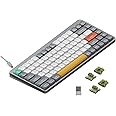
The nuphyAir75 V2 is a portable 75% mechanical keyboard designed for versatility and style. With a robust aluminum frame, it features a translucent bottom shell, multi-device connectivity, customizable RGB lighting, and an impressive battery life of up to 220 hours. Compatible with various operating systems, this keyboard is perfect for professionals seeking both functionality and aesthetic appeal.


| Brand | nuphy |
| Product Dimensions | 31.64 x 13.5 x 1.35 cm; 598 g |
| Batteries | 1 9V batteries required. |
| Item model number | Air75 V2 |
| Manufacturer | nuphy |
| Series | Air75 V2 Grey Moss |
| Color | Grey |
| Number of USB 2.0 Ports | 1 |
| Power Source | Battery Powered |
| Hardware Platform | Laptop |
| Operating System | Linux, Windows |
| Number of Batteries | 1 |
| Are Batteries Included | No |
| Lithium Battery Energy Content | 2.6 Watt Hours |
| Lithium Battery Packaging | Batteries contained in equipment |
| Number Of Lithium Ion Cells | 7 |
| Item Weight | 598 g |
J**I
One of the Best Low-profile Mechanical Keyboard in the Market
The keyboard is built really well and is compact enough to travel with it.The 75% key size is sufficient for most use. The typing sounds phenomenal! I got the one with brown switches, it's the right combination of sound and "thotch feel."One of the best features of this keyboard is the customization. Your can modify according to your needs. The battery size and life is great.If you get this, you won't regret!The only minor issue is the connecting cable is USB C to A. I wish it was C to C
G**O
Me encanta!
Esta super bonito el teclado!, me da una sensación que escribes más rápido, esto me parece que es por el low profile, se siente bien construido, lo puedes usar por bluetooth o por cable, tiene iluminación RGB pero las letras de cada key no se iluminan. Me falta probar la duración de la batería. Por el momento me dejo una buena sensación de calidad, seguiré probándolo.
R**A
Keychron K3 Pro vs Nuphy Air75 v2 - Only one CLEAR winner: Air75 v24
TLDRBetween the K3 Pro and Air75 v2, I much prefer the Nuphy Air75 v2 because of its superior build quality, better typing sound, reliability, and overall typing experience. With the Keychron K3 Pro, I found myself wondering if there was another keyboard that had a more refined typing experience. I am completely satisfied with the Air75 v2 after almost a month of use, and would definitely recommend this to anyone in the market for a new wireless mechanical keyboard. It’s a pleasure to type on and you won’t regret it!Background:I was in the market for a new mechanical keyboard, and my criteria were:(1) Smaller footprint for portability and to save room on my desk(2) Must provide great typing experience both in terms of tactile feedback and sound(3) Must have good battery life(4) Must have reliable bluetooth/wireless connection(5) Aesthetically pleasing to look atThis review compares the two 75% layout keyboards I have tried: Keychron K3 Pro vs. Nuphy Air75 V2, and why I ultimately decided on keeping the latter.I ordered BROWN switches for both keyboards.BUILD QUALITYBoth keyboards are well built, with an aluminum base/housing. Both the K3 and the Air75 come with PBS keycaps, which feel and sound much more substantial than ABS keycaps which feel and sound like cheap plastic.- K3 features a floating keycap design with no bezels on the board, meaning the keys are quite exposed. Picking up the K3 keyboard to move it makes me feel uncomfortable, as my fingers are pulling up at the sides of the keys, making me feel like it could damage the mechanisms overtime. The Air75 V2 has an aluminum housing featuring a thin bezel around the keyboard, which feels much better to pick up.- Key rattling is minimal on K3 but present, and it makes it feel just a little cheaper compared to the Air75 V2, which has no obvious key rattle. I’m sure the rattle on the K3 can be addressed by reapplying lube to your switches, but if you are looking for something with good sound and typing experience fresh out of the box, you’ll find that in the Nuphy Air75 v2.SOUND & TYPING EXPERIENCEIf you are switching from a cheaper consumer keyboard like the Apple Magic Keyboard or other budget-friendly mechanical keyboards, you will find it a pleasant upgrade to both the K3 and Air75. However, comparing the two keyboards side by side, the Air75 sounds better to me and the difference was immediately obvious.K3’s sound compared to the Air75 is brighter, more hollow, and less refined. Because of there is a little play on some of the keycaps, there’s a slight rattle here and there, making the keys sound brighter and cheaper.Air75’s sound is solid, thocky, and solid. For the most part, the keys don’t have any real discernible rattle, so you’re not hearing anything else when you type besides that solid keystroke. Because the rattle really comes from the switches themselves, it is impossible to get a prelubed keyboard that’s “perfect”; you are bound to find a key or two that has just a little bit of rattle here and there, but nothing significant. If you happen to find a key that sounds off or doesn’t give the right kind of feedback, I suggest either reapplying lube to the switch, or switching out the actual switch itself for another (quick fix) and the problem can be resolved easily.I did not expect the typing sound and experience to be that drastic between Nuphy’s Air75 v2 and Keychron’s K3 Pro, but it really was apparent and made for a much more pleasant typing experience on the Air75.WIRELESS CONNECTIVITYThis one is huge. The K3’s bluetooth capability was not reliable at all. Out of the box on Day 1, I was experiencing connectivity issues where the keyboard would suddenly disconnect, and would take a minute before it would reconnect again. It was interfering with my Apple Magic Mouse, which was also connected wirelessly to my MacBook Pro via Bluetooth.The Air75, however, has not given me any issues via Bluetooth at all, and has been consistently reliable through hours of use.WAKE-UP TIME FROM SLEEP MODESimilarly, the K3’s wakeup time took longer after it automatically went into sleep mode, which means your initial keystrokes are not recognized as quickly. Over time, this presents a productivity issue if you have to consistently wait for the keyboard to wake up before you start working.The Air75 wakes up immediately upon the first keystroke, which is a much more pleasant experience and it means I can get to work quicker. It has never had issues waking up and being connected wirelessly via bluetooth.SWITCHESI ordered BROWN switches for both the Keychron K3 Pro and the Nuphy Air75, which in theory should give the same typing experience. However, there is a more noticeable “bump” and tactile feedback from the brown switches on the Nuphy Air75 V2.Nuphy also ships with a collection of their different switches for you to try. After trying the other switches out, I find myself gravitating towards the Aloe switches, which are quieter and feel much more weightless. I ended up ordering a batch of Aloe switches directly from Nuphy, which I am excited to receive in a few months (the long shipping times directly from Nuphy is because they ship from China). The Gateron Browns feel good with a solid sound and gentle but noticeable bump/tactile feedback, but I feel like I will enjoy an even quieter and linear typing experience for faster typing speeds.LIGHTING EFFECTSThe backlights on the K3 were decent, but mine was the white-color only. The backlights on the Air75 are brighter, and came in RGB, which I have been enjoying. The colors are rich, saturated, and the transitions are buttery and smooth. I like that there are two LED indicators on the side of the keyboard, which are multi-functional and indicate whether Caps Lock is engaged (left), connectivity (left) and keyboard battery status (right).
S**!
Cool keyboard!
I like the how it feels. Soft and smooth and st the same type mechanic.
C**A
Parfait.
Le clavier correspond à mes attentes, le son des touches et le toucher sont très agréables. Cependant, la seul norme qui semble exister est le qwerty donc il faut avoir l'habitude de taper sur un clavier pour trouver certaine touches.
Trustpilot
2 weeks ago
2 months ago