🔐 Elevate your network game with silent power and pro-grade security!
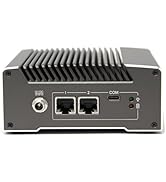
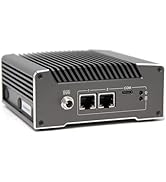
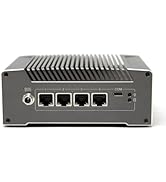
The Protectli Vault FW4B is a compact, fanless firewall micro appliance powered by an Intel Quad Core Celeron J3160 CPU, equipped with 8GB DDR3L RAM and a 120GB mSATA SSD. Featuring 4 Intel Gigabit Ethernet ports and AES-NI hardware encryption, it supports major open-source firewall OS for customizable, high-performance network security. Ideal for busy home or small business networks demanding silent, reliable, and scalable protection.





| ASIN | B07G9NHRGQ |
| Batteries | 1 CR2 batteries required. |
| Best Sellers Rank | #3,460 in Computers & Accessories ( See Top 100 in Computers & Accessories ) #137 in Mini Computers |
| Brand | Protectli |
| Card Description | Integrated |
| Chipset Brand | Intel |
| Color | Black |
| Computer Memory Type | DDR3 SDRAM |
| Customer Reviews | 4.6 4.6 out of 5 stars (748) |
| Date First Available | August 8, 2018 |
| Flash Memory Size | 120 |
| Graphics Coprocessor | Intel Integrated Graphics |
| Hard Drive | 120 GB SSD |
| Hard Drive Interface | Solid State |
| Hardware Platform | PC |
| Item Dimensions LxWxH | 4.5 x 4.3 x 1.5 inches |
| Item Weight | 2.57 pounds |
| Item model number | FW4B-0-8-120 |
| Max Screen Resolution | 3840x2160 or 1920x1080 |
| Memory Speed | 1600 MHz |
| Number of Processors | 1 |
| Operating System | OS Agnostic |
| Processor | 1.6 GHz celeron |
| Processor Brand | Intel |
| Product Dimensions | 4.5 x 4.3 x 1.5 inches |
| RAM | 8 GB DDR3L |
| Screen Resolution | 3840 x 2160 |
| Series | FW4B - 4 Port |
| Wireless Type | 802.11bgn |
D**H
Small PC, enough for a home LAN firewall with high traffic and over 150 smart devices total.
Pretty good first impression together with PFSense! Yes, it gets warm even when it's idle, but there is a simple solution for that: "AC Infinity MULTIFAN S1, Quiet 80mm USB Fan, UL-Certified for Receiver DVR PlayStation Xbox Computer Cabinet Cooling". This fan is pretty quiet, the size is a perfect match and it can run at 3 different speeds. In my case the lowest speed is enough to keep this device only at 2-3 degrees above room temperature. If it gets warmer I will simply switch the fan to its second speed and it will still be silent. The PFSense load and configuration took some time, but it 100% worth it. To my surprise the speed became noticeably faster since the entire parasite traffic was blocked. I asked Grok to generate me a step by step manual keeping in mind my router brand and model and it made it. There were some difficulties, but not too critical and easily resolvable. What nice is - I dropped an old 15" monitor and a keyboard together with this PC, UPS, cable modem, router, switch to where they are almost invisible, at the very top of the furniture where I can check it every time if I need to. The web interface is powerful and works pretty well on both my laptop and even my cell phone.
K**)
Superb Micro Appliance for PFSense Firewall Software
I'm using the Protectli Vault FW4B 8GB RAM, 120GB mSATA SSD as a firewall appliance for my extensive home network. It has enough 'horsepower' to handle several people in the household watching video, a total of 35 clients on my gigabit network, a VoIP phone system, an at-home business and inbound and outbound VPN service. I bought model with the larger RAM and SSD drive for plenty of buffering and network storage space. The PFSense community edition software is free and easy to download and write into the firewall appliance. Using a keyboard and display, the basic bring-up is easy. Once the basic firewall is active, the more advanced features of the PFSense firewall sofware can be overwhelming at first for an intermediate IT professional. I use the firewall software to VPN through my Internet provider as well as offering remote access VPN sever to my network and file share. In my setup, the firewall appliance sits between my cable modem and a managed switch and my WiFi router (which has been re-configured to be an access point). The firewall appliance serves as a router with DHCP complete with VLANs for segregating traffic. The Protectli FW4B will definitely work for a large household and a small business. In the picture, you will see the Protectli vault FW4B on an open-wire shelf in my IT closet. I found NetworkChuck's YouTube video entitled "your home router SUCKS!! (use pfSense instead)" to be a good introduction that covers about 25% of this firewall's capabilities. I also found Lawrence Systems' YouTube video "2020 Getting started with pfsense 2.4 Tutorial: Network Setup, VLANs, Features & Packages" to be useful material. I hope this firewall appliance serves you well.
R**H
Powerful Firewall Box
I instantly fell in love with this thing when I got it and still love it. Works beautifully with pfsense. Supporting blazing fast speeds in my home network plus VPN and content blocking for ads trackers and malware for everyone connected to the WiFi which I’m running out of a separate WAP attached to the OPT1 port. I love the start up and shut down tunes it plays out of the beeper which let me know when the network is back on, it’s not simply a power up jingle, it actually waits until pfsense has finished booting up to play it. I also love how sturdy and heavy it is. Note: this kind of firewall running pfsense is very warm constantly, it needs to be able to dissipate the heat so don’t just cram it in a tight space just because you can, it might overheat.
M**D
Amazing Solution - Buy Yours Today!
I was seeking some good hardware to leversage pfsense - woweeee did I find it! You will love this unit. Runs so well - FAST too. I like the interactive beeps it does during certain points of boot / shutdown (maybe silly to some of you! but it helps me! :) I am using to front end my home FIOS network. Removed the Verizon router - put this between my ONT and our ASUS Mesh. I am not a UNIX admin or Network SME, but downloading pfsense with VGA support to my USB key (wrote image with Rufus) was the most complex part of set up - seriously, I am 100% confident my 7th grader niece could do this set up. It is amazingly straight forward. All I can say is both Proteckli and Pfsense are sincerely amazing teams. This solution is a killer deal for ~$300. Also - one of my more “firewall savvy” friends had me install pfBlockerng - totally totally awesome! THANK YOU PROTECTLI AND PFSENSE FOR BEING AWESOME!
C**S
Great Untangle firewall
I replaced an older SFF with an Atom processor, 4GB of RAM and a HDD with this unit after upgrading my Internet connection from cable to 1 Gbps fibre. I was hitting a CPU and NIC choke-point, and only getting ~400Mbps at any point on my network. Install was super easy, booting to a USB key with the ISO image loaded was seamless and presented no issues. Untangle recognized all 4 NICs and numbered them correctly (eth0-eth3) with WAN and LAN as eth0 and eth1, as expected. Using the Intel i210 NICs is huge for Untangle performance, which is why I bought this specific model. My previous firewall was using RealTek NICs based on the 8168 chipset, and while I generally didn't have problems with streaming and overall performance, the NICs were a definite bottleneck during the day when I'm also constantly VPN'd in to work and I'm certain after research were capping my max throughput. After I got everything configured, my CPU and RAM usage are both way lower (CPU went from 4% avg to < 1%, RAM from 65% to 23% utilized), and more importantly my throughput has jumped to ~825Mbps in some parts of the wired network, and ~700Mbps on wireless. Huge improvement and I'm able to realize the value of my improved ISP connection. Nice little overall system.
C**X
My trusty old Netgate sg-2220 died and I needed to get my hands upon a replacement ASAP. This little beauty had next-day delivery in my area, and I was up and running again in less than 24 hours after my original hardware failed. Everything you need is right there, and now I'm considering more of these for light automation duties around the house. HDMI output is useful, as fiddling around with the serial console with the sg-2220 was at times frustrating. Thought has been put into the rear-facing Ethernet and power as well, which works out well on a desk with your network cables facing to the rear.
Z**L
Male, ale velmi efektivni, slaby navod.
A**S
Geschäftlich setze ich schon lange auf Sophos. Nun wollte ich auch unser Homeoffice besser absichern, bzw. die YouTube-Ergüsse unserer Kids ein wenig einschränken. Klappt hervorragend. Einfach das Sophos Home Image auf einen Stick herunterladen, Stick einstecken und hochfahren. Achtung: Ich hatte nach der Installation einen schicken Konsolenbildschirm erwartet und wollte das Ding schon zurücksenden. Einfach die Sophos Start-IP eingeben und siehe da, man kann dann über das Webinterface die XG Installationsprocedure durchlaufen. Und natürlich darauf achten, das WAN und LAN vertauscht sind (gerade wenn man sich per Browser einloggen möchte), dass kann man nach der Installation problemlos unter den Schnittstellen ändern. Das Teil läuft schnell (startet gefühlt schneller als unsere original Sophos XP Hardware aus 2022) und für den Heimgebrauch mit X Tablets & Handys ein paar Macs und IoT Geräten reicht es allemal (bis zu 50 IPs). Während des Betriebs wird es nicht warm und der Stromverbrauch hält sich mit unter 30W auch in Grenzen. Da kein Lüfter verbaut ist, vergisst man schnell, dass das Teil irgendwo in der Ecke vor sich hinbrütet. Also für alle die sich mit der Materie auskennen und keinen Bock auf eine Red haben oder unnötig noch Abos etc. dazukaufen wollen, ggf. ein paar Familienmitglieder ein wenig Einbremsen möchten und der normalen Fritz Firewall nicht trauen, go get it....
A**X
The barebones Protectli Vault is a fantastic piece of kit for anyone getting in to building their own firewall / router. You need to buy your own RAM and mSATA storage. Buying the barebones kit and getting the RAM and storage separately can work out cheaper than buying it includes, but you run the risk of compatibility issues. I settled on 8GB RAM and a 128GB storage drive and have had no issues. The device is delivered with the AMI bios flashed. If you buy directly from Protectli, you have the choice of AMI (similar to what would be on your normal computer) or Coreboot. AMI works with a lot more hardware but Coreboot has the advantage of being completely open-source. There's some discussion over whether Coreboot brings with it a slight performance increase but I haven't been able to prove it one way or another. I did choose to flash Coreboot to my Vault. This was an easy process of running a live USB with Ubuntu and following the instructions on the Protectli website. The process was a breeze and worked immediately. Once this was complete, I installed OPNsense. The process was as simple as following the install guide on their website. In theory, since this is an x86 platform, you could run almost any OS. Both pfSense and OPNsense work fantastic on the Vault. My Vault has been up for a few weeks now. It's running a number of VLANs with a DHCP server for each. I don't use it for IDS/IPS but plan to in the future. The system has been rock solid and I'm getting the full throughput my ISP advertises. The system idles around 2-3% CPU usage and occasionally spikes to 20% when changing settings in the web interface. Overall, the Vault (FW4B) has been excellent. You certainly don't need 128GB storage, but I'd suggest extending to 8GB RAM if you can afford it since most firewall operating systems load in to RAM when they boot, although 4GB minimum would suffice. This has been a fantastic upgrade to an old desktop running pfSense, the stability is unparalleled and price to performance is absolutely worth it. Whilst the upgradability is limited due to the form factor, the extremely low power draw of the integrated system makes it entirely worth it. I have absolutely no complaints regarding this product and thoroughly recommend it to anyone running a home lab or small to medium business.
A**R
This product is NOT fully compatible with Pfsense or OPNsense. During the installation procedure you can choose from several keyboard maps (Belgian, French, Italian etc) but none of them work. So configuring an Azerty keyboard via the installer is not possible. The same installation software does install correctly on other appliances so there must be an incompatibility. I contacted Protecli and they are aware of the problem.
Trustpilot
5 days ago
2 weeks ago