
DOWNLOAD THE APP


Customer Services
Copyright © 2025 Desertcart Holdings Limited
DOWNLOAD THE APP

♻️ Elevate your workspace sustainably with style and seamless connectivity!
The Logitech MK250 Bluetooth Wireless Mouse and Keyboard Combo offers fast, dongle-free Bluetooth connectivity, a compact yet fully featured keyboard with numpad, and an ambidextrous mouse designed for comfort. Built to last with spill-resistant keys and over 64% recycled plastic, it delivers up to 12 months of battery life, making it the perfect eco-friendly, reliable setup for professionals balancing productivity and sustainability.


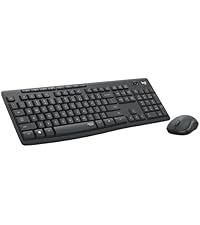


| ASIN | B0F376HPFR |
| Antenna Location | Office |
| Are Batteries Required | Yes |
| Best Sellers Rank | #2 in Computer Keyboard & Mouse Combos |
| Brand | Logitech |
| Color | White |
| Compatible Devices | Laptop, Personal Computer, Tablet |
| Connectivity Technology | Bluetooth |
| Customer Reviews | 4.3 out of 5 stars 686 Reviews |
| Hand Orientation | Ambidextrous |
| Item Weight | 0.84 Pounds |
| Keyboard Description | Membrane |
| Keyboard Layout | QWERTY |
| Manufacturer | Logitech |
| Movement Detection | Optical |
| Number of Batteries | 2 AAA batteries required. (included) |
| Number of Keys | 99 |
| Operating System | Chrome OS, Windows 10.11 or later, macOS 12 or later |
| Other Special Features of the Product | Lightweight, Portable |
| Power Source | Battery Powered |
| Special Feature | Lightweight, Portable |
| UPC | 097855204844 |
| Warranty Description | 1 Year Limited Hardware Warranty |
A**I
Simple, reliable, and very comfortable to use
This keyboard is exactly what I was looking for. Setup was quick and easy, and the Bluetooth connection has been stable with no lag or dropouts. The keys are comfortable and quiet, making it great for everyday typing at home or in the office. I really like having the full numpad while still keeping a relatively compact size. The keyboard feels sturdy, and the spill-resistant design gives some peace of mind. Battery life has been excellent so far, and it works smoothly across both Windows and Mac. Overall, it’s a solid, no-frills keyboard that does its job well. Great quality and performance for the price.
J**.
Great Affordable Keyboard and Mouse Combo ✨
Love this affordable keyboard and mouse combo! Both devices paired quickly and easily with my MacBook Air and perform very well. The keys on the keyboard are comfortable to type on and have a nice, tactile feel. While I do wish that this keyboard had a backlight and a light indicator for the caps lock key, it isn't a huge dealbreaker for me. The sound of the keyboard when typing is very muted, but on the flipside, the clicking of the mouse does sound louder than the previous mouse that I was using. Overall, I would recommend this keyboard and mouse combo! As someone who bought this set for back-to-school purposes, I'm sure that it will serve my needs well 🙂
D**M
Great Little Keyboard for the Price
When buying such an inexpensive keyboard/mouse combo when replacing the Microsoft keyboard I had for over ten years, I expected there to be some drawbacks. However, I have found size and durable feel to the keyboard to be a breath of fresh air. It works perfectly for its use (I am using a computer to control all the media that is displayed on my living room television, and this keyboard is the controller). It's suze is good, as it takes up very little room on the coffee table. I haven't noticed any lag issues when gaming, and there haven't been any Bluetooth connectivity issues up to this point. The mouse has been a problem. It loses connectivity after it is idle for a couple of hours or more, and I've had nothing but problems getting it reconnected. I've given up on it, and gone back to the Microsoft mouse that I was using, and fortunately, there are no issues when using the combination of that mouse and the Logitech keyboard. I also dislike the feel of the Logitech mouse (it feels cheap), and I'm happy to do without it. All said, the combo gets 4-stars despite the mouse being worthless, as I'd have spent twice the amount I spent on the combo for just the keyboard, and been thrilled with the buy. If you are looking for a small keyboard, I would recommend the keyboard any day of the week (you can buy it separately from the mouse). I'd recommend steering clear of the combo, and finding a separate mouse if needed.
Y**A
Meow.
Works great. Nice tactile feel to keys and buttons. Connects quickly at the press of a button.
A**I
Keyboard
For an affordable and first keyboard purcahse, this is worth buying it. For my small desk, it works great and when setting it up, it was really easy. Simply connect to bluetooth, it'll ask you to type a couple of keys, and done. It was also great that batteries were already included too, I didn't know that batteries were needed but was thankful it was already provided. I also like the simplicity and feeling of the keyboard as each key are soft to the touch a quiet when using it. Great purchase and if I ever need another keyboard in the future, will purchase again.
A**J
Great budget keyboard and mouse set
So many things to love about this keyboard: price point, Mac/Windows versatility, clean design, soft touch/silent keys, 2 diff heights, super easy setup. Has everything you need and nothing you don't need. Really comfortable to type for a long time on this keyboard and quiet enough for an office setting. Other reviews mention a noisy space bar, but mine is silent. If I had one complaint, it would be the tiny up/down arrow keys. The mouse is ok, but not my favorite. The size and shape are comfortable for small hands. The scroll wheel has a nice feel. But the mouse itself is very clicky, not quiet at all. I use the Logi Lift mouse with this keyboard. Overall - highly recommend this combo for a simple budget setup that just works.
V**N
Recommend
Love this keyboard & mouse. My first Wifi keyboard. Connected great, love the soft pink color, highly recommend.
J**.
Nice keyboard, but no on/off switch or button
This keyboard connected wirelessly easily, and is pretty quiet to type on. I don’t like loud keyboard button clicks and this isn’t too loud. My only complaint is functionality - there doesn’t seem to be an on/off switch or button.
Trustpilot
2 weeks ago
2 weeks ago